
Overview of Data Retention
- Helen Griffith
Data retention is the period that Vonage stores interaction content for an account. Your account’s contracted data retention period determines your maximum retention period. When Vonage has stored interaction content for the retention period, Vonage deletes it.
In the Data Retention area of Vonage Contact Center (VCC) Admin Portal, a user with an admin license can change automatic deletion settings for interaction content, including voicemails. The admin user can override the contracted period up to its maximum value. The user can also turn on or pause deletion for a given account in specific situations, such as a legal obligation.
For information about your account's contracted retention period, contact your account manager.
The administrator can change the data retention settings for interaction content—consisting of call recordings, transcripts, categorization results, and voicemails.
In this page |
|---|
Automatic deletion states
- On
When automatic deletion is On, interaction content is being automatically deleted according to retention settings. - Pending
An automatic deletion state of Pending indicates that retention settings have changed or automatic deletion has been turned on within the past 30 days. While automatic deletion is pending, the administrator can verify the retention settings and make further changes if required. If the administrator changes the settings, the 30 days is reset; automatic deletion will be in the Pending state for 30 days. Interaction content is not automatically deleted while automatic deletion is in Pending state. Paused
When automatic deletion is Paused, no interaction content is being automatically deleted. Automatic deletion is paused if Vonage changes the contracted data retention period for your account. An administrator can also manually pause automatic deletion.Automatic deletion must not remain in paused for a prolonged period. You must contact your account manager if you want to change your contracted data retention period. After 30 days, Vonage reserves the right to turn on automatic deletion using the current contracted value.
Different information appears in Data Retention depending on whether automatic deletion is on, pending, or paused.
Automatic deletion on
When automatic deletion is turned on, the following information appears in the Data Retention area:
- Storage location shows the location of all interaction content. Each region has two storage locations. To change your storage location, contact Vonage support. When your storage location changes, future interaction content is stored in the new location.
Automatic deletion is On indicating that interaction content is being automatically deleted according to retention settings.
Automatically delete content older than contains the number of days after which Vonage deletes interaction content. The minimum value is 1 day.
Contracted data retention period displays the maximum number of days that Vonage will retain interaction content according to your Data Retention Service Description.
Screen recordings
Screen recordings are deleted after 30 days — or sooner, if the contracted data retention period for your account is less than 30 days. Also, a screen recording is deleted if its related call recording is deleted.Visual Engagement meeting recordings
Recordings of Visual Engagement meetings are deleted after 30 days — or sooner, if the data retention period for your account is less than 30 days.
Last update displays the name of the user who last turned on the data retention settings for the account and the date and time they did so.
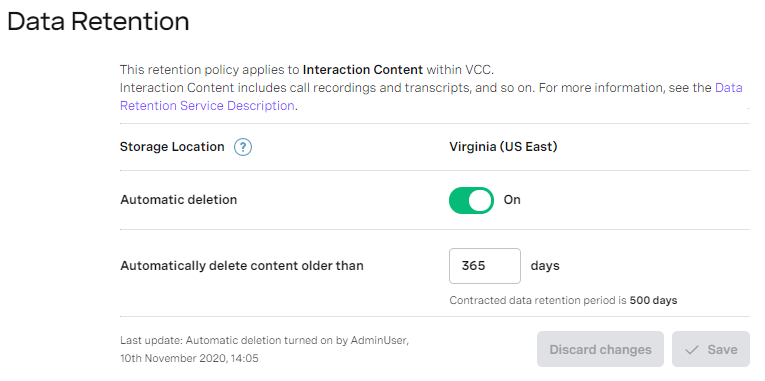
For information about turning on automatic deletion of interaction content, see Turning on automatic deletion in Changing data retention settings.
Automatic deletion pending
When an admin user logs in to an account with automatic deletion in pending state, a warning message appears on the VCC Admin Portal's home page. The message prompts the user to review data retention settings.

When automatic deletion is pending, the following information appears in the Data Retention area:
- Storage location shows the location of all interaction content. Each region has two storage locations. To change your storage location, contact Vonage support. When your storage location changes, future interaction content is stored in the new location.
- Automatic deletion is Pending, indicating that retention settings have been changed or automatic deletion has been turned on within 30 days.
A warning message appears with the number of days after which automatic deletion will be turned on.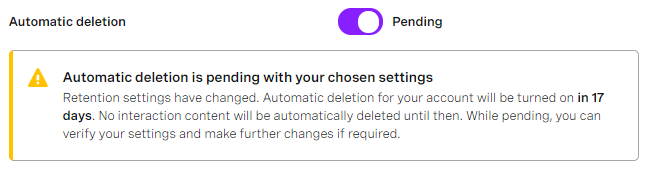
- Automatically delete content older than contains the number of days after which Vonage will delete interaction content when automatic deletion is turned on. The minimum value is 1 day.
- Contracted data retention period displays the maximum number of days that Vonage will retain interaction content according to your Data Retention Service Description.
- Last update displays the name of the user who last turned on the data retention settings for the account and the date and time they did so.
For information about changing data retention settings, see Changing data retention settings.
Automatic deletion paused
When an admin user logs in to an account with automatic deletion paused, a warning message appears on the VCC Admin Portal's home page. The message prompts the user to review data retention settings.

When automatic deletion is paused, the following information appears in the Data Retention area:
- Storage location shows the location of all interaction content. Each region has two storage locations. To change your storage location, contact Vonage support. When your storage location changes, future interaction content is stored in the new location.
Automatic deletion is Paused, indicating that no interaction content is being automatically deleted.
Reason for pausing automatic deletion contains the reason provided by the user who paused deletion. When Automatic deletion is Paused, the field is read-only.
Automatically delete content older than contains the number of days after which Vonage automatically deletes interaction content. The minimum value is 1 day. When Automatic deletion is Paused, the field is read-only.
Contracted data retention period displays the maximum number of days that Vonage will retain interaction content according to your Data Retention Service Description.
Last update displays the name of the user who last paused the data retention settings for the account and the date and time they did so.
For information about pausing automatic deletion for an account, see Pausing automatic deletion in Changing data retention settings.
For general assistance, please contact Customer Support.
For help using this documentation, please send an email to docs_feedback@vonage.com. We're happy to hear from you. Your contribution helps everyone at Vonage! Please include the name of the page in your email.