
Editing a user
Vonage recommends editing users in User Admin. This topic describes how to edit users in User Access only. For information on editing users in User Admin, see Configuring individual users. For differences between User Admin and User Access, see User administration in the Vonage Contact Center Admin Portal.
How do I edit an existing user's access?
You can edit your own managees. A managee is a user that you manage.
To edit an existing user, in User Access, click edit alongside the user you want to edit. For information on accessing User Access, see Configuring user access. An existing user record appears.
The Linked accounts section contains a list of accounts that this user can access and use.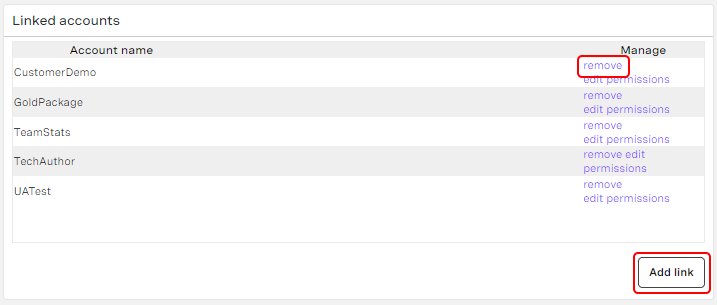
You can perform the following tasks:
- Add a linked account. To add a linked account, click Add link. A list of accounts appears. Click the check box or boxes alongside the name or names of the account or accounts you want to add, and click Add. The account or accounts appear in the list of linked accounts.
Remove the link to an account. To remove the link to an account, click remove alongside the linked account. The account is removed from the list of linked accounts. You cannot remove all account links for a user—the user must be linked to at least one account.
API credentials
If the user has user-level API credentials associated with this account, you cannot remove the link. You must delete their API credentials and then remove the link. For information about deleting API credentials, see How do I delete API credentials? in Configuring API credentials.
The Hierarchy section contains a list of the user's managees.
You can add a new managee. To add a managee, click Add managee. A list of users that you can add appears. Click the check box alongside the user's name or users' names and click Add. The user or users are added to the hierarchy.
For general assistance, please contact Customer Support.
For help using this documentation, please send an email to docs_feedback@vonage.com. We're happy to hear from you. Your contribution helps everyone at Vonage! Please include the name of the page in your email.