Vonage Contact Center omni-channel solution
- Helen Griffith
- Dawid Wietrzykowski (Unlicensed)
What is Vonage Contact Center's Omni-Channel Solution?
Using Vonage Contact Center's omni-channel solution, agents can work on work items—cases, chats, leads, and so on—that have arrived through Salesforce and on phone calls received through Vonage Contact Center (VCC).
To be able to use VCC's omni-channel features, you must have integrated VCC into Salesforce and correctly configured the Salesforce Omni-Channel feature. For information about configuring Salesforce Omni-Channel, see Salesforce help. In addition, VCC's omni-channel solution must be enabled for your VCC account.
You can then configure omni-channel for VCC in two different ways:
- Integration with Salesforce Omni-Channel presence
- Integration with Salesforce external routing
Integration with Salesforce Omni-Channel presence
When you have configured Salesforce Omni-Channel, both Salesforce and VCC can route work to your agents at the same time. Salesforce Omni-Channel routes work items—cases, chats, and so on—to agents using routing settings configured in Salesforce, while VCC routes phone calls to agents using configured interaction plans. Because the two systems route different types of interactions independently, VCC may route interactions to agents who are already busy in Salesforce; Salesforce may route work items to agents who are already busy in VCC. This situation causes a problem for the agent in knowing how to prioritize their incoming work.
To deal with such conflicts, if enabled for your account, you can use Salesforce Omni-Channel presence integration. With Salesforce Omni-Channel presence integration, you can create mappings between VCC's major states and Salesforce's presence statuses so each system knows the status of the agent in the other. If the agent is busy in VCC, the agent appears busy in Salesforce. The converse is also true.
For information about configuring Salesforce Omni-Channel presence integration, see Integrating with Salesforce Omni-Channel presence.
When you create your mappings, you can configure the following events:
- When the agent changes their state in ContactPad, their presence status updates in the Salesforce Omni-Channel widget
- When the agent changes their presence status in their Omni-Channel widget, their state updates in ContactPad
- When the agent logs in to ContactPad, the agent goes into an online presence status in the Salesforce Omni-Channel widget
- When the agent logs out of ContactPad, the agent goes offline in the Salesforce Omni-Channel widget
- When the agent goes offline in Salesforce Omni-Channel, the agent logs out of ContactPad
When Salesforce assigns a chat to an agent, and auto-acceptance is enabled, the agent's state in ContactPad automatically changes to Busy Inbound. If auto-acceptance is not enabled, the chat shows as Alerting in ContactPad until the agent accepts it in the Omni-Channel widget. You can optionally configure changing the agent's state in ContactPad to Busy Inbound whenever the agent's presence status in the Omni-Channel widget is updated to a busy status. For more information, see Integrating with Salesforce Omni-Channel presence.
Revert to status before interaction (inbound only)
When you have integrated VCC with Salesforce Omni-Channel presence, when an agent finishes working with an interaction or interactions including any wrap time, VCC changes the agent's Omni-Channel presence status to the status mapped to ContactPad's Ready state. In some situations you may want to override this setting. For example, an agent working on chats only may manually change their presence status in the Omni-Channel widget to Ready for Chats. When the agent finishes working with some chats and VCC changes their state in ContactPad back to Ready, the agent might prefer that VCC reverts their presence status to Ready for Chats instead of the mapped status.
If the revert to last status feature is enabled for your account, when an agent's ContactPad state returns to Ready after working on one or more interactions, VCC reverts the agent's presence status in the Omni-Channel widget to their pre-interaction status.
If you have set Agent Post Call State to a state other than Ready or Ready (Offline), the revert to last status feature will not work. VCC will update agents' presence statuses to the mapped status regardless of whether agents have changed their presence status manually.
Integration with Salesforce external routing
An alternative approach to Salesforce Omni-Channel presence integration involves integrating with Salesforce external routing. Salesforce external routing is a routing model within Salesforce Omni-Channel that notifies a third party that an interaction needs routing. If external routing is enabled in your Salesforce org, you can configure Salesforce to delegate routing decisions for supported interactions to Vonage Contact Center. Using your configured interaction plans, Vonage Contact Center routes the interaction to an agent according to the configuration in your chosen interaction plan in Interaction Plan Architect.
With external routing, VCC can route all types of interactions—live (such as phone calls), semi-live (such as web chats) and non-live (such as emails). For more information about interaction types, see Interaction types. External routing can also route custom objects. Custom objects are routed in the same way as cases and are treated as non-live interactions.
VCC supports external routing for the following types of work items:
- Cases
- Chats
- Messaging
- Messaging for In-App and Web
- Custom objects
When Salesforce external routing is enabled, configured and integrated with your VCC account, when a record of a configured type of Salesforce object arrives in or is created in Salesforce, Salesforce routes the corresponding work item to the configured named route in VCC.
VCC routes the resulting interaction according to the settings in the named route's interaction plan. When VCC routes the interaction to a queue or to an agent, the exact events depend on which optional features are available for your account, and the type of interaction.
VCC makes routing decisions for the different interactions using logic configured in one place; you no longer need to configure the logic for routing phone calls within VCC, and the logic for routing other types of interactions in Salesforce. You can also report on all types of interaction activity—real-time and historical statistics for your agents and their interactions—within VCC.
Vonage Contact Center handles delivery errors that might occur in a third-party system. If a delivery error occurs in Salesforce when Vonage Contact Center routes an interaction to an agent, Vonage Contact Center informs the agent about unsuccessful delivery and routes the interaction to another agent.
For information about integrating with Salesforce external routing, see Configuring Salesforce external routing for Vonage Contact Center.
Limitations
Salesforce external routing is not compatible with integration with Salesforce Omni-Channel presence. For information about integration with Salesforce Omni-Channel, see Vonage Contact Center omni-channel solution. Ask your account manager to disable this feature.
To use external routing for work items other than Live Agent chats (now simply called Chat in Salesforce), you must change the owner of the item to a queue that you create for external routing. For information about creating queues for external routing, see Create queue later in this page.
In the Omni-Channel widget in Salesforce, agents remain active regardless of their ContactPad status. This will impact the Live Agent chat button. For information about working around agents' active status, see Agent Availability API.
In order to capture user-related information for a chat like a username, email address, and so on, use a Salesforce pre-chat form. For information about configuring pre-chat forms, see Salesforce help.
Vonage recommends limiting the number of simultaneous chats to ten per agent.
Frequent queue switching might cause routing issues.
Salesforce external routing supports versions of ContactPad that can handle multiple interactions; you cannot use single-interaction ContactPad.
Integration with Salesforce external routing does not currently support the following features:
- Manual wrap up
- Configuring multiple Contact Center accounts
- Enforced disposition codes
- Manual parking—this functionality is replaced by the interrupt feature
- Status-based capacity model for External Routing
Multi-interaction routing
When you have configured omni-channel for VCC, VCC can route multiple interactions to an agent. The agent can work with those interactions at the same time. The number of interactions that an individual agent can work on depends on the available capacity of the agent.
ContactPad with multi-interaction routing
When multi-interaction routing is available in your account, agents will notice some changes in ContactPad. For information about ContactPad, see Overview of ContactPad. With multi-interaction routing, agents can work on multiple interactions—of different interaction types—at the same time.
Queue information panel
The number of interactions waiting in an agent's queue appears above the queue information panel tab. This agent has three queueing interactions: one live interaction and two semi- or non-live interactions (one call and two other interactions).
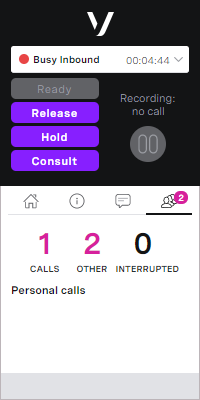
Information panel
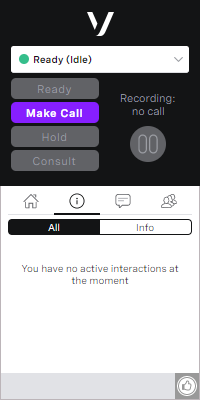
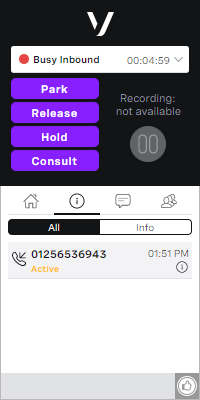
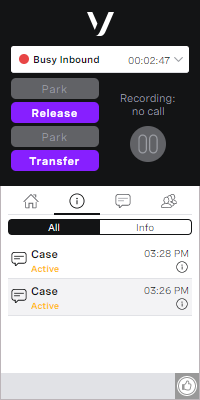
The interactions list in the Information panel shows the interactions that an agent is currently handling. To see the interactions list, click All in the Information panel. Each interaction the agent is currently handling is presented as a separate item in the All tab. If, for example, an agent is handling two chats, both will be listed as separate interactions in ContactPad.
In the first example, the agent has no active interactions. In the second example, the agent is handling one live interaction—a phone call. In the third example, the agent is handling two non-live interactions—two cases. In the final example, the agent is handling one semi-live interaction—a chat—and two non-live interactions—two cases.
Capacity and optimum load
Capacity
VCC sizes interactions according to their type. An interaction's size determines the percentage of an agent's capacity each interaction uses. You can configure capacity at an account level or, if enabled for your account, for individual agents.
An agent's capacity is based on the number and type of interactions they are working on at any time. If an agent isn't working on any interactions, their capacity is 100%. VCC considers an agent's capacity and the capacity required by an interaction in determining the agent's availability to handle an interaction. If the agent doesn't have capacity to handle it, VCC will not route the interaction to them.
The following values are the default sizes of interactions of different types:
- Live interactions: 100%
- By default, VCC can route one live interaction to an agent. To do so, the agent must have no other interactions assigned to them, as the live interaction requires 100% of their capacity in such a case.
- Semi-live interactions: 100% or 33% depending on your account settings
- If the default is 100%:
- VCC can route one semi-live interaction to an agent. To do so, the agent must have no other interactions assigned to them, as the semi-live interaction requires 100% of their capacity in such a case.
- If the default is 33%:
- VCC can route up to three semi-live interactions to an agent, as long as they have no other interactions assigned to them.
- If an agent is working with any other interactions, VCC can only route the agent a new semi-live interaction if their total used capacity is less than 67%, as the semi-live interaction requires 33% of their capacity.
- For example, if an agent is working with one web chat (33%) and one case (with a size of 25%), VCC can route another chat to the agent as they are at only 58% capacity.
- If the default is 100%:
- Non-live interactions: 100% or 25% depending on your account settings
- If the default is 100%:
- VCC can route one non-live interaction to an agent. To do so, the agent must have no other interactions assigned to them, as the non-live interaction requires 100% of their capacity in such a case.
- If the default is 25%:
- VCC can route up to four non-live interactions to an agent, as long as they have no other interactions assigned to them.
- If an agent is working with any other interactions, VCC can only route a new non-live interaction to the agent if their total used capacity is less than 75%, as the non-live interaction requires 25% of their capacity.
- For example, if an agent is working with two cases (50%) and one web chat (with a size of 33%), VCC cannot route another case to the agent as they are already at 83% capacity.
- If the default is 100%:
For information about configuring interaction capacities, see Configuring multi-interaction routing.
External routing and capacity
When using external routing, the following information relating to capacity applies:
- When routing an interaction to an agent, VCC notifies Salesforce of the capacity taken up by the routed interaction. This means that, in Omni-Channel Supervisor, a supervisor can see how much capacity an agent has available. For information about Omni-Channel Supervisor, see Omni-Channel Supervisor (Salesforce help).
However, if an agent transfers an interaction to another agent through a Salesforce queue, the capacity of the new agent reflects capacity settings configured in Salesforce rather than in VCC. - If you are using Salesforce’s Live Agent, the chat button can be disabled automatically when your agents aren't available to take any new chats. This ensures that chats only enter the queue when an agent has the capacity to work on them.
- If you change the capacity settings in VCC, it can take up to 10 hours for those settings to be applied to interactions routed with external routing.
Dashboards and capacity
Agent capacity is also used in Dashboards to show the availability of agents to handle different types of interactions in queues.
Optimum load
An agent's optimum load is the ideal capacity that their assigned interactions should consume. When the optimum load feature is enabled, VCC preferentially routes interactions to agents whose assigned interactions consume closest to but less than their configured optimum loads. VCC routes interactions to these agents rather than agents who are idle, that is, not working on any interactions.
The purpose of the optimum load feature is to assign new semi- and non-live interactions to agents already working on semi- or non-live interactions, while freeing up other agents for handling live interactions such as phone calls; live interactions use up 100% of an agent's capacity. Optimum load aims to avoid a scenario where all agents are working on a small number or semi- or non-live interactions, using up a small amount of the agents' capacity. In this scenario, no agents would be available for handling live interactions.
VCC avoids routing interactions to agents whose assigned interactions consume more than their optimum load.
If enabled, you can configure optimum load settings for your account. For information about configuring optimum load for your account, see Configuring multi-interaction routing.
The optimum load feature does not work if either of the two interrupt toggles have been enabled:
Interruption and resume
Interrupt and resume are only available if you are using Salesforce external routing.
By default, VCC cannot route an interaction to an agent if the agent does not have the capacity to handle it. When the interrupt feature is enabled, VCC can temporarily stop the agent working on non-live interactions to increase the agent's available capacity. Increasing the agent's capacity enables VCC to route live, semi-live, or both types of interactions to the agent within their available capacity.
The interrupt feature can be enabled for live interactions, semi-live interactions, or both types of interactions.
The interruption time is not included in the interaction handle time.
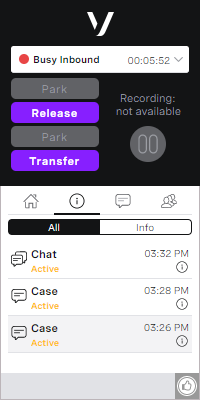
For example, an agent is working on three non-live interactions and the interrupt feature is enabled for both live and semi-live interactions:
Live interactions
When a new live interaction arrives, VCC interrupts all three non-live interactions and routes the live interaction to the agent. After the agent finishes handling the live interaction, VCC resumes the interrupted non-live interactions and the agent can continue to work on them.
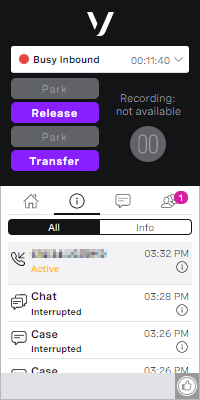
Semi-live interactions
When a new semi-live interaction arrives and is accepted (either automatically or by the agent), VCC interrupts just one of the non-live interactions to free up enough capacity (50%) to handle the semi-live interaction which requires 33% capacity. VCC routes the semi-live interaction to the agent. After the agent finishes handling the semi-live interaction, VCC resumes the interrupted non-live interactions and the agent can continue to work on them.
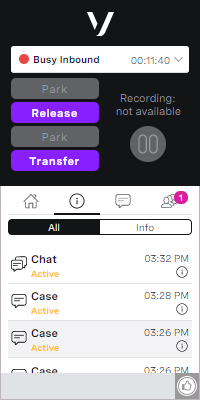
When the agent releases the live or semi-live interaction that interrupted the non-live interaction or interactions, the interrupted interaction is resumed. The agent can continue working with the resumed non-live interaction.
The toggles should not be enabled if the optimum load feature is being used.
Cross-media consult
If cross-media consult is enabled for your account, an agent can consult with a third party while they are handling a semi- or non-live interaction. The third party could be another agent or someone on another phone number. The agent always performs the consult using a phone call.
For information about using cross-media consult, see Using multi-interaction routing.
Transferring interactions
While working on an interaction, agents can transfer the interaction to another agent, number, queue or service depending on the type of interaction:
Live interactions
Agents can transfer live interactions to another agent, number, queue or service in the normal way using ContactPad. For information about transferring live interactions, see Making and receiving calls in ContactPad.Semi-live interactions
Agents cannot currently transfer semi-live interactions.Non-live interactions
Agents can transfer a non-live interaction to another agent or service. For information about transferring a non-live interaction to another agent or service, see Using multi-interaction routing.
If cross-media consult is enabled for your account, agents might also be able to consult with another agent, number, queue or service before transferring.
An agent can transfer cases and custom objects to another VCC agent or a VCC interaction plan using ContactPad, or to VCC agents or Salesforce queues by changing the Case Owner field in the case record or Owner field in the custom object record. Changing the case or custom object owner to a Salesforce queue that is configured to use external routing triggers Salesforce to reroute the case using external routing. For more information, see Transferring a case or a custom object.
Transferring interactions with external routing
Currently agents can transfer only cases and custom objects; no other object types can be transferred.
Agent Availability API
This API provides information on the availability of a customer's agents. The suggested use includes a customer using this API on their website to only show the live chat button when an agent is available. For more information on the Agent Availability API see the the API documentation site.
The implementation of the API relies on the customer having the development skills available their side.
Auto-acceptance of or declining semi-live interactions
If auto-acceptance is enabled in your Salesforce org, when VCC routes a semi-live interaction to an agent—as long as the agent has capacity to handle the interaction—the agent automatically accepts the interaction. (If the agent doesn't have capacity, the interaction remains in the queue until the agent does have capacity.)
If the declining of semi-live interactions is enabled in your Salesforce org, when VCC routes an interaction to an agent, the agent can choose to manually accept or decline the interaction in the Omni-Channel widget.
The default is for the agent to manually accept interactions and be unable to decline interactions. For information about configuring auto-acceptance or declining of interactions in the Omni-Channel widget, see Salesforce help.
If an agent declines an interaction, the interaction returns to the queue until another agent accepts the interaction.
You can also configure timeouts for semi-live interactions in the Omni-Channel widget. If an interaction has been waiting in an agent's Omni-Channel widget for the configured period of time, Salesforce automatically declines the interaction on the agent's behalf and the interaction returns to the queue. VCC routes the interaction to another suitable agent when such an agent becomes available.
Notifications
When VCC routes an interaction to an agent, notifications received by the agent depend on the interaction type. For information about what happens when VCC routes a new interaction to an agent, see Examples.
For general assistance, please contact Customer Support.
For help using this documentation, please send an email to docs_feedback@vonage.com. We're happy to hear from you. Your contribution helps everyone at Vonage! Please include the name of the page in your email.