
Setting up queued callbacks
- Helen Griffith
- Dawid Wietrzykowski (Unlicensed)
When an inbound call arrives in Vonage Contact Center, VCC routes the call through applets as configured in the interaction plan. Using your configuration settings, VCC determines which agent or agents can handle the call and estimates when such an agent will be available.
If the queued callbacks feature is enabled for your account, you can configure your interaction plan to set up a callback to the caller.
For more information about queued callbacks, see Queued callbacks.How can I enable a caller to hang up their phone but remain, virtually, in a queue?
If you want to enable callers to hang up their phone but remain, virtually, in a queue, configure your interaction plan to use callbacks. Configure your plan to set up a callback when a caller either voluntarily breaks out of a queue or in any other queue-breakout scenario. When a suitable agent becomes available, Vonage Contact Center initiates an outbound call from that agent to the caller.
To configure queued callbacks, perform the following tasks:
Create a Callback applet
Routing a call through a Callback applet sets up an outbound call to the caller. For information about Callback applets, see Callback applet. To create a Callback applet, perform the following steps:
Create a Callback applet. For information about creating an applet, see Creating an applet. Your new Callback applet appears.
Optionally select the interaction plan and initial applet for the callback in the Callback Initial Applet section. When initiating a callback, Vonage Contact Center routes an outbound call from the agent to the interaction plan and applet you specify.
Vonage Contact Center must eventually route the callback through an Automatic Call Distributor (ACD) applet that behaves as a skills based router, that is, a Universal Contact Distributor (UCD) applet.
If you select Return to previous queue in the Interaction Plan list, Vonage Contact Center routes the outbound call through the last UCD applet that the original voice call entered.
If you select an interaction plan in the Interaction Plan list, the Applet list appears.
If you select an applet in the Applet list, the path that the callback takes through the interaction plan must include a UCD applet.
Make sure that you do not configure the Callback applet to route the callback through any applet that requires user input—such as a Menu applet. The callback cannot provide input and will time out.
Optionally define the number that Vonage Contact Center must make the callback to in either the Data Source or the Number to Dial field in the Callback Numbers section. Only one of these fields will appear.
By default, Vonage Contact Center makes the callback to the original CLID. Use a combination of text and data sources in the field to overwrite the default number.Data sources
You can include one or more data sources. The data sources are placeholders for values collected during the call. Vonage Contact Center replaces the data sources with values before initiating the callback. You must not include any spaces in the field.
If you plan to use data sources for the callback number, you must have configured these data sources within your interaction plan. For information about using data sources in interaction plans, see Using data sources in interaction plans.
Use the following format to specify a placeholder for a data source:
$(DataSource)
For example, "0207$(CallbackNumber)" or "$(AreaCode)$(CallbackNumber)".
If you do not define a callback number, Vonage Contact Center makes a callback to the CLID. If Vonage Contact Center cannot locate a CLID, the callback fails.
If the CLID contains a telephone number other than the caller's telephone number (such as a main switchboard number), Vonage Contact Center cannot make a callback directly to the caller.If enabled for your account, optionally define the number that Vonage will present to the recipient of the outbound (callback) call in the Number to Present field in the Callback Numbers section.
By default, Vonage Contact Center presents the number specified in ContactPad by the agent initiating the callback. Use a combination of text and data sources in the Number to Present field to overwrite the default number.Data sources
You can include one or more data sources in Number to Present. The data sources are placeholders for values collected during the call. VCC replaces the data sources with values before initiating the callback. You must not include any spaces in the Number to Present field.
If you plan to use data sources for the presented number, you must have configured these data sources within your interaction plan. For information about using data sources in interaction plans, see Using data sources in interaction plans.
The Dialled Number (
$(DialledNumber)) data source contains the ID of the interaction plan rather than its phone number. The ID and the phone number will often be the same, but this is not guaranteed. Therefore you should not use$(DialledNumber)as the Number to Present.Use the following format to specify a placeholder for a data source:
$(DataSource)
For example, "0207$(PresentedNumber)" or "$(AreaCode)$(PresentedNumber)".If you do not define a number to present, Vonage Contact Center uses the number specified in ContactPad by the agent initiating the callback.Available callback numbers
Ultimately, the number that Vonage Contact Center presents must be configured and available for your account.
Such a number is either a number on your account—located in Architect (within Interaction Plans)—or a custom callback number.
To add a new callback number to use with your account, contact your Vonage Contact Center account manager.
If you configure a number that is not available for your account, Vonage Contact Center presents the default outbound CLID for your account.
For more information about callback numbers, see Callback numbers.Optionally select the next applet for the original call. Vonage Contact Center routes the original voice call to this applet after the applet sets up the callback.
If the subsequent applet or applets have not completed by the time Vonage Contact Center initiates the callback, the caller might still be connected to the original call. In this situation, the callback will fail. Vonage will not attempt a later callback. For this reason, we recommend that you only use the next applet for a short message to let the caller know their callback request has been accepted.
Click Update.
When Vonage Contact Center routes a call through the Callback applet, the applet sets up an outbound call to the caller. Vonage Contact Center initiates the callback when a suitable agent becomes available.
Configure a breakout in an Automatic Call Distributor (ACD) applet in your interaction plan.
The breakout must route the call to the Callback applet. For information about UCD applets and configuring breakouts, see Configuring breakouts.
Most simply, you can configure the breakout to route the call directly to the Callback applet. The Callback applet maintains both the caller's position in the queue and all skills associated with the call. Vonage Contact Center initiates the callback, therefore, at approximately the same time that the original call would have been answered. Vonage Contact Center assigns the call to the same agent who would have answered the original call. For an example of this configuration, see Basic queued callbacks example using a voluntary breakout later in this page.
Alternatively, you can configure the breakout to route the call to one or more other applets, before the Callback applet. If one or more of the intervening applets change any routing parameters, Vonage Contact Center may initiate the callback earlier or later than the call might have originally been routed to an agent. For example, you could route the call through a Skill Tagger applet that removes skills. Removing skills is likely to increase the chance that an appropriate agent is available to make the callback sooner. For an example of this configuration, see Advanced queued callbacks example using an estimated wait time breakout later in this page.
Using non-voluntary breakouts
If you configure non-voluntary (forced) breakouts in your UCD to route the call to a Callback applet, you must NOT set the Interaction Plan in the Callback Initial Applet section of the Callback applet to Return to previous queue. It is likely that the condition that caused the breakout—such as no agents available or the estimated wait time exceeds the breakout time—persists and the callback will initiate another callback, and so on. For the same reason, if you select an alternative target UCD, you should also ensure that this UCD does not have similar breakouts to the original UCD.
Example interaction plans with queued callbacks
Basic queued callbacks example using a voluntary breakout
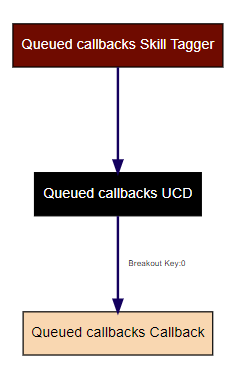
In this example, when an inbound call arrives in Vonage Contact Center, the following events take place:
- Vonage Contact Center routes the inbound call through a skill tagger applet (Queued callbacks Skill Tagger). This applet tags the call with French and Spanish skills.
- Vonage Contact Center then routes the call to a UCD applet (Queued callbacks UCD).
The UCD applet has a single voluntary breakout option. - If the caller presses 0 on their telephone keypad, Vonage Contact Center routes the call to a Callback applet (Queued callbacks Callback). Vonage Contact Center sets up a callback for when calls in front of this call in the queue have been routed to agents and when an agent with French and Spanish skills becomes available.
Advanced queued callbacks example using an estimated wait time breakout
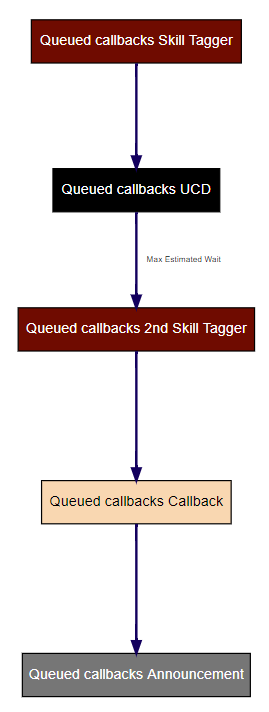
In this example, when an inbound call arrives in Vonage Contact Center, the following events take place:
- Vonage Contact Center routes the inbound call through a skill tagger applet (Queued callbacks Skill Tagger). This applet tags the call with French and Spanish skills.
- Vonage Contact Center then routes the call to a UCD applet (Queued callbacks UCD).
The UCD applet has an estimated wait time breakout time of 300 seconds (5 minutes). - If the estimated wait time exceeds 5 minutes, Vonage Contact Center routes the call to the configured breakout applet. The breakout applet is another Skill Tagger applet (Queued callbacks 2nd Skill Tagger). This applet removes all skills. Vonage Contact Center uses the call's new skill requirements to determine which agent or agents can handle the call and the call's new position in the queue.
- Vonage Contact Center routes the call to a Callback applet (Queued callbacks Callback). Vonage Contact Center sets up a callback for when calls in front of them in the UCD queue have been handled and an appropriate agent becomes available.
Vonage Contact Center routes the call to an announcement appplet (Queued callbacks Announcement). This applet thanks the caller for setting up the callback. This announcement must be complete or the caller must hang up before the callback is initiated, otherwise the callback fails.
Advanced queued callbacks example using a callback initial applet
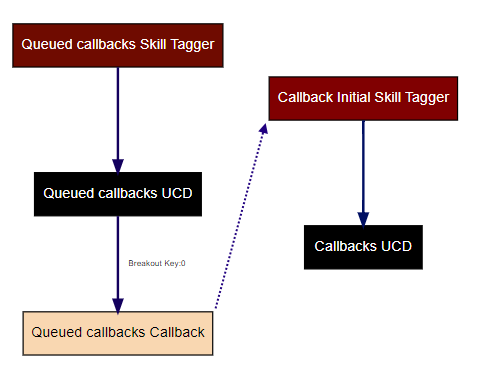
In this example, when an inbound call arrives in Vonage Contact Center, the following events take place:
- Vonage Contact Center routes the inbound call through a skill tagger applet (Queued callbacks Skill Tagger). This applet tags the call with French and Spanish skills.
- Vonage Contact Center then routes the call to a UCD applet (Queued callbacks UCD).
The UCD applet has a single voluntary breakout option. - If the caller presses 0 on their telephone keypad, Vonage Contact Center routes the call to a Callback applet (Queued callbacks Callback). Vonage Contact Center sets up a callback.
- When Vonage Contact Center sets up the callback, Vonage Contact Center routes the callback through a Skill Tagger applet (Callback Initial Skill Tagger). This applet removes all skills. Vonage Contact Center uses the callback's new skill requirements to determine which agent or agents can make the callback and the callback's new position in the queue.
- Vonage Contact Center then routes the callback to a UCD applet (Callbacks UCD).
For general assistance, please contact Customer Support.
For help using this documentation, please send an email to docs_feedback@vonage.com. We're happy to hear from you. Your contribution helps everyone at Vonage! Please include the name of the page in your email.