
Setting up voicemail
How can I configure voicemail for my interaction plan?
If enabled for your account, you can set up the voicemail feature. When you have set up voicemail, if an agent is unable to answer an inbound call to their personal queue, the caller can leave a voicemail for the agent. Vonage Contact Center can optionally send the agent an email to notify them that they have a voicemail. The agent can later listen to that voicemail in ContactPad or in a voicemail player, accessed by clicking the link in the email.
For more information about the voicemail feature, see Voicemail in ContactPad.
You must set up personal queues to use the voicemail feature. For information about setting up personal queues, see Setting up personal queues.
After you have set up personal queues in your interaction plan, you are ready to set up voicemail in a VoiceMail applet. For information about the VoiceMail applet, see VoiceMail applet. Perform the following steps:
- Create a VoiceMail applet. For information about creating an applet, see Creating an applet. A new VoiceMail applet appears.
Provide the following information:
Field Description Next Applet Optional. In the Next Applet list, click the applet that Vonage Contact Center routes the interaction to after a caller successfully leaves a voicemail.
The caller might hang up before this applet runs.
We recommend that you select an Announcement applet to thank the caller for leaving a message, or a Send SMS applet to send the agent an SMS to let them know they have received a voicemail.
No Personal Queue Applet Optional. In the No Personal Queue Applet list, click the applet that Vonage Contact Center routes the voice call to if the interaction is not assigned to an agent's personal queue. In this event, the caller won't hear a greeting and Vonage Contact Center will not record a voicemail.
If you do not select an applet in the No Personal Queue Applet list, the call will end immediately if it is not assigned to an agent's personal queue.
We recommend that you select an Announcement applet to inform the caller that they cannot leave a voicemail at this time.
Next Applet On Failure Optional. In the Next Applet On Failure list, click the applet that Vonage Contact Center routes the voice call to if an error occurs while uploading the caller's voicemail.
If you do not select an applet in the Next Applet On Failure list, the call will end immediately if an error occurs.
We recommend that you select an Announcement applet to inform the caller that their voicemail was not saved.
Email Agent When a caller leaves an agent a voicemail, Vonage Contact Center can send the agent an email. The email informs the agent that they have a voicemail and also provides a link to that voicemail.
Select the Email Agent check box to send an agent an email if a caller leaves a voicemail.
If you select the Email Agent checkbox, Vonage Contact Center will try once to send the email. If the email fails for any reason—missing or incorrect agent email address—Vonage Contact Center logs the error but does not retry sending the email. The voicemail is still accessible in ContactPad; the agent just doesn't receive an email.
All emails from VCC come from the same email address: noreply@cc.vonage.com. Users should add this email address to their list of safe senders.
- To save your changes, click Update.
You can now continue to configure your interaction plan.
Your VoiceMail applet must be part of a complete interaction plan that includes a Skill Tagger applet that you have configured to route calls to personal queues.
Example interaction plan
The following visualization shows an interaction plan that routes calls to the specified agent's personal queue, and then directly to a VoiceMail applet. You might set up your interaction plan in this way for out of hours calls.
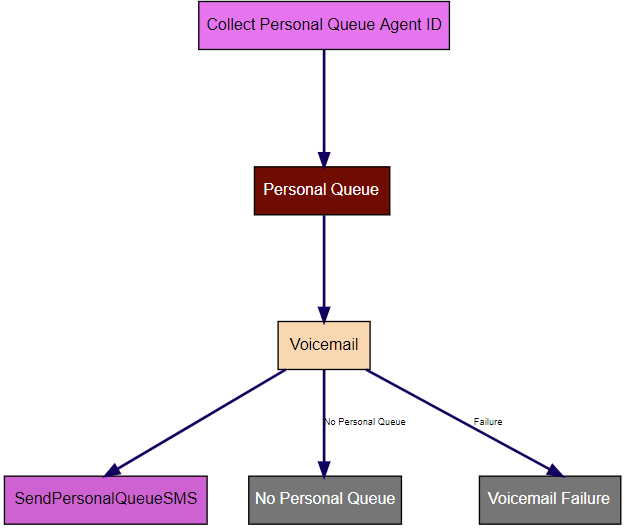
The plan includes the following applets:
Collect Personal Queue Agent ID (IVR Collect Digit String)
This applet prompts the caller to type the ID of the agent they want to leave a voicemail for on their telephone keypad. The applet stores the value the caller provides in an IVR slot. Vonage Contact Center routes the call to the specified applet (Personal Queue).
Personal Queue (Skill Tagger)
This applet sets the personal queue data. Vonage Contact Center routes the call to the next specified applet (Voicemail).
Voicemail (VoiceMail)
This applet is a VoiceMail applet that records a voicemail for the target agent. Vonage Contact Center then routes the call to the following applets:
- SendPersonalQueueSMS (Send SMS). If the caller records a voicemail and Vonage Contact Center successfully uploads that voicemail, Vonage Contact Center routes the voice call to a Send SMS applet. The Send SMS applet sends an SMS to the agent to let them know that they have received a voicemail.
- No Personal Queue (Announcement). If the caller has not provided a valid agent ID for a personal queue, Vonage Contact Center routes the call to an Announcement applet. The Announcement applet informs the caller that they cannot record a voicemail for the specified agent.
- Voicemail Failure (Announcement). If the caller has recorded a voicemail but Vonage Contact Center does not successfully upload that voicemail, Vonage Contact Center routes the voice call to an Announcement applet. The Announcement applet informs the caller that their voicemail has not been saved.
For general assistance, please contact Customer Support.
For help using this documentation, please send an email to docs_feedback@vonage.com. We're happy to hear from you. Your contribution helps everyone at Vonage! Please include the name of the page in your email.