
Extended agent presence (calls) in ContactPad
- Helen Griffith
- Dawid Wietrzykowski (Unlicensed)
When on a call, an agent can consult with another agent, telephone number, queue or service. Alternatively, the agent can transfer the call to another agent, queue or service. For more information about consulting and transferring calls, see Working with an inbound call. When an agent clicks to consult, a list of agents, queue names, and service names appears. Alongside the agents' names, one of the following statuses appears:
- Available now. If an agent is 'Available now', the agent is in Ready state in Vonage Contact Center and can accept a consult or any transferred call.
- Interruptible. If an agent is 'Interruptible', the agent is working on a case and therefore in Busy state in Vonage Contact Center. The agent can accept a consult or call transfer. Your account must be configured to allow agents working on cases to be interrupted with calls for the Interruptible status to appear.
- Logged in. If an agent is 'Logged in', the agent is either on a call and therefore in Busy state, or in an Away, Wrap Up or fault state in Vonage Contact Center. The agent is not currently available to take a call. The agent's name is grayed out in the list.
- Logged out. If an agent is 'Logged out', the agent is not logged in to Vonage Contact Center and cannot accept a call. The agent's name is grayed out in the list.
Lines and queues are differentiated from agents in the list by their logos:  (line),
 (queue).
At a glance an agent can see the availability of other agents to take a call. The statuses are represented by the following logos:  (Available now),
  (Interruptible),
  (Logged in),
  (Logged out).
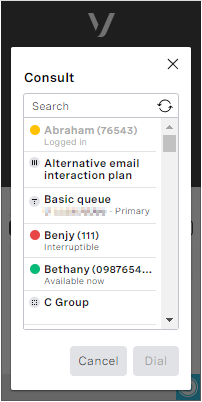
In the example, Benjy and Demo Agent are available right away for calls; Carys is working on a case but can accept a call; Abraham is logged in but temporarily unavailable—he cannot accept a call; and Helen is logged out and cannot accept calls.
| Status | Logged in to | Vonage Contact Center state | On a call? | On a case? | Can accept calls? |
|---|---|---|---|---|---|
| Available now | Yes | Ready | No | No | Yes |
| Interruptible | Yes | Busy (on a case) | No | Yes | Yes |
| Logged in | Yes | Busy/Away/Extended Away/Wrap Up/any fault state | Yes/No | Yes/No | No |
| Logged out | No | Logged out | No | No | No |
For general assistance, please contact Customer Support.
For help using this documentation, please send an email to docs_feedback@vonage.com. We're happy to hear from you. Your contribution helps everyone at Vonage! Please include the name of the page in your email.