Configuring emergency numbers
- Dawid Wietrzykowski (Unlicensed)
- Helen Griffith
If enabled for your account, you can define emergency numbers in the VCC Admin Portal.
When an agent attempts to make a call to any of these emergency numbers—using any mechanism supported by Vonage Contact Center—a message appears in ContactPad. The message warns the agent that they cannot make emergency calls using the platform and to use a phone instead. Vonage Contact Center blocks the call. The agent's state changes to Prohibited Emergency until they acknowledge the warning. After acknowledging the warning, the agent's state changes back to Ready.
If, during a call, an agent clicks the Consult button in ContactPad and tries to consult an emergency number, Vonage Contact Center blocks the consult. A warning message appears in ContactPad. The agent returns to the original call after they acknowledge the warning by clicking Confirm.
This behavior is consistent for all calls to defined emergency numbers, for all agents, regardless of their location.
The feature enables you to comply with emergency calls regulations, such as Kari's Law in the United States.
Defining the list of emergency numbers is your responsibility. Check with local authorities and regulators for a list of emergency numbers appropriate to your agent locations.
How do I add an emergency number?
To specify emergency numbers, perform the following steps:
- Log in to the VCC Admin Portal and go to Configuration (within Account Settings). Configuration appears. For information on accessing Configuration, see Editing Configuration (Account Settings). If enabled for your account, the Emergency Numbers section is available.
- In the Emergency Numbers section, click Add New.
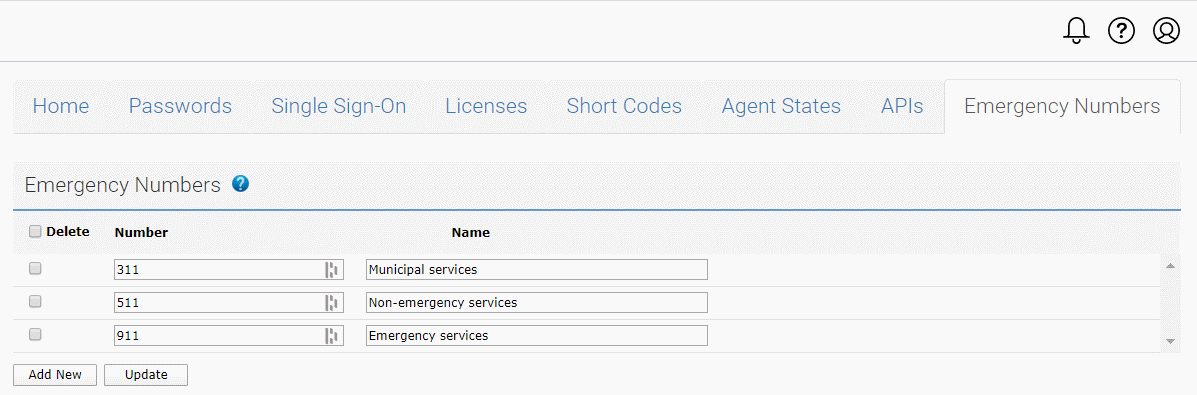
- Type an emergency number, a name, and click Update.
How do I delete an emergency number?
To delete an emergency number, select the check box alongside the number you want to delete. Click Update. The emergency number is removed from the list of existing numbers.
To delete all the emergency numbers, select the Delete check box and click Update. The list of emergency numbers is cleared.
For general assistance, please contact Customer Support.
For help using this documentation, please send an email to docs_feedback@vonage.com. We're happy to hear from you. Your contribution helps everyone at Vonage! Please include the name of the page in your email.