Summer '21 release
- Helen Griffith
In this page |
|---|
 Platform-wide feature
 Optional feature
General Availability Features
Salesforce Service Cloud Voice
VCC Express | CX Express | VCC Essentials | CX Elevate | VCC Select | VCC Premium | Service Cloud Voice |
|---|---|---|---|---|---|---|
|

Vonage for Service Cloud Voice integrates Vonage Contact Center (VCC) with Salesforce's Service Cloud Voice. For information about Service Cloud Voice and its benefits, see Service Cloud Voice (Salesforce help).
Vonage for Service Cloud Voice enables Salesforce to deliver these benefits using VCC. For example, when a customer calls in, Vonage's transcription capabilities turn the customer's and the agent's speech into text. The agent can view this text alongside customer data in the console. They can then deliver a personalized experience based on factors like the customer’s purchase history, warranty information, or past interactions across channels. With the call converted to text, Einstein AI provides recommended responses, knowledge articles, and next best actions to the agent.
You can use Service Cloud Voice with existing interaction plans, users, and contact numbers. However, you may need to change items like case pops. We recommend that you review your VCC implementation to understand what changes need to be made, if any, to take advantage of Service Cloud Voice.
Your existing integration between Salesforce and VCC will not change and continues to provide the existing benefits. Service Cloud Voice just provides a possible alternative to how Salesforce and VCC work together to provide benefit to your contact center.
Desk Phone Support
VCC Express | CX Express | VCC Essentials | CX Elevate | VCC Select | VCC Premium | Service Cloud Voice |
|---|---|---|---|---|---|---|
|
Service Cloud Voice includes desk phone support. Alongside digital channels, agents can talk with customers using their chosen hardphone, such as a desk phone or a mobile phone. An agent can configure their desk phone number in the User Admin area of the Vonage Contact Center admin portal.
For more information about Vonage for Service Cloud Voice, see Vonage Premier for Service Cloud Voice.
ContactPad
Contact List - Short Codes
VCC Express | CX Express | VCC Essentials | CX Elevate | VCC Select | VCC Premium | Service Cloud Voice |
|---|---|---|---|---|---|---|
|
|
|
|
|
|
|
Contact center agents often need to make or transfer calls or consult with numbers off platform—this may be to a commonly dialed third party. To support that, supervisors configure short code extensions within VCC so that agents don’t need to remember the full dialable number. For example, agents can dial 123 to call +1(123) 4567-890.
Supervisors can configure a large number of short codes. Previously, these short codes weren't searchable within ContactPad. Agents needed to either remember the short codes, or more commonly, supervisors would need to create separate documents mapping the short code extensions to the commonly dialed numbers. One of our highest voted ideas on the community forum was to improve that experience.
With this release, supervisors can configure short codes to appear within the make call and consult dialogs of ContactPad. Agents can search for the short-code name for a quick and simple experience.
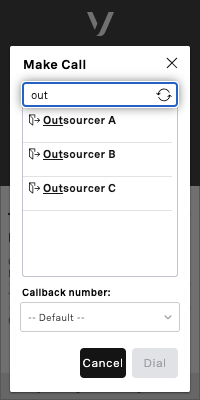
For more information about configuring short codes and using them in ContactPad, see Configuring short codes and Making and receiving calls in ContactPad.
Enforced Disposition Code for Multi-Interaction ContactPad
VCC Express | CX Express | VCC Essentials | CX Elevate | VCC Select | VCC Premium | Service Cloud Voice |
|---|---|---|---|---|---|---|
|
|
|
|
|
|
Enforced Disposition Codes ensures that agents log an outcome for all interactions..
Using multi-interaction ContactPad, agents were previously able to bypass logging a disposition code, impacting data integrity.
From Summer ‘21, agents using multi-interaction ContactPad can no longer bypass the 'Logging the Call' state from the ContactPad UI. Agents must log an outcome before making or receiving another call.
For more information about enforced disposition codes, see Disposition codes.
Detailed Problem Reporting
VCC Express | CX Express | VCC Essentials | CX Elevate | VCC Select | VCC Premium | Service Cloud Voice |
|---|---|---|---|---|---|---|
|
|
|
|
|
|
|
Agents already have the capability to report audio problems directly from ContactPad. In the Summer' 21 release, we are extending that functionality to allow agents to report wider Vonage problems.
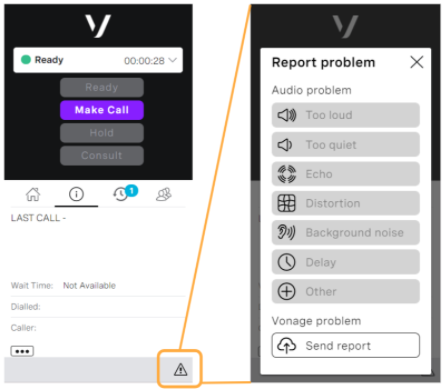
The 'exclamation' (report problem) button will be shown in place of the 'thumbs up' button (report audio problem only) today. The report problem feature allows agents to report either audio problems (when on a call) or general Vonage problems (at any point).
Clicking Send report will send Vonage diagnostic information from the agent’s browser. A trend of these will be used to alert engineers who are on call. If the issue persists, and a support case is raised, these detail reports will provide a record of the problem, complete with detailed logs. This will reduce the need for agents to join calls with the Vonage Engineering team to troubleshoot issues, ultimately leading to faster resolution times.
For more information about reporting problems in ContactPad, see Reporting problems in ContactPad.
Dashboards
Filter Interaction Details by Group
VCC Express | CX Express | VCC Essentials | CX Elevate | VCC Select | VCC Premium | Service Cloud Voice |
|---|---|---|---|---|---|---|
|
|
|
|
|
|
|
In the Spring ‘21 release, we are adding support for outbound and internal interactions within the Interaction Details widget type in Dashboards. Traditionally, this widget was filtered by queues for inbound interactions; filtering by queues is not applicable to outbound interactions.
With this release, we have added a group filter to the Interaction Details widget type. Dashboard creators can build widgets showing all active interactions within their team or group.
The group filter is available on all existing and new Dashboards.
Threshold Notifications in Browser
VCC Express | CX Express | VCC Essentials | CX Elevate | VCC Select | VCC Premium | Service Cloud Voice |
|---|---|---|---|---|---|---|
|
|
|
|
|
|
|
With Dashboards today, you can set thresholds to visualize changes in key metrics. Vonage indicates the move between threshold areas by changing the color of the value on screen.
This feature builds upon those thresholds, by allowing you to enable browser notifications for the same changes.
Available within the widget configuration screen, select the Thresholds tab. The new bell icon— or
or —indicates whether or not browser notifications have been enabled for the listed threshold changes.
When enabled, if a metric within that widget passes the configured threshold (in either direction) a notification appears.


On clicking this notification, the appropriate widget within the Dashboard comes into focus, and the value is highlighted. The notification will still trigger even if the browser window or tab is out of focus (but open).
For more information about threshold notifications, see Overview of Real-time Analytics.
WebRTC
WebRTC for VCC extension for Edge browser
VCC Express | CX Express | VCC Essentials | CX Elevate | VCC Select | VCC Premium | Service Cloud Voice |
|---|---|---|---|---|---|---|
|
|
|
|
Vonage Contact Center WebRTC now officially supports the new Microsoft Edge browser. The browser extension required to use VCC WebRTC is available to install from the new Microsoft Edge Add-ons website. Go to Microsoft Edge Add-ons and search for 'WebRTC for Vonage CC'.
For information about the WebRTC for VCC extension for Edge, see ContactPad with WebRTC.
Cadence
Cadence for Microsoft Dynamics
VCC Express | CX Express | VCC Essentials | CX Elevate | VCC Select | VCC Premium | Service Cloud Voice |
|---|---|---|---|---|---|---|
|
|
|
|
|
|
Cadence, designed to support outbound teams to reach their prospects or customers, is now available within Microsoft Dynamics CRM. With manual creation of lists in this first release, you will be able to populate prospect lists with any record type from within Dynamics to maximize your chances of connecting.
Without leaving the MS Dynamics UI, reps will be able to click to start their outbound cadence. Cadence automatically prioritizes the rep's workload based on their configured prioritization and pop the record related to the prospect list. Cadence then allows the rep to click to dial from any number in that record.
For information about using Cadence in Microsoft Dynamics, see Working with prospects in ContactPad in Microsoft Dynamics 365.
Enforced Disposition Code Support
VCC Express | CX Express | VCC Essentials | CX Elevate | VCC Select | VCC Premium | Service Cloud Voice |
|---|---|---|---|---|---|---|
|
|
|
|
|
|
Business decisions or analysis can only be informed by good data. Enforced disposition codes is a feature used by a large percentage of our customer base in Salesforce to make sure outcomes were logged for calls; however this previously wasn’t supported by Cadence. When an agent logged the outcome of their cadence step, they needed to log their disposition code separately to be able to make or receive their next call.
Now agents logging the outcome of a cadence step will automatically log that outcome as a disposition code, allowing them to move onto their next interaction immediately, improving the user experience.
Cadence Working Hours
VCC Express | CX Express | VCC Essentials | CX Elevate | VCC Select | VCC Premium | Service Cloud Voice |
|---|---|---|---|---|---|---|
|
|
|
|
|
|
Compliance regulations for outbound dialing are enforced in most geographies: ensuring compliance is paramount for all administrators.
Now, supervisors managing the workload for outbound teams are now able to define the time zone and working hours for individual prospect lists. Supported across both Salesforce and Microsoft Dynamics, reps will only be automatically presented records within the configured window.
We know lists are likely to contain prospects across multiple time zones. To maintain compliance in these scenarios, you are able to define the time zone for individual prospects in either Salesforce or Microsoft Dynamics so your window for connecting is relative to their time zone.
For information about working hours in Cadence, see Using Cadence as a supervisor.
Administration
User Admin Refresh
VCC Express | CX Express | VCC Essentials | CX Elevate | VCC Select | VCC Premium | Service Cloud Voice |
|---|---|---|---|---|---|---|
|
|
|
|
|
|
|
As we consolidate our User Administration experience into one place, we have been working to improve the user experience. Within this release, we are refreshing the entire User Admin capability.
Improvements include:
- Improved skills, group and schedule navigation. Making updates to these objects is now more efficient.
- Dedicated bulk actions sidebar. Improves the user experience outside and inside of bulk.
- Improved URL navigation. Allows users to bookmark individual objects within User Admin.
- Support for password reset within User Admin.
The classic User Admin view will be available until the next release (Winter 22’).
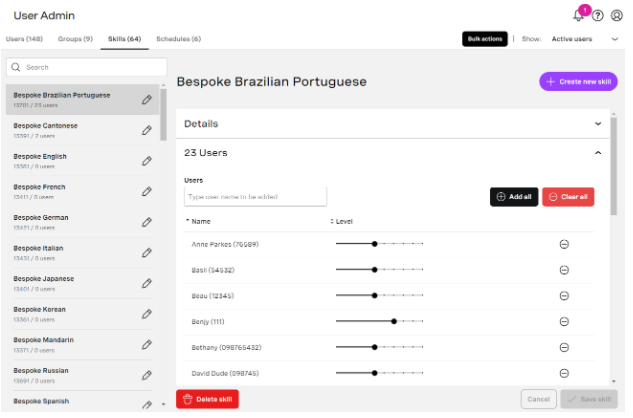
For more information about User Admin, see User Admin.
Tracking of Last Login
VCC Express | CX Express | VCC Essentials | CX Elevate | VCC Select | VCC Premium | Service Cloud Voice |
|---|---|---|---|---|---|---|
|
|
|
|
|
|
|
Within the Winter ‘21 release, we enabled a 'Last Login' column within the User Admin export. In this release, we are extending that offering by covering all login scenarios, including alternative single sign-on providers.
Any login to VCC will now be captured within the column, allowing administrators to identify both active and inactive users. Data within the column has been backfilled until April 2020.
Platform
Interaction Content Search Improvements
VCC Express | CX Express | VCC Essentials | CX Elevate | VCC Select | VCC Premium | Service Cloud Voice |
|---|---|---|---|---|---|---|
|
|
|
|
|
|
|
Since the release of the Interaction Content page, we have been working on improving the user experience. Within this release, the filter capabilities has been improved to support the following additional features:
- Search across an unlimited time period, made possible by progressive loading of results.
- Improved date and time filtering component, offering relative time period options.
- Search based on the agent IDs of all agents that connected to the interaction, and not just the last (available for interactions that happen after the Summer ‘21 release).
- Improved search performance, providing results faster than ever before.
This page will now entirely replace the Call Recordings page. See the Call Recording Search - Retired section later in this page for more details.
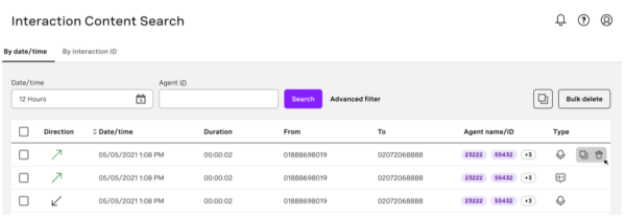
For more information about Interaction Content Search, see Interaction Content.
Beta/Early Access Program
Our Beta/Early Access Program gives some customers access to VCC enhancements that are still under development. Incorporating feedback from customers during the program allows us to continue improving these features, which ensures that every feature fulfills its purpose in a range of different
environments. All customers using features in the Beta/Early Access Program must agree to participate in the feedback process.
If you are interested in gaining access to a feature in the Beta/Early Access Program, contact your Customer Success Manager or Account Manager. Participation in this pilot program is at the discretion of Product Management and not guaranteed.
Screen Recording Desktop Application (Beta)
VCC Express | CX Express | VCC Essentials | CX Elevate | VCC Select | VCC Premium | Service Cloud Voice |
|---|---|---|---|---|---|---|
|
|
|
|
|
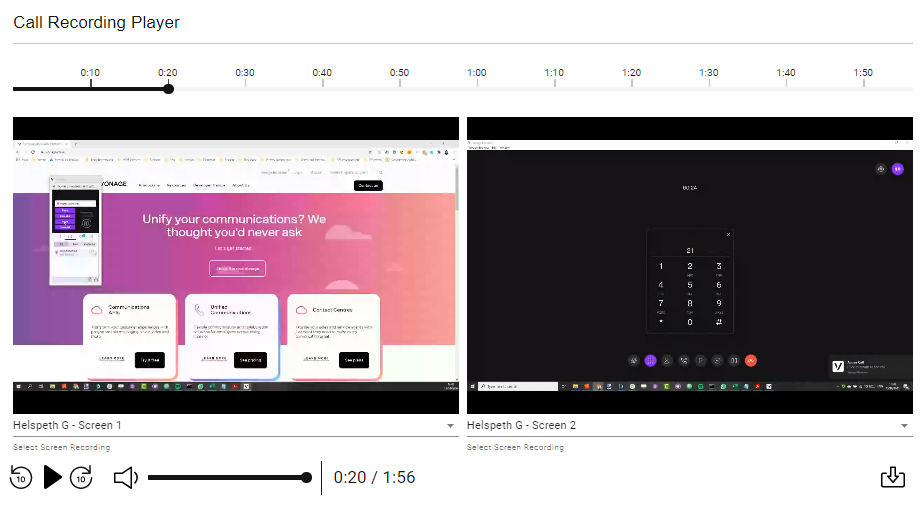
Screen Recording allows supervisors and quality managers to understand what agents were doing on their desktops during the call, and listen to the call. This improves quality management capabilities, making it easy to identify inefficiencies. This functionality has already been released and the Desktop Application is an enhancement.
Screen Recording will enable your business to achieve the following:
- Identify coaching opportunities to improve call efficiency
- Record one or two screens, not just browsers or applications
- Understand after-call work activities
- Synchronize desktop activity with audio recordings
- Enable playback of multiple screens at once
- Zoom into agents’ screens
- Download audio and video in a single file
- Easily identify which calls have just audio and/or transcription and/or screen recordings
- Store screen recordings securely
- Set permissions on who can view screen recordings
- Provide central control of whose screens are recorded
- Link screen recordings to Conversation Analyzer
In this Beta program we will be offering a desktop application to record the screen(s) instead of a Chrome Plugin.
Analytics Dashboards (Limited Early Access)
VCC Express | CX Express | VCC Essentials | CX Elevate | VCC Select | VCC Premium | Service Cloud Voice |
|---|---|---|---|---|---|---|
|
|
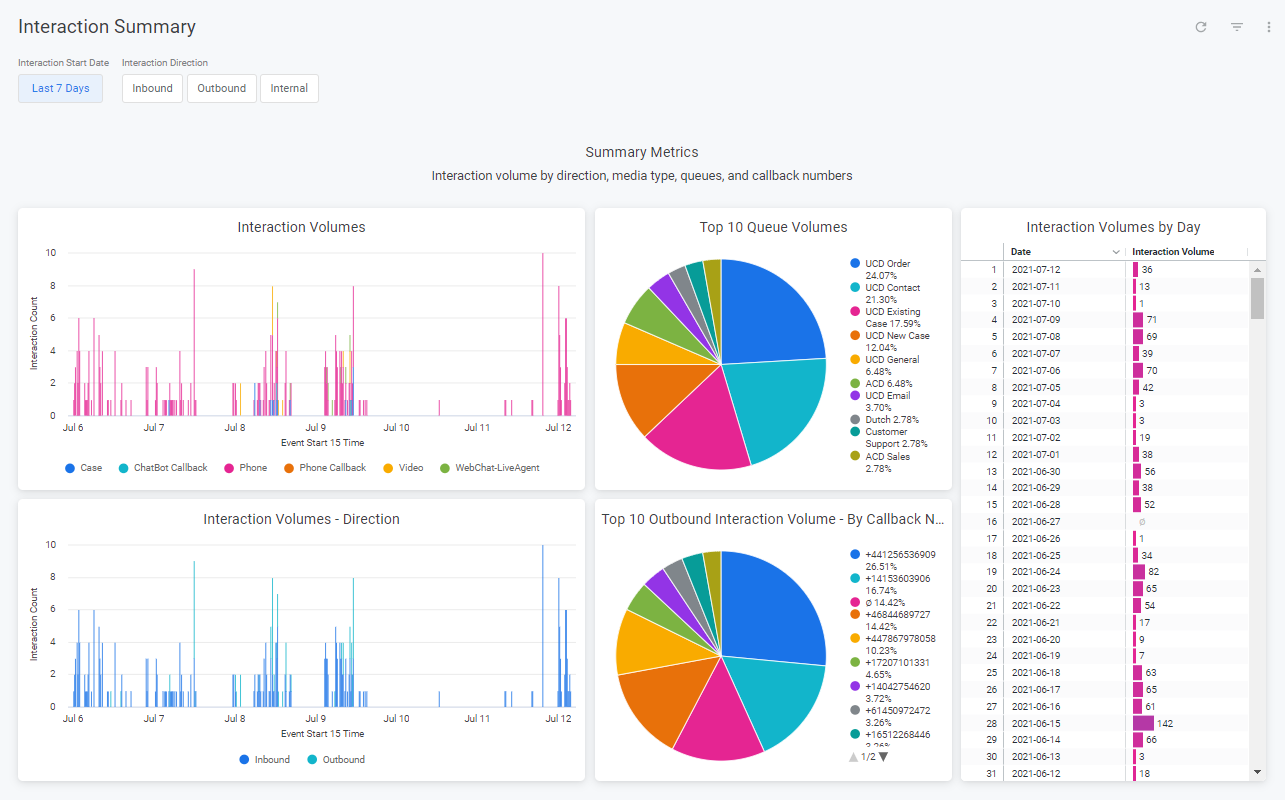
Historic reporting within a contact center is a key pillar of success. The new Analytics Dashboards offering will bring the power of a Business Intelligence system into the VCC Portal for customers of all types. This offers the ability to:
- Report historically on interaction and agent data
- Create custom Analytics Dashboards to meet your needs
- Download reports in a variety of formats
- Build a custom formula calculation to deliver truly bespoke reporting
This feature is now open for limited early access for any customers on the CX Express or CX Elevate packages. Contact our Account Management team to discuss early access in more detail.
User Admin API (Limited Early Access)
VCC Express | CX Express | VCC Essentials | CX Elevate | VCC Select | VCC Premium | Service Cloud Voice |
|---|---|---|---|---|---|---|
|
|
|
|
A new major version of the User Admin API is now available for early access. Version 4 offers an API that can manage all aspects of a user's settings, skill groups, schedules, callback numbers, and permissions, allowing API users to create, read, update, and delete, each user and their child links.
The move to user level API permission, announced in the Spring ‘21 release, continues. The API now enforces user permissions throughout all endpoints.
Contact our Account Management team to discuss early access in more detail.
Important announcements
Locations not Clouds
VCC Express | CX Express | VCC Essentials | CX Elevate | VCC Select | VCC Premium | Service Cloud Voice |
|---|---|---|---|---|---|---|
|
|
|
|
|
|
|
Vonage has historically referenced our contact center regions based upon their cloud numbers; Cloud 11, 8, 17, 12, and so on. Following this release, the use of cloud numbers will cease. Vonage will now refer to regions and locations.
Regions:
- EMEA - Europe, Middle East, and Africa
- NAM - North American
- APAC - Asia-Pacific
Locations:
- London
- Frankfurt
- Virginia
- California
- Sydney
- Singapore
Within the VCC System Settings component, you can see your hosted region and location.
This change will also be reflected in the VCC Uptime page, and VCC Status page and alerts.
Enable Automatic Deletion - Reminder
In the Winter ‘21 release we provided the ability for administrators to review and enable the automatic deletion of their interaction content (call recordings, transcripts, and so on). The majority of users have completed this, but a significant number are still outstanding.
This is a final warning for customers to review their data retention settings and enable automatic deletion. Starting November 1, 2021, Vonage will issue final warnings to customers with automatic deletion paused for more than 180 days, and begin enabling automatic deletion on their behalf. These customers will forgo the opportunity to review these settings. Review your retention settings within the Data Retention portal component.
If you need to enable automatic deletion, admins will be presented with a notification upon login, as shown below.
Log a Call is now Voice Only
The Log a Call feature was originally designed to provide agents a quick and simple user interface to log the outcome for a call. The outcome was then saved against the activity record for that call in Salesforce.
The interface was designed when agents handled a single interaction at a time and refreshed each time the agent was delivered an interaction.
As customers began to adopt a capacity based implementation to compliment our omnichannel products, it became impossible for agents to select which interactions they would like to log notes against.
Taking effect in this release, only voice interactions will be logged through Log a Call and for customers using Enforced Disposition Codes, only voice interactions will move into the 'Logging the Call' state.
Note
Opting out
Feature Retirement
Along with the exciting new functionality added to the product with every release, we are also working to retire older parts of the product. The removal of functionality within our product is completed in up to these stages: This is an optional stage that gives users early warning of our intent to deprecate functionality. It is most commonly used when an alternative is announced, and gives users the ability to migrate ahead of the functionality becoming deprecated. At this stage we encourage customers to stop using the mentioned product functionality, and migrate to an alternative. This indicates that a piece of functionality is no longer supported. The functionality will continue to work, but no new enhancements or bug fixes will be made (with the exception of security vulnerabilities) and new functionality may not be compatible. We commonly announce the target Retirement date when deprecating. At this stage customers must stop using the mentioned product functionality, and migrate to an alternative. After the retirement date the functionality will either cease working entirely, or become completely unsupported.Intent to deprecate
Deprecated
Retired
Real Time Admin Functions - Retired
Over the past several releases, the functionality offered within User Admin has achieved parity with Real Time admin functions, and in many areas surpassed it. Support for the Real Time admin functions will be retired on September 6, 2021. All users must migrate to User Admin.
The ‘agents’ and ‘groups’ buttons will be removed. All other functions, such as changing agent states and call monitoring will continue to be supported within Real Time.
Skills Management - Retired
User Admin will replace Skill Management. User Admin has parity features and the advantage of supporting skill levels and bulk changes. Following this release, users of Skill Management will initially be redirected to User Admin.
Skills Management will be turned off globally on September 6, 2021. All users must migrate to User Admin.
Call Recording Search - Retired
The Call Recordings search has been replaced by the Interaction Content search. This new page provides access to all interaction content types; such as call recordings, categorization results, transcripts, and so on. Following this release, users of the Call Recordings search will initially be redirected to the Interaction Content search.
The Call Recordings search will be turned off globally on September 6, 2021.All users must migrate to the Interaction Content search.
Internet Explorer 11 - Retired
In the Summer ‘20 release we issued an intent to deprecate IE 11 support on January 1, 2021. On that date, support for IE11 was formally deprecated within the VCC product.
Support for this browser version will be retired on September 1, 2021, and core functionality with VCC will cease to work.
All users must immediately migrate to a supported browser version, as detailed in our technical prerequisites.
Support for Excel 2000 and 2003 formats within Stats and Reports - Retired
In the Spring ‘20 release, we deprecated support for Excel 2000 and 2003 formats within Stats and Reports Profiles. Following this release, all existing and new Stats and Reports profiles will run in CSV format instead of Excel.
SOAP Interaction applet - Deprecated
The SOAP Interaction applet is being removed. API requests to third party applications must use the Data Connector applet moving forward.
Projected Retirement date: Winter ‘22 Release
Conversation Analyzer Dashboard (Einstein Analytics) - End of Life
A Salesforce Einstein dashboard package for Conversation Analyzer was introduced as a pilot and did not go GA. This pilot and package are being withdrawn.
Insights Stats API - Agent Summaries and Queues - Deprecated
The GET /agent-summaries and GET /queues endpoints available within the Insights Stats API are now deprecated. These have been replaced with the more detailed endpoints GET /interactions and GET /agent-activities.
Projected Retirement date: Winter ‘22 Release
Interaction Content API - Version 2 - Deprecated
In Spring ‘21 we introduced Interaction Content API Version 3. Within this release we are formally deprecating support for Version 2 of that API. All customers should plan a migration to the Version 3 of the API, which has the same capabilities (and more) with improved access permissions.
Projected Retirement date: First half 2022
Salesforce Managed Packages
The following packages and earlier versions will be deprecated.
Package | Supported Versions | Deprecated Versions* | Retired |
|---|---|---|---|
Vonage Contact Center for Salesforce | 20.105 or higher | 20.104 or lower* | 18.250 or lower |
Vonage Contact Center Connect | 20.106 or higher | 20.105 or lower* | 18.259 or lower |
Vonage Contact Center Advanced Reporting | 2.65 or higher | 2.64 or lower* | 2.56 or lower |
* These packages will be retired from Winter ‘22
Salesforce Log a Call
The Log a Call UI is an interface most Salesforce agents use to log call information regarding their most recent interaction. The UI can be configured to be used on the page layout, utility bar or within the quick actions in Salesforce Classic.
Classic Support - Deprecated
The ‘Log a Call’ interface will receive no further enhancements in Salesforce Classic, either in the quick actions tab or in the utility bar and will be considered deprecated. We will not be taking steps to remove this functionality from future packages for customers who have not yet migrated to Lightning.
Projected Retirement date: pending
Page Layout support for Lightning Console Apps - Deprecated
The Log a Call interface can be hosted on either the page layout or the utility bar.
From Summer ‘21 we will consider configuration on the page layout, specifically for console apps in Lightning, deprecated.
Projected Retirement date: Winter ‘22
Copy Interaction Plans - Deprecated
There is a function in Interaction Architect which allows system administrators to copy entire call plans from one line over to another. Within this release we are formally deprecating this functionality as it has been superseded by superior change management within the Interaction Plan Management feature, released in Spring ‘21.
Projected Retirement date: Winter ‘22
For general assistance, please contact Customer Support.
For help using this documentation, please send an email to docs_feedback@vonage.com. We're happy to hear from you. Your contribution helps everyone at Vonage! Please include the name of the page in your email.