Q1 '24 release
- Helen Griffith
| In this page |
|---|
 Platform-wide feature
 Paid-for feature
 Enhancement to paid-for feature
General Availability Features
Vonage Premier for Service Cloud Voice
Supervisor barge-in
| VCC Priority | VCC Express | VCC bundled w/VBC Express | VCC Essentials | VCC bundled w/VBC Elevate | VCC Select | VCC Premium | Service Cloud Voice |
|---|---|---|---|---|---|---|---|
|
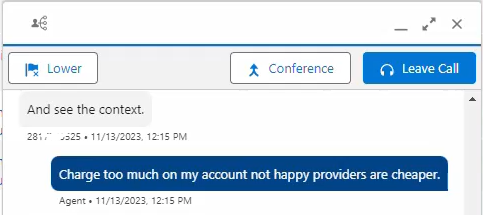
When a supervisor clicks Monitor on an active call, in addition to viewing the conversation entries (and real-time transcription), the supervisor can join and listen in, muted. We now also offer the ability for the supervisor to barge in (unmuted) using the Conference button as shown in the image below. This is known as Join mode on the core VCC platform, in which the supervisor joins the call as a monitor, similar to being in a conference call. The supervisor can speak and be heard by the agent and the external participant.
ContactPad
Updated login for embedded ContactPad
| VCC Priority | VCC Express | VCC bundled w/VBC Express | VCC Essentials | VCC bundled w/VBC Elevate | VCC Select | VCC Premium | Service Cloud Voice |
|---|---|---|---|---|---|---|---|
 |
|
|
|
|
|
|
Vonage has introducted a new login process for ContactPad embedded within iFrames. This update aligns with changes in web privacy, including the phasing out of third-party cookies by browsers like Google Chrome.
Key changes:
- Single login button: Users see a streamlined login interface with a single button and any single sign-on options enabled.
- Pop-out authentication: A separate authentication window appears on login and logout.
- Pop-up permissions: Users must enable pop-ups for Vonage on their first logout.
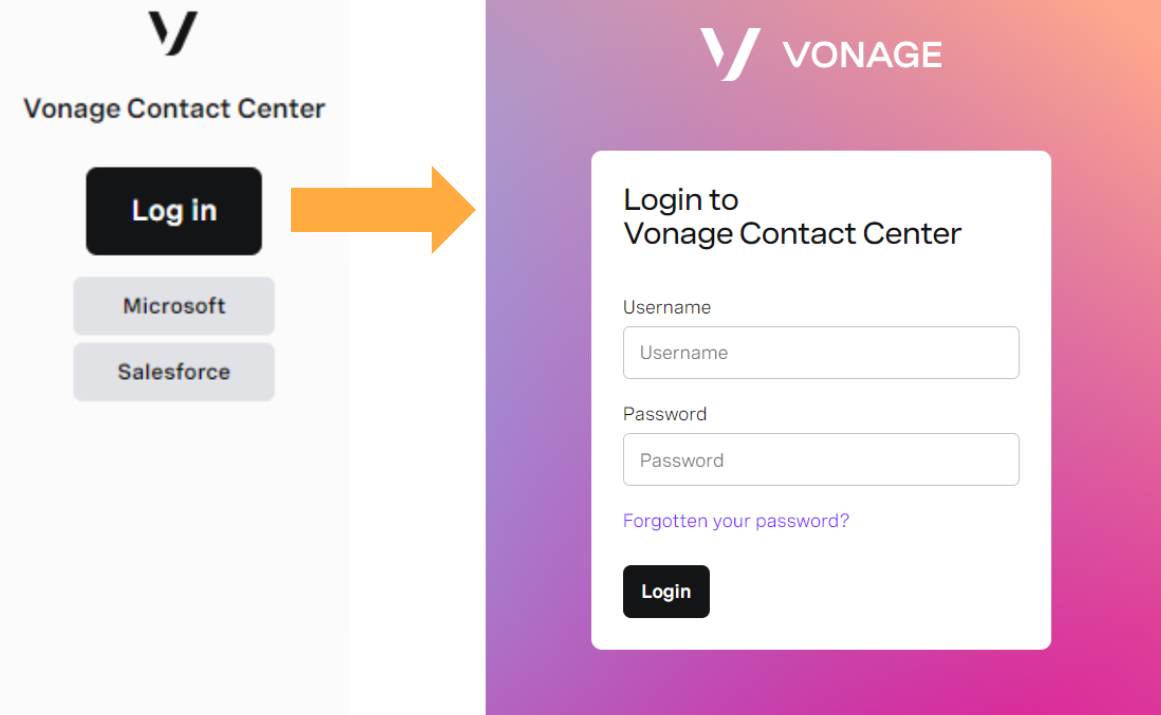
This change is part of our ongoing commitment to user security and privacy, adapting to the latest web standards. For any queries or feedback, please reach out to Vonage support.
Administration
Virtual Assistant applet
| VCC Priority | VCC Express | VCC bundled w/VBC Express | VCC Essentials | VCC bundled w/VBC Elevate | VCC Select | VCC Premium | Service Cloud Voice |
|---|---|---|---|---|---|---|---|
|
|
|
|
|
|
|
|
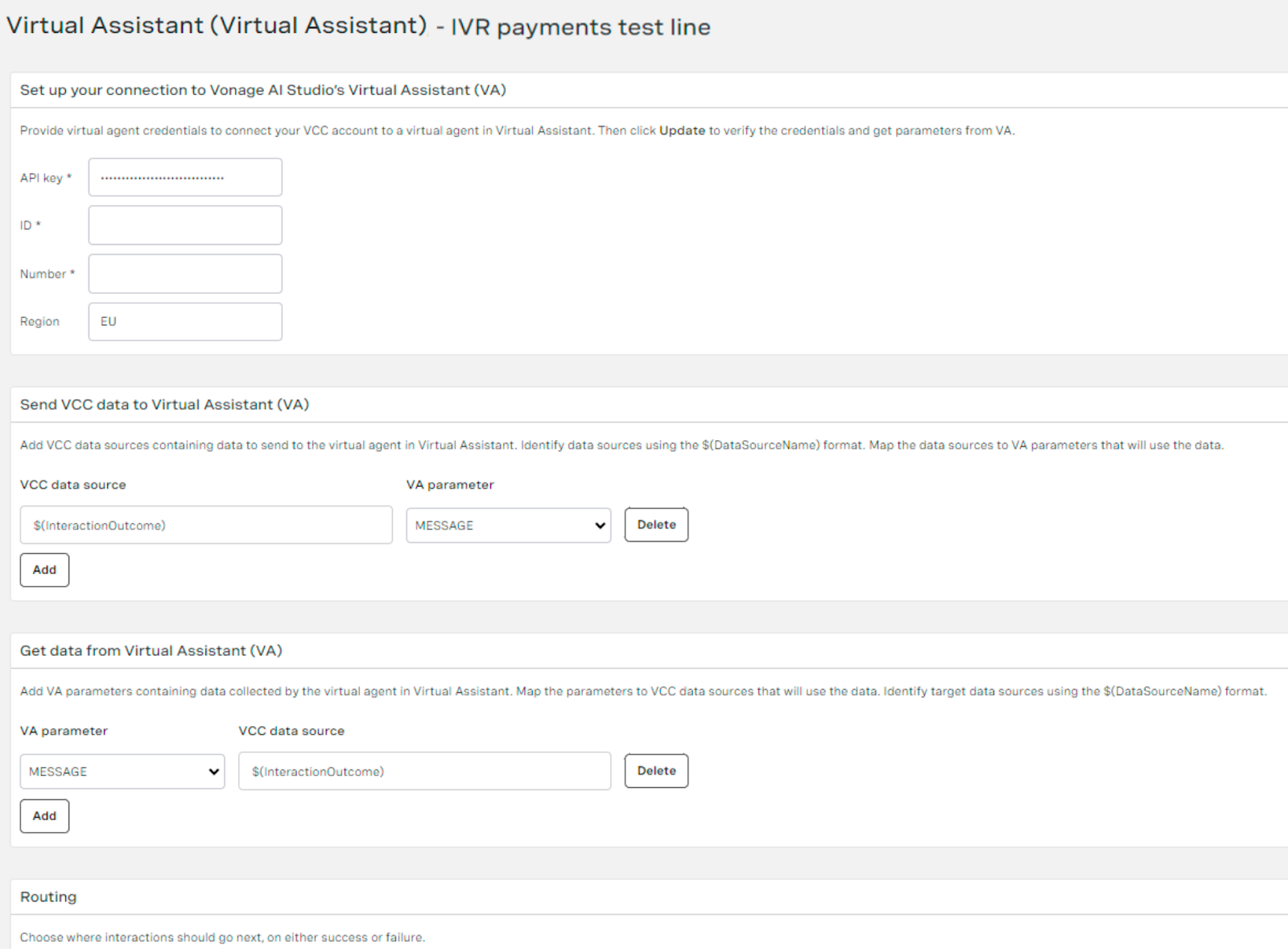
Vonage Contact Center has a new Virtual Assistant applet that facilitates the routing of interactions to Vonage AI Studio’s Virtual Assistant. Virtual Assistant uses artificial intelligence (AI) to handle a contact’s request, referencing FAQ content, suggesting actions for updating or reading contact data, or routing the call to a human agent through a tailored interaction plan. Contacts engage with a virtual agent resulting in an outcome of either abandoned, escalated to a human agent, or resolved.
To route interactions from VCC to Virtual Assistant, a VCC admin user needs to configure an interaction plan that includes the new Virtual Assistant applet, and have an active Vonage AI Studio account.
As part of setting up the Virtual Assistant applet, the admin should provide the virtual agent’s detail, define which parameters to send to and receive from the Virtual Assistant, and routing definitions as shown in the image below.
Menu - Tone applet updates
| VCC Priority | VCC Express | VCC bundled w/VBC Express | VCC Essentials | VCC bundled w/VBC Elevate | VCC Select | VCC Premium | Service Cloud Voice |
|---|---|---|---|---|---|---|---|
|
|
|
|
|
|
| |
Updated applet: As part of this release, we have added capabilities from the new Announcer applet into the Menu Tone applet, providing the ability to reference WAV files, dynamic audio, and text-to-speech from within the Menu Tone applet for the first time. In addition, the Menu - Tone applet has been renamed to Menu applet.
‘Report a problem’ actions appear in Audit Log
| VCC Priority | VCC Express | VCC bundled w/VBC Express | VCC Essentials | VCC bundled w/VBC Elevate | VCC Select | VCC Premium | Service Cloud Voice |
|---|---|---|---|---|---|---|---|
|
|
|
|
|
|
|
If an agent experiences a problem when using ContactPad, they can report the problem to VCC. This sends a detailed system report from ContactPad for investigation.
Audit Log — available within the VCC admin portal — has been extended and now logs when an agent clicks Send report in ContactPad. This enables admins and supervisors to view when agents report a problem within ContactPad.
WebRTC
Virtual Desktop Infrastructure support for ContactPad with WebRTC
| VCC Priority | VCC Express | VCC bundled w/VBC Express | VCC Essentials | VCC bundled w/VBC Elevate | VCC Select | VCC Premium | Service Cloud Voice |
|---|---|---|---|---|---|---|---|
|
|
|
|
|
An increasing number of enterprise customers are using Virtual Desktop Infrastructure (VDI) to manage the environment contact center agents use on a daily basis. Using WebRTC with VDI can present challenges such as increased latency and packet loss, both of which reduce call audio quality. These challenges occur because audio is not routed directly to the agent and is instead routed through the remote desktop server.
Since the release, Vonage offers VDI support. To use a VDI, the agent should open a specific webpage in a browser on their local computer which enables WebRTC media to be routed directly to the agent. This bypasses the remote desktop server and avoids the problems caused when audio is not routed directly.
Headset controls for ContactPad WebRTC
| VCC Priority | VCC Express | VCC bundled w/VBC Express | VCC Essentials | VCC bundled w/VBC Elevate | VCC Select | VCC Premium | Service Cloud Voice |
|---|---|---|---|---|---|---|---|
|
|
|
|
|
WebRTC provides the best user experience for agents by bringing all of the VCC call controls into ContactPad. Without WebRTC, agents have to answer the call outside the contact center and then use ContactPad for all other call controls. The agent has to find and switch to ContactPad to answer, reject, hangup, mute, and unmute calls — even if they are busy elsewhere.
As part of the release, Vonage offers headset control support for USB-connected headsets that are compatible with WebHID. Using a compatible headset means that agents can perform basic call controls even if they are in an application, window, or tab that does not contain ContactPad. Using WebHID means that no additional software will be required. Note that different headset models and manufacturers support different combinations of call controls.
Distinct reporting of WebRTC permissions issues
| VCC Priority | VCC Express | VCC bundled w/VBC Express | VCC Essentials | VCC bundled w/VBC Elevate | VCC Select | VCC Premium | Service Cloud Voice |
|---|---|---|---|---|---|---|---|
|
|
|
|
|
|
|
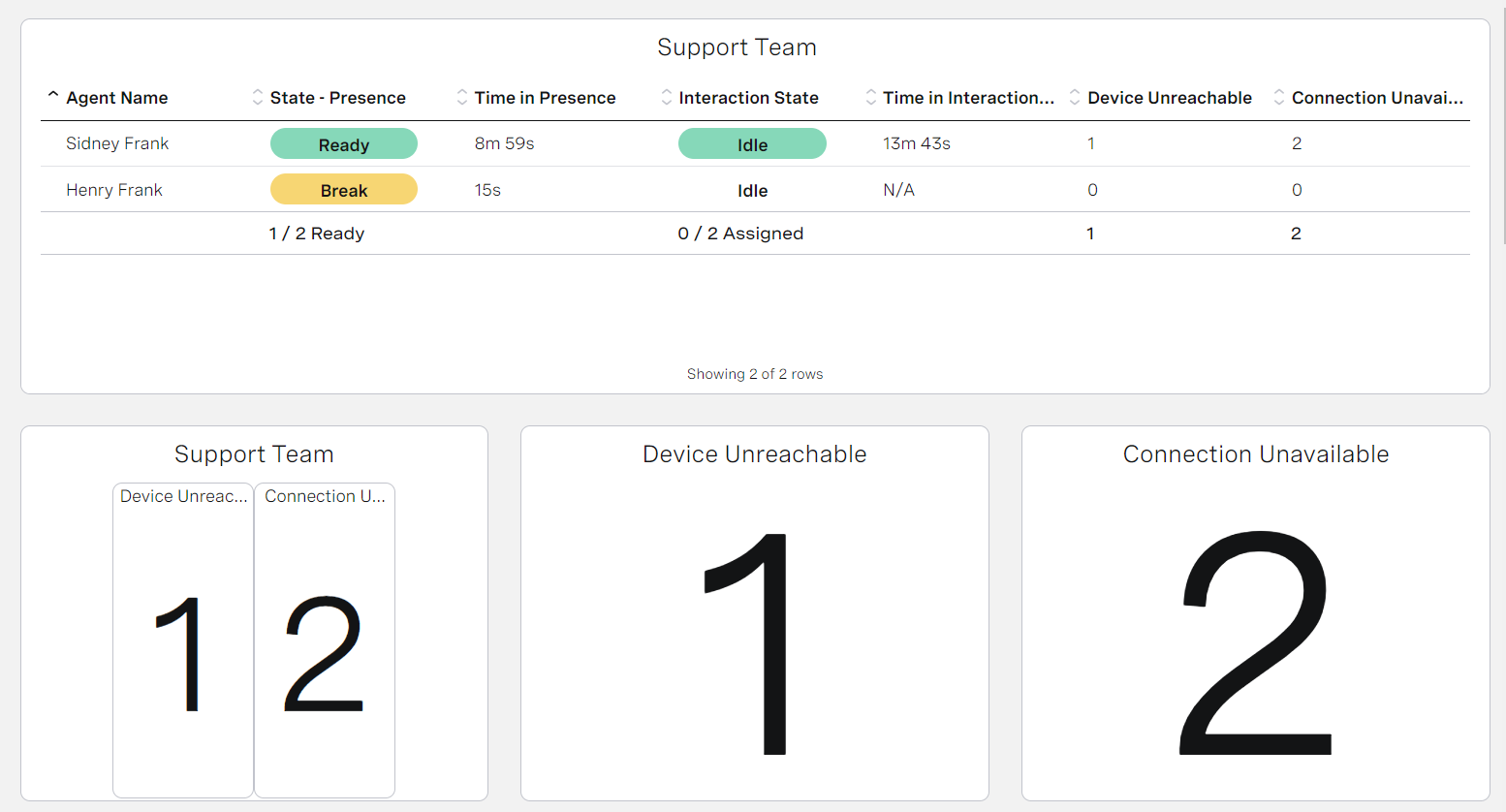
Vonage is pleased to announce a significant enhancement in ContactPad's reporting functionality, focusing on WebRTC connection failures. This update brings more granular insights into the two primary reasons for WebRTC connection failures experienced by agents - connection issues (reported as Connection Unavailable) and permission problems (reported as Device Unreachable).
Previously, ContactPad informed users about the category of failure, but now, we have taken a step further by allowing users to distinctly report on these issues through both Real-time and Historical Analytics.
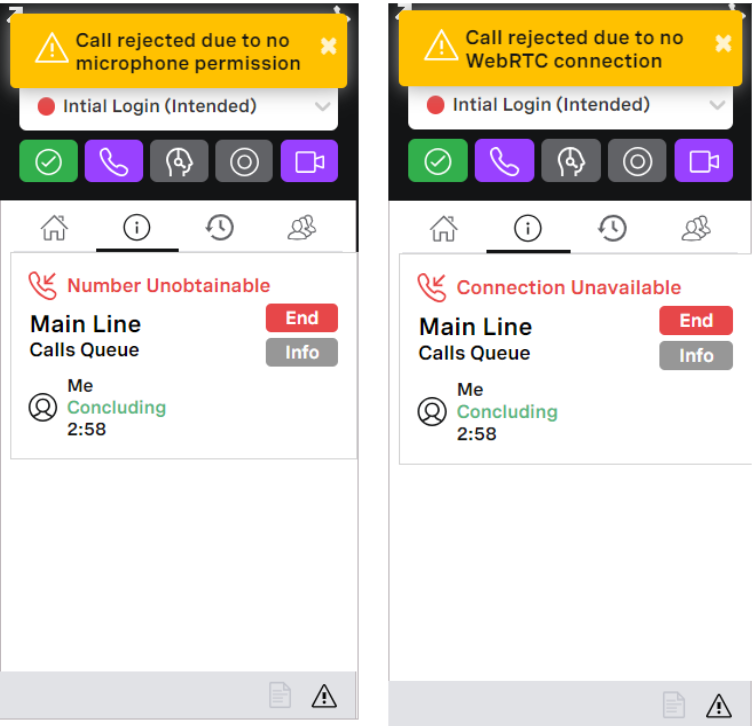
This means that when a WebRTC connection fails, ContactPad notifies the user about the nature of the issue, whether it is a connection or permission problem, and allow for this information to be distinctly tracked and analyzed within Analytics.
Real-time Analytics
Historical Analytics

This enhanced reporting capability enables support teams to diagnose and address the root causes of connection failures accurately.
This feature is part of Vonage's ongoing commitment to providing robust and insightful communication tools, ensuring our clients have the necessary data to make informed decisions and maintain high-quality service standards.
Insights
Historical Analytics shows Virtual Assistant results
| VCCPriority | VCC Express | VCC bundled w/VBC Express | VCC Essentials | VCC bundled w/VBC Elevate | VCC Select | VCC Premium | Service Cloud Voice |
|---|---|---|---|---|---|---|---|
| | | | | | | |
In Historical Analytics, administrators can access basic analytics related to Virtual Assistant performance, including the numbers of abandoned, escalated, or resolved calls.
This functionality is applicable exclusively to accounts subscribed to Vonage AI Studio and that have interaction plans featuring the new Virtual Assistant applet. To learn about this new applet, see Virtual Assistant applet earlier in this page.
Note that accounts using the existing Virtual Agent applet cannot view the basic analytics in Historical Analytics.
Team Monitoring
| VCC Priority | VCC Express | VCC bundled w/VBC Express | VCC Essentials | VCC bundled w/VBC Elevate | VCC Select | VCC Premium | Service Cloud Voice |
|---|---|---|---|---|---|---|---|
|
|
|
|
|
|
| |
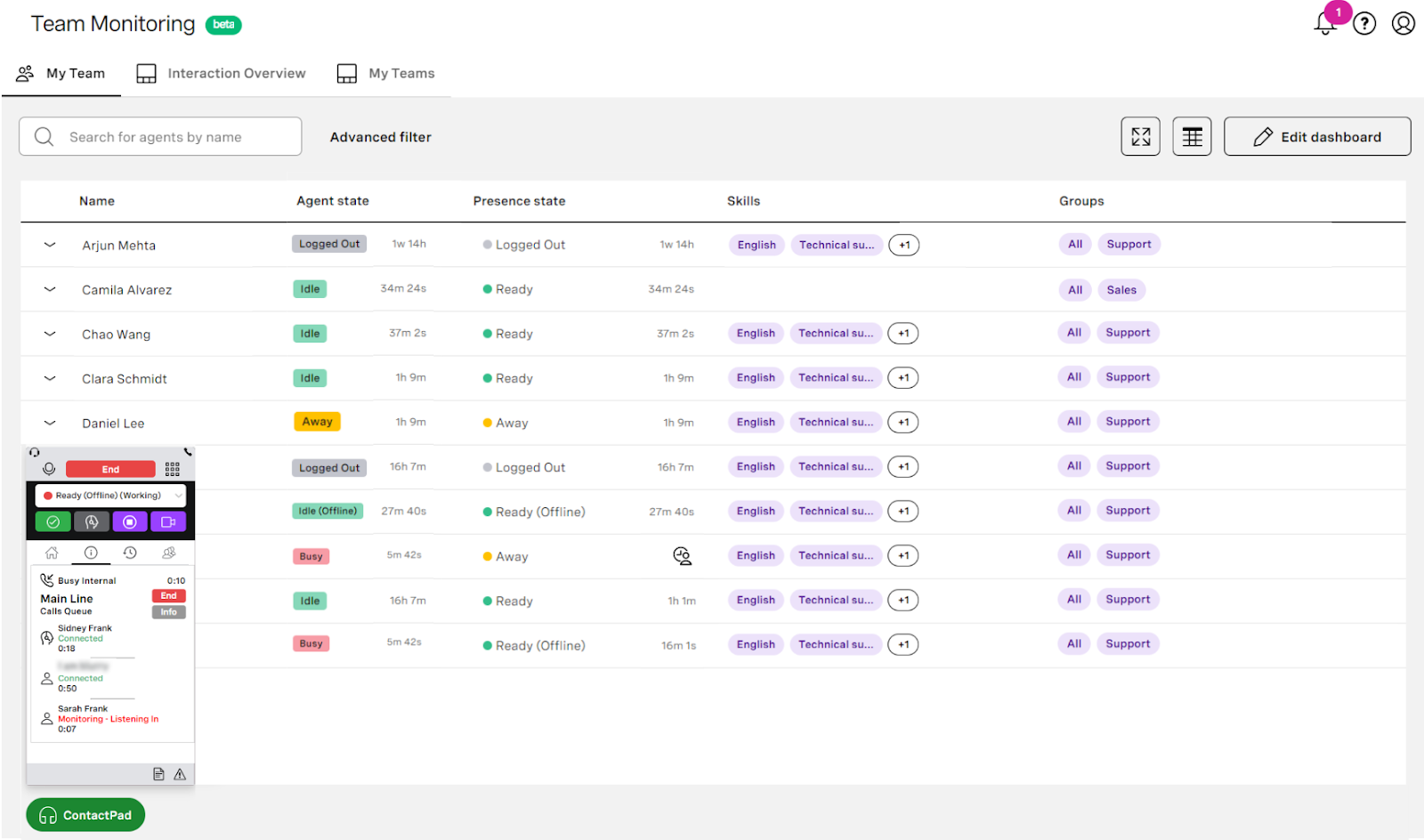
Vonage is excited to announce the full release of Team Monitoring, an innovative addition to our Insights suite, available to all from Q1 '24. Initially available in beta since Q2 '23, Team Monitoring is designed to enhance management and support capabilities for administrators and supervisors within modern contact centers.
Key features of Team Monitoring:
- Agent management: Enables effortless adjustment of agent presence and real-time viewing of interaction status, ensuring supervisors can respond quickly to changing situations.
- Skill and group views: Offers supervisors a comprehensive overview of agent skills and group alignments, optimizing team organization and resource allocation.
- Call monitoring flexibility: Supervisors can now monitor calls directly from their embedded ContactPad using either WebRTC or PSTN, providing flexibility and ease in call monitoring.
- Dynamic monitoring modes: Allows seamless switching between monitoring modes — listening, coaching, or joining calls — facilitating real-time support and guidance.
- Enhanced reporting: Features new monitoring metrics in Real-time Analytics and comprehensive dimensions within Historical Analytics, delivering deeper insights into team performance and monitoring activities.
- Embedded Real-time Analytics dashboards: All real-time analytics are now conveniently accessible in one place through embedded dashboards, streamlining access to key metrics and data.
Team Monitoring's overhaul of call monitoring functionality is a highlight, offering detailed reporting and a choice of using configured phone numbers or WebRTC softphones for call monitoring. This new product area is tailored to meet the dynamic needs of modern contact centers, providing essential tools for effective team management and monitoring.
With Team Monitoring, Vonage continues to demonstrate its commitment to offering robust, user-friendly solutions that empower supervisors, and enhance team performance in the ever-evolving landscape of customer communication and support.
Real-time Analytics user experience improvements
| VCC Priority | VCC Express | VCC bundled w/VBC Express | VCC Essentials | VCC bundled w/VBC Elevate | VCC Select | VCC Premium | Service Cloud Voice |
|---|---|---|---|---|---|---|---|
|
|
|
|
|
|
| |
Real-time Analytics access and navigation has been aligned with other insights products — Historical Analytics and Team Monitoring. Supervisors can access Real-time Analytics from within the Insights product area of Vonage Contact Center and view existing dashboards either in a list view or as tiles. If no dashboards appear, supervisors can initiate creating a new dashboard in the same way as they do in Historical Analytics and Team Monitoring.
Historical Analytics actions appear in Audit Log
| VCC Priority | VCC Express | VCC bundled w/VBC Express | VCC Essentials | VCC bundled w/VBC Elevate | VCC Select | VCC Premium | Service Cloud Voice |
|---|---|---|---|---|---|---|---|
|
|
|
|
|
|
| |
Audit Log — available within the VCC admin portal — has been extended and now includes logs of the actions made within Historical Analytics. From now on, it is possible to report on all the events of creating, editing, viewing, copying, and deleting dashboards. The audit logs contain the username who made the changes, together with the ID and the name of the respective dashboard. For the copy action, audit logs contain the ID and the name of both the source and the target dashboards.
Conversation Analyzer
Conversation Analyzer in Historical Analytics
| VCC Priority | VCC Express | VCC bundled w/VBC Express | VCC Essentials | VCC bundled w/VBC Elevate | VCC Select | VCC Premium | Service Cloud Voice |
|---|---|---|---|---|---|---|---|
|
|
|
|
|
|
| |
This is now available as GA after a successful pilot. This feature enables users to access insights generated by Conversation Analyzer within Historical Analytics. These insights give users a more complete view of the overall customer experience and satisfaction. With the pre-built default dashboards showing analysis of the categorization data, users can instantly identify insights and trends, and assess their team’s compliance and product knowledge.
Platform
Infrastructure refresh in Asia-Pacific
| VCC Priority | VCC Express | VCC bundled w/VBC Express | VCC Essentials | VCC bundled w/VBC Elevate | VCC Select | VCC Premium | Service Cloud Voice |
|---|---|---|---|---|---|---|---|
|
|
|
|
|
|
| |
Over the past two years, Vonage has been performing a global infrastructure refresh project with a seamless and phased migration. The final phase will complete during Q1 2024, with the refresh of the infrastructure in the Asia-Pacific (APAC) region.
If you are a customer or you use Global Voice Assurance (GVA) in the APAC region, the telephony region dropdown within User Admin will include new_singapore and new_sydney instead of Singapore and Sydney.
When migration has been completed, the telephony region will revert to the original naming of Singapore and Sydney. In addition, any references to Cloud 12 and Cloud 14 will be removed from the status page, and these locations will be referred to as Sydney and Singapore.
No action is required — agent telephony regions will be automatically migrated.
Interaction content storage in Canada (Montreal)
| VCC Priority | VCC Express | VCC bundled w/VBC Express | VCC Essentials | VCC bundled w/VBC Elevate | VCC Select | VCC Premium | Service Cloud Voice |
|---|---|---|---|---|---|---|---|
|
|
|
|
|
|
| |
Vonage is expanding its global infrastructure with the introduction of a new interaction content storage location in Montreal, Canada. This addition enhances our worldwide presence, which already includes San Francisco, London, Frankfurt, Singapore, Sydney, Richmond, and Portland. This new storage option in Montreal allows customers to choose to store their interaction content within Canada, catering specifically to those with data residency preferences or requirements.
The types of content that can be stored in the Montreal location include:
- Voicemails
- Call recordings
- IVR audio captured
- Meeting recordings
- Chat transcripts
- Categorization results
- Screen recordings
- Call transcripts
- Video recordings
While the generation and processing of this content, along with its metadata, will still happen in the USA, the actual persistence of this sensitive personal data will be exclusively in the customer's selected location. This ensures that data residency preferences are respected, particularly for Canadian customers or those with specific compliance needs.
Customers interested in using this new storage location in Montreal should contact their Vonage account manager or customer success manager. This direct engagement will facilitate a smooth transition and ensure that specific storage requirements are met.
Beta/Early Access Program
Our Beta/Early Access Program gives some customers access to VCC enhancements that are still under development. Incorporating feedback from customers during the program allows us to continue improving these features, which ensures that every feature fulfills its purpose in a range of different environments. All customers using features in the Beta/Early Access Program must agree to participate in the feedback process.
If you are interested in gaining access to a feature in the Beta/Early Access Program, please contact your Customer Success Manager or Account Manager. Participation in this pilot program is at the discretion of Product Management and not guaranteed.
Webhook subscriptions
| VCC Priority | VCC Express | VCC bundled w/VBC Express | VCC Essentials | VCC bundled w/VBC Elevate | VCC Select | VCC Premium | Service Cloud Voice |
|---|---|---|---|---|---|---|---|
|
|
|
|
|
|
| |
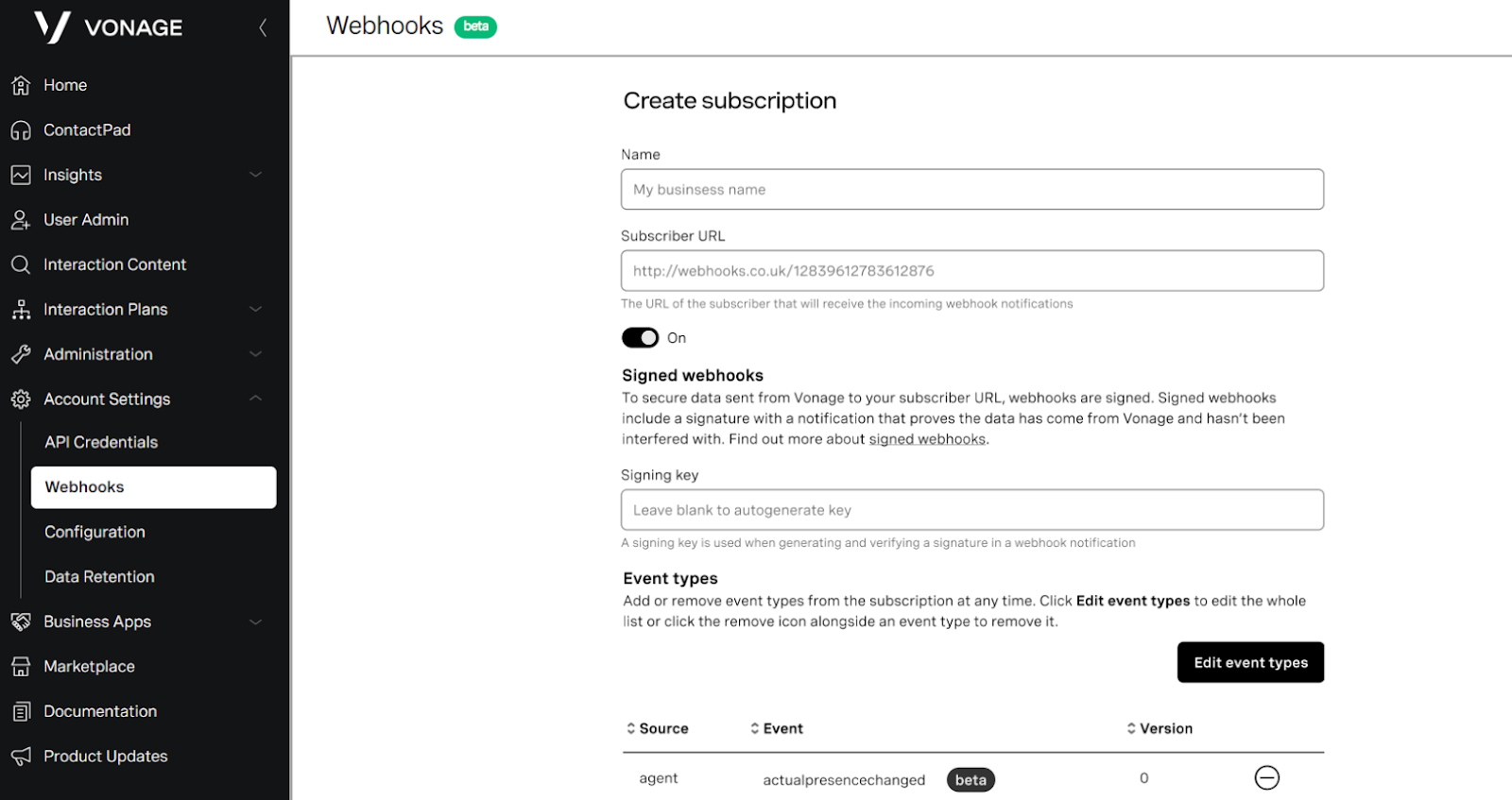
Vonage is pleased to announce the continuation and expansion of the beta access to webhooks for the Vonage Contact Center (VCC). In this latest update, we have introduced a user-friendly interface allowing admins to configure subscription URLs to receive webhook events via HTTP POSTs. This enhancement significantly simplifies setting up and managing webhook integrations, making it more accessible and efficient for administrators.
Additionally, we are expanding the scope of our webhook offerings by adding four new events. The events include:
- Parking and unparking of non-live interactions: This set of events includes triggering when an agent parks a non-live interaction, aiding in tracking paused agent activity, and activation when an interaction is unparked, signaling its resumption.
- Interrupting and resuming non-live interactions: These events encompass when an agent's non-live interactions are interrupted for higher priority work, along with when the interactions are resumed.
Users participating in the beta are encouraged to explore these new features and provide feedback to help shape the future development of VCC webhooks. If you want to join the beta program, contact your Vonage account or customer success manager.
Feature Retirement
Along with the exciting new functionality added to the product with every release, we are also working to retire older parts of the product. The removal of functionality within our product is completed in up to these stages: This is an optional stage that gives users early warning of our intent to deprecate functionality. It is most commonly used when an alternative is announced, and gives users the ability to migrate ahead of the functionality becoming deprecated. At this stage we encourage customers to stop using the mentioned product functionality, and migrate to an alternative. This indicates that a piece of functionality is no longer supported. The functionality will continue to work, but no new enhancements or bug fixes will be made (with the exception of security vulnerabilities) and new functionality may not be compatible. We commonly announce the target Retirement date when deprecating. At this stage customers must stop using the mentioned product functionality, and migrate to an alternative. After the retirement date the functionality will either cease working entirely, or become completely unsupported.Intent to deprecate
Deprecated
Retired
For a full list of deprecated features, see Vonage Contact Center feature retirement.
Unite case routing (deprecated)
As announced in the Q3 release, we are continuing our plan to retire Unite case routing, with the product now being deprecated.
For the past two years, we have been working on improving our External Routing product, by increasing the types of media it can route and bringing it to parity with Unite. External Routing has now surpassed Unite and therefore we do not see the need to have two case routing products and intend to retire Unite during 2024.
Admins should begin to plan migration from Unite to External Routing. If further support is required please reach out to your Customer Success Manager or Account Manager.
Projected retirement date: Q3, 2024.
Call Parking (deprecated)
Call Parking is a complex feature that does not fit into many common contact center use cases. Few customers use this feature and the feature's complexity impacts the development of other in-demand Vonage Contact Center features, so we intend to retire Call Parking during the first half of 2024. Contact center admins and supervisors should start to consider alternative approaches and processes. If further support is required please reach out to your Customer Success Manager or Account Manager.
Projected retirement date: Q4, 2024.
DTMF call controls (deprecated)
DTMF call controls are a legacy, PBX-related feature from the first versions of Vonage Contact Center. Few customers use this capability today with all call controls available within ContactPad or Service Cloud Voice. We intend to retire DTMF call controls during the first half of 2024. Contact center agents using DTMF call controls should switch to using the on-screen controls within ContactPad or Service Cloud Voice to control calls. If further support is required, please reach out to your Customer Success Manager or Account Manager.
Projected retirement date: Q2, 2024.
Real Time (legacy) (deprecated)
With the announcement of Team Monitoring capabilities alongside our existing Real-time Analytics, we are formally deprecating our Real-Time (legacy) analytics platform. This strategic decision is a significant step in our journey towards offering more advanced, efficient, and user-friendly analytics tools for our customers.
The full retirement of Real-Time (legacy) is planned for the Q3 2024 release, approximately six months from now. This transition period is carefully planned to ensure that all our customers have ample time to migrate to Team Monitoring or enhance their experience with Real-time Analytics with minimal operational disruption. The Vonage team is committed to supporting our customers throughout this migration process, providing the necessary guidance and assistance to ensure a smooth transition.
The introduction of Team Monitoring, alongside the already live Real-time Analytics, represents not just a change but a significant upgrade. These platforms offer enhanced features, deeper analytics, and more intuitive interfaces, all tailored to meet the evolving needs of modern contact centers. We encourage users of Real-Time (legacy) to start planning their migration to these superior platforms. Our customer support and success teams are ready to assist with any questions and facilitate your transition.
For further information or assistance with the migration, we encourage you to contact your Vonage account manager or customer success manager. We're excited about this new chapter in analytics and customer engagement, and we're here to ensure your transition to Team Monitoring and Real-time Analytics is as seamless and beneficial as possible.
Projected retirement date: Q3, 2024.
Send HTTP Post applet (retired)
In early 2023, Vonage announced the deprecation of the Send HTTP Post applet. We are officially retiring this applet.
All customers using the Send HTTP Post applet have been notified. Users must transition away from this applet by March 1, 2024, to avoid potential disruptions to their integrations.
Retirement date: March 1, 2024.
ContactHub (retired)
In early 2023, Vonage announced the deprecation of the ContactHub. We are officially retiring this service.
All customers using ContactHub have been notified. Users must transition away from this service by March 1, 2024, to avoid potential disruptions to their integrations.
Retirement date: March 1, 2024.
Inspire (wallboards) (retired)
Inspire will no longer be provided by Vonage as a product and we are announcing its deprecation. Our native dashboards provide you with the ability to have wallboard functionality. The data that Vonage Contact Center inserts into Salesforce that Inspire consumes will continue to be passed to Salesforce.
Retirement date: March 31, 2024.
Package Supported Deprecated* Retired 24.100 or higher 23.117 or lower 23.117 or lower 24.124 or higher 23.118 or lower 22.101 or lower 2.83 or higher 2.80 or lower 2.76 or lower 24.100 or higher 23.149 or lower 23.149 or lower * These packages will be retired after the Q3 2024 releaseSalesforce package deprecation and retirement
Vonage Contact Center Core Components 23.108 or higher 23.106 or higher N/A
(version 2.85 is highly recommended using the new flags)
For general assistance, please contact Customer Support.
For help using this documentation, please send an email to docs_feedback@vonage.com. We're happy to hear from you. Your contribution helps everyone at Vonage! Please include the name of the page in your email.