Q4 '22 release
- Helen Griffith
| In this page |
|---|
 Platform-wide feature
 Optional feature
General Availability Features
Service Cloud Voice
Consult with VBC Contact Directory Users
| VCC Priority | VCC Express | VCC bundled w/VBC Express | VCC Essentials | VCC bundled w/VBC Elevate | VCC Select | VCC Premium | Service Cloud Voice |
|---|---|---|---|---|---|---|---|
|
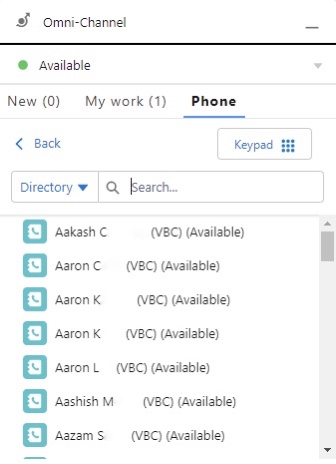
In the Q4 ‘22 release, we gave agents the ability to consult with VBC users, straight from the Omni-Channel widget or utility within Salesforce. Agents can also see if the user in VBC is available for a call or if they are already busy with another interaction.
This allows front office teams to easily contact back office teams. Agents can provide a better and quicker resolution to customers, as they can use one system to communicate with multiple parties.
For more information, see the Consulting, transferring, and conferencing (or merging) calls section in Vonage Premier for Service Cloud Voice.
Consult with Microsoft Teams Contact Directory Users
| VCC Priority | VCC Express | VCC bundled w/VBC Express | VCC Essentials | VCC bundled w/VBC Elevate | VCC Select | VCC Premium | Service Cloud Voice |
|---|---|---|---|---|---|---|---|
|
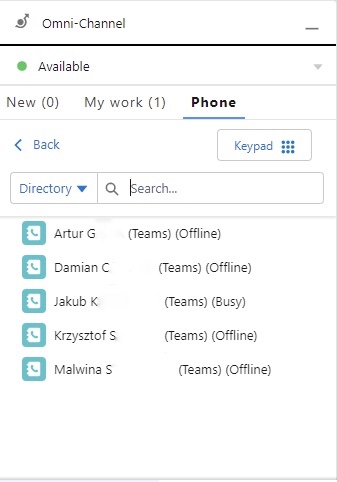
In Q4 ‘22, we also enabled agents to consult with Microsoft Teams users, straight from the Omni-Channel widget or utility within Salesforce. Agents can also see if the user in Microsoft Teams is available for a call or if they are already busy with another interaction.
This allows front office teams to easily contact back office teams. Agents can provide a better and quicker resolution to customers, as they can use one system to communicate with multiple parties.
For more information, see the Consulting, transferring, and conferencing (or merging) calls section in Vonage Premier for Service Cloud Voice.
Salesforce Omni-Channel Flows Route VCC Calls to Agents
| VCC Priority | VCC Express | VCC bundled w/VBC Express | VCC Essentials | VCC bundled w/VBC Elevate | VCC Select | VCC Premium | Service Cloud Voice |
|---|---|---|---|---|---|---|---|
|
In Q4 ‘22, building on existing functionality, we enabled Salesforce Omni-Channel flows to route inbound calls to agents, as well as to interaction plans. This allows you to make routing decisions in Salesforce as well as in VCC. It also provides the option of using Salesforce as a single routing engine for all interactions. Having a single routing engine can reduce setup and maintenance time. The single routing engine can also ensure agents are routed work effectively across all channels.
For more information, see the Omni-Channel flow routing section in Vonage Premier for Service Cloud Voice.
Salesforce Omni-Channel Flows Support Multiple Record Popping
| VCC Priority | VCC Express | VCC bundled w/VBC Express | VCC Essentials | VCC bundled w/VBC Elevate | VCC Select | VCC Premium | Service Cloud Voice |
|---|---|---|---|---|---|---|---|
|
As part of our integration with Omni-Channel flows in Salesforce, within a flow you can pop multiple records at once when the call is delivered to the agent. This means additional context can be provided to agents as soon as the call is presented to them. In turn, this allows agents to review all relevant information more quickly which can help reduce average handle time of the call.
For more information, see the Omni-Channel flow routing section in Vonage Premier for Service Cloud Voice.
Auto Select Callback Number Based on Prefix of Number Dialed
| VCC Priority | VCC Express | VCC bundled w/VBC Express | VCC Essentials | VCC bundled w/VBC Elevate | VCC Select | VCC Premium | Service Cloud Voice |
|---|---|---|---|---|---|---|---|
 |
Since the Q4 ‘22 release, agents can automatically present a callback number based on the prefix of the number dialed when making an outbound call in Service Cloud Voice. When making an outbound call to a geographical number, a callback number from the same geographical region is automatically selected and then presented. Automatically presenting local geographical numbers can reduce pre call admin time for agents as well as increase the likelihood of the recipient answering the call.
For more information, see the Prefix-based callback numbers section in Vonage Premier for Service Cloud Voice.
Desktop Notifications for Inbound Calls
| VCC Priority | VCC Express | VCC bundled w/VBC Express | VCC Essentials | VCC bundled w/VBC Elevate | VCC Select | VCC Premium | Service Cloud Voice |
|---|---|---|---|---|---|---|---|
|
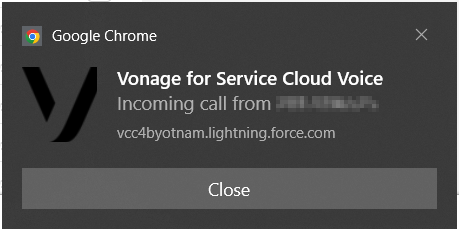
Not all agents spend all their time using Salesforce. For some of the time they may be using other applications such as Microsoft Word or Excel, or another browser-based application. When a call is presented to the agent within the Salesforce web application, the agent may not see it as their focus is on the other application. In the Q4 ‘22 release, we added desktop notifications that show the agent that there is an inbound call. The agent can click on the notification to be taken to the Salesforce web application for Service Cloud Voice.
For more information, see the Desktop notifications for inbound calls section in Using Vonage Premier for Service Cloud Voice.
Queued Callbacks
| VCC Priority | VCC Express | VCC bundled w/VBC Express | VCC Essentials | VCC bundled w/VBC Elevate | VCC Select | VCC Premium | Service Cloud Voice |
|---|---|---|---|---|---|---|---|
|
Queued callbacks are a core part of the Vonage Contact Center platform. Also known as virtual hold, it enables callers to drop from the inbound call queue while retaining their position in the queue. The caller is then contacted by the first available agent user. This capability is now available in our Service Cloud Voice integration. The configuration for queued callbacks in SCV is the same as for the core Vonage Contact Center platform.
For more information, see the Queued callbacks section in Vonage Premier for Service Cloud Voice.
Salesforce Open CTI
Log A Call Enhancements in Lightning
| VCC Priority | VCC Express | VCC bundled w/VBC Express | VCC Essentials | VCC bundled w/VBC Elevate | VCC Select | VCC Premium | Service Cloud Voice |
|---|---|---|---|---|---|---|---|
|
|
|
|
|
|
|
In the Q4 ‘22 release, we gave Salesforce administrators greater control over Vonage’s Log a Call Lightning component. This feature is only available to users within Salesforce’s Lightning Experience, not within Classic.
Administrators can now restrict the objects that a call can be related to by replacing the standard RelatedTo Field on the Log a Call component with a custom field. They can also remove either or both of the Name and RelatedTo fields.
For more information, see Restricting which object types agents can relate calls to and Hiding fields for relating calls to objects.
VCC-VBC Integrated Experience
Transfer to Groups & Queues
| VCC Priority | VCC Express | VCC bundled w/VBC Express | VCC Essentials | VCC bundled w/VBC Elevate | VCC Select | VCC Premium | Service Cloud Voice |
|---|---|---|---|---|---|---|---|
|
|
|
|
|
|
|
VCC agents now have the capability to transfer to a VBC call group or call queue. Both call groups and call queues are at the bottom of the directory list. Entering “queue” or “group” in the search box will filter the list accordingly.
Administration
Feature Permissions Management in User Admin
| VCC Priority | VCC Express | VCC bundled w/VBC Express | VCC Essentials | VCC bundled w/VBC Elevate | VCC Select | VCC Premium | Service Cloud Voice |
|---|---|---|---|---|---|---|---|
|
|
|
|
|
|
| |
Previously, managing feature permissions for supervisor and admin users could be done only within User Access and only for individual users. Permissions couldn't be managed for multiple users at the same time.
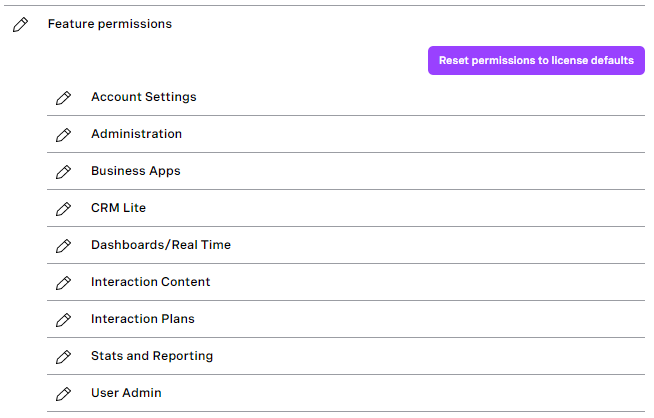
In the Q4 ‘22 release, we migrated permission management into User Admin. This was done in parity with User Access and takes advantage of User Admin capabilities.
The new section of feature permissions is now available in the single user form and in bulk actions. The ability to manage user permissions through bulk actions improves efficiency and significantly reduces time to manage permissions for multiple users.
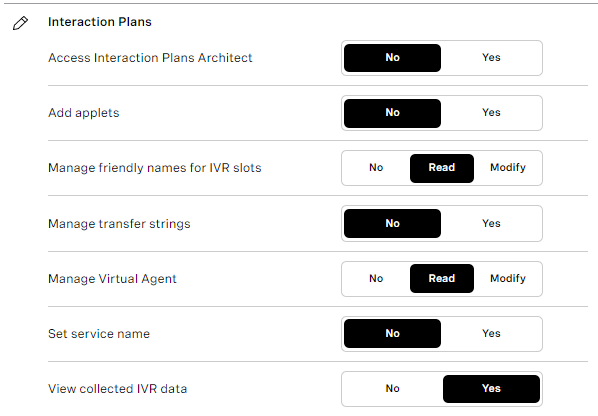
For more information, see Configuring admin and supervisor feature permissions and the Permissions settings—Feature permissions section in Configuring multiple users (using bulk actions).
Service Name Reporting Improvements
| VCC Priority | VCC Express | VCC bundled w/VBC Express | VCC Essentials | VCC bundled w/VBC Elevate | VCC Select | VCC Premium | Service Cloud Voice |
|---|---|---|---|---|---|---|---|
|
|
|
|
|
|
| |
Before the launch of Interaction Plans Manager (IPM), Interaction Architect had a one-to-one relationship between destinations and interaction plans. The name of the destination would always be provided to Salesforce Advanced Reporting, Insights Stats API, and Analytics in the service name property.
IPM reduced the number of interaction plans and removed this one-to-one relationship — many destinations can be mapped to a single interaction plan. Reporting groups, which relate to interaction plans, replaced the service names. Removing service names made reporting on landing destinations/numbers more difficult and reduced the visibility of where interactions originate.
In Q4 ‘22, we added a new property to destinations within IPM. This property allows admins to choose the source of the service name that will be assigned to the interaction for reporting.
The options available are:
- Reporting group (Default)
- Interaction plan name
- Destination name
The configured value flows through to the Insights Stats API, Analytics, Dashboards, and Salesforce Advanced Reporting.
For more information, see the Service names section in Interaction Plans Manager and Viewing service names in Real-time Analytics.
Automatic Presence Change After Wrap or Unexpected State
| VCC Priority | VCC Express | VCC bundled w/VBC Express | VCC Essentials | VCC bundled w/VBC Elevate | VCC Select | VCC Premium | Service Cloud Voice |
|---|---|---|---|---|---|---|---|
|
|
|
|
|
|
| |
When an agent finishes a call they go into a wrap state. Or, if an agent can’t take a call for some reason they will be put into an unexpected state. Previously, after a configured timeout for the wrap or unexpected state expired, the agent would go back to a ready state. Since Q4 '22, administrators can configure post-wrap and post-unexpected states in each queue to control the state the agent is in after the wrap or unexpected state times out.
For more information, see Changing post wrap state and Changing post unexpected and fault state.
Removal of Duplicate Queued Callbacks
| VCC Priority | VCC Express | VCC bundled w/VBC Express | VCC Essentials | VCC bundled w/VBC Elevate | VCC Select | VCC Premium | Service Cloud Voice |
|---|---|---|---|---|---|---|---|
|
|
|
|
|
|
| |
Previously, if a caller was routed to a queue multiple times and requested a callback each time, they would receive multiple callbacks.
In the Q4 '22 release, we updated the Callback applet to check whether there is already a callback for this caller in this applet. If a callback already exists, the applet doesn’t create a new request. The Callback applet uses the caller's CLID to check for an existing callback. If the caller requests a callback from a different Callback applet—associated with a different queue possibly—they will still receive an additional callback.
For information, see the Duplicate callback calls section in Queued callbacks.
Analytics
Historical Data Available From 2018 Onwards
| VCC Priority | VCC Express | VCC bundled w/VBC Express | VCC Essentials | VCC bundled w/VBC Elevate | VCC Select | VCC Premium | Service Cloud Voice |
|---|---|---|---|---|---|---|---|
|
|
|
|
|
|
| |
In the Q4 ‘22 release, we enabled Analytics to access historical data starting from 14th February 2018. Data from before February 2018 can be retrieved only from Stats and Reports.
For more information, see the What range of historical data is available? section in Overview of Historical Analytics.
Data Displayed in Viewer's Time Zone
| VCC Priority | VCC Express | VCC bundled w/VBC Express | VCC Essentials | VCC bundled w/VBC Elevate | VCC Select | VCC Premium | Service Cloud Voice |
|---|---|---|---|---|---|---|---|
|
|
|
|
|
|
| |
Previously, when opening default dashboards, depending on the region of the user’s VCC account, dashboards would be displayed in the time zone for London (EMEA), Los Angeles (NAM), or Sydney (APAC).
Dashboards now display data by default in the viewer's time zone according to their browser’s configuration.
For more information, see the What time zone the data is displayed in? section in Overview of Historical Analytics.
Beta/Early Access Program
Our Beta/Early Access Program gives some customers access to VCC enhancements that are still under development. Incorporating feedback from customers during the program allows us to continue improving these features, which ensures that every feature fulfills its purpose in a range of different environments. All customers using features in the Beta/Early Access Program must agree to participate in the feedback process.
If you are interested in gaining access to a feature in the Beta/Early Access Program, please contact your Customer Success Manager or Account Manager. Participation in this pilot program is at the discretion of Product Management and not guaranteed.
Extended Automatic Wrap - Early Access
| VCC Priority | VCC Express | VCC bundled w/VBC Express | VCC Essentials | VCC bundled w/VBC Elevate | VCC Select | VCC Premium | Service Cloud Voice |
|---|---|---|---|---|---|---|---|
|
|
|
|
|
|
| |
In Q4 '22 release, we changed how manual wrap is handled in single-interaction ContactPad and made it available in multi-interaction ContactPad. Instead of entering an unlimited manual wrap state, agents can manually extend their automatic wrap state an unlimited number of times. This extended wrap will expire like automatic wrap if the agent stops extending it. Customers who are interested in trialing and providing feedback have this feature enabled prior to a wider release.
Important Announcements
North America Infrastructure Refresh
As part of our continued technology life cycle, in order to provide our customers with a stable, secure, and scalable service over the coming months, Vonage will be updating and refreshing our infrastructure within the North America (NAM) region. We expect this to have no impact on the vast majority of customers; those with bespoke configurations will be contacted to manage any impact on a case by case basis.
As part of this move, accounts with a primary processing center in California, USA, will move to Oregon, USA.
These changes will introduce new public IP addresses. NAM customers that make use of an allowlist will need to update their allowed IPs as detailed in the Technical prerequisites before December 1, 2022.
Intended state
With Vonage’s existing intended state feature, an agent can set the state that the agent wants to be in after their current interaction ends. This gives agents a convenient way to manage their status after a call and avoids calls being delivered to agents who need to stop working. In the Q4 release we enabled this feature for all accounts.
Feature Retirement
Along with the exciting new functionality added to the product with every release, we are also working to retire older parts of the product. The removal of functionality within our product is completed in these stages:
Intent to deprecate | This is an optional stage that gives users early warning of our intent to deprecate functionality. It is most commonly used when an alternative is announced, and gives users the ability to migrate ahead of the functionality becoming deprecated. At this stage we encourage customers to stop using the mentioned product functionality, and migrate to an alternative. |
|---|---|
Deprecated | This indicates that a piece of functionality is no longer supported. The functionality will continue to work, but no new enhancements or bug fixes will be made (with the exception of security vulnerabilities) and new functionality may not be compatible. We commonly announced the target Retirement date when deprecating. At this stage customers must stop using the mentioned product functionality, and migrate to an alternative. |
Retired | After the retirement date the functionality will either cease working entirely, or become completely unsupported. |
For a full list of deprecated features, see Vonage Contact Center feature retirement.
User Access permission management - Deprecated
From the Q4 '22 release, User Admin has provided the ability to manage users’ full permissions. Therefore, user permission management in User Access will be deprecated.
Projected retirement date: Q1, 2023.
Motivate (Gamification) - Deprecated
Motivate will no longer be provided by Vonage as a product and will be deprecated. You can continue to purchase this through CloudApps or use our alternative Gamification product.
Projected retirement date: Q2, 2023.
Inspire (Wallboards) - Deprecated
Inspire will no longer be provided by Vonage as a product and will be deprecated. Our native dashboards provide you with the ability to have wallboard functionality. The data that Vonage Contact Center inserts into Salesforce that Inspire consumes will continue to be passed to Salesforce.
Projected retirement date: Q2, 2023.
Manual Wrap in Single Interaction ContactPad - Intent to deprecate
From the Q4 release, the ability to extend wrap is available. This wrap mechanism replaces the unlimited manual wrap feature in single-interaction ContactPad. Extended wrap is available in Early Access for customers who would like to enable it before manual wrap is deprecated.
Projected retirement date: Q1, 2023.
Salesforce Managed Packages
The following packages and earlier versions are deprecated.
Package | Supported Versions | Deprecated Versions* | Retired |
|---|---|---|---|
Vonage Contact Center for Salesforce | 22.104 or higher | 21.105 or lower* | 21.103 or lower |
Vonage Contact Center Connect | 22.111 or higher | 21.106 or lower* | 20.114 or lower |
Vonage Contact Center Advanced Reporting | 2.76 or higher | 2.71 or higher* | 2.65 or lower |
Vonage for Service Cloud Voice | 22.100 or higher | 1.9 or lower* | 1.8 or lower |
* These packages will be retired after the Q2 2023 release
For general assistance, please contact Customer Support.
For help using this documentation, please send an email to docs_feedback@vonage.com. We're happy to hear from you. Your contribution helps everyone at Vonage! Please include the name of the page in your email.