Q4 '23 release
| In this page |
|---|
 Platform-wide feature
 Paid-for feature
 Enhancement to paid-for feature (Conversation Analyzer)
General Availability Features
Service Cloud Voice
Secondary ringing in Service Cloud Voice for WebRTC
| VCC Priority | VCC Express | VCC bundled w/VBC Express | VCC Essentials | VCC bundled w/VBC Elevate | VCC Select | VCC Premium | Service Cloud Voice |
|---|---|---|---|---|---|---|---|
|
An agent can now, optionally, specify a secondary ringing device (speakers). When the agent receives an inbound call, they hear ringing in their primary audio device. If they do not answer the call within the configured time period and if they have selected a secondary ringing device, they will then hear ringing in their secondary ringing device.
Set and track after-conversation work time
| VCC Priority | VCC Express | VCC bundled w/VBC Express | VCC Essentials | VCC bundled w/VBC Elevate | VCC Select | VCC Premium | Service Cloud Voice |
|---|---|---|---|---|---|---|---|
|
Admin users can enable agents to extend the time they need to finish any additional tasks after a customer call. The agents can completely wrap up their work before they start a new call. This is a feature of Service Cloud Voice that is now supported by Vonage.
Conversation intelligence rules
| VCC Priority | VCC Express | VCC bundled w/VBC Express | VCC Essentials | VCC bundled w/VBC Elevate | VCC Select | VCC Premium | Service Cloud Voice |
|---|---|---|---|---|---|---|---|
|
Admin users will be able to create rules that trigger Salesforce actions, such as suggesting the next best action. These rules leverage AI-powered conversation intelligence signals, based on our real-time transcription. This is a feature of Service Cloud Voice that is now supported by Vonage.
Configuring one-sided call recording for Service Cloud Voice
| VCC Priority | VCC Express | VCC bundled w/VBC Express | VCC Essentials | VCC bundled w/VBC Elevate | VCC Select | VCC Premium | Service Cloud Voice |
|---|---|---|---|---|---|---|---|
|
Administrators can control whether outbound calls are recorded for just an agent or for both the customer and the agent. Using Salesforce data, admin users can specify that only the agent or both parties are recorded. This is in addition to being able to configure whether a call is recorded based on dialed number and Salesforce field values.
Connect Dialer for Salesforce
Improved Connect performance
| VCC Priority | VCC Express | VCC bundled w/VBC Express | VCC Essentials | VCC bundled w/VBC Elevate | VCC Select | VCC Premium | Service Cloud Voice |
|---|---|---|---|---|---|---|---|
|
|
The Q4 2023 release included improvements that reduce record locks within Salesforce. These improvements ensure that agents can get to the next record to dial quicker with a significant reduction in errors.
Support Salesforce public groups for Connect
| VCC Priority | VCC Express | VCC bundled w/VBC Express | VCC Essentials | VCC bundled w/VBC Elevate | VCC Select | VCC Premium | Service Cloud Voice |
|---|---|---|---|---|---|---|---|
|  |
Administrators can now take advantage of the public group structure within Salesforce when assigning users to dial lists. Administrators no longer need to assign individual users to a dial list; instead, they can assign one or more public groups of users. If the membership of assigned public groups changes so does the membership of the dial list. In the following image, you can see a selection of available groups and which ones have been selected for the dial list.
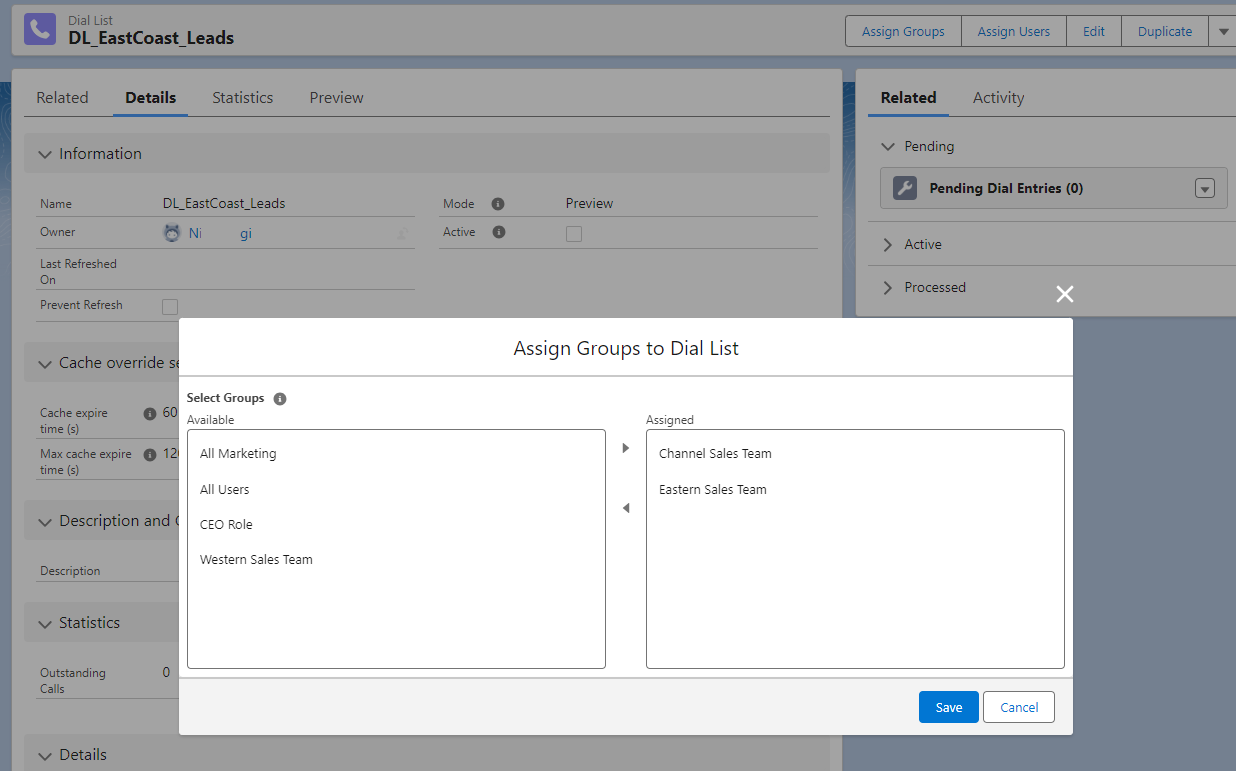
Dial list preview
| VCC Priority | VCC Express | VCC bundled w/VBC Express | VCC Essentials | VCC bundled w/VBC Elevate | VCC Select | VCC Premium | Service Cloud Voice |
|---|---|---|---|---|---|---|---|
| |
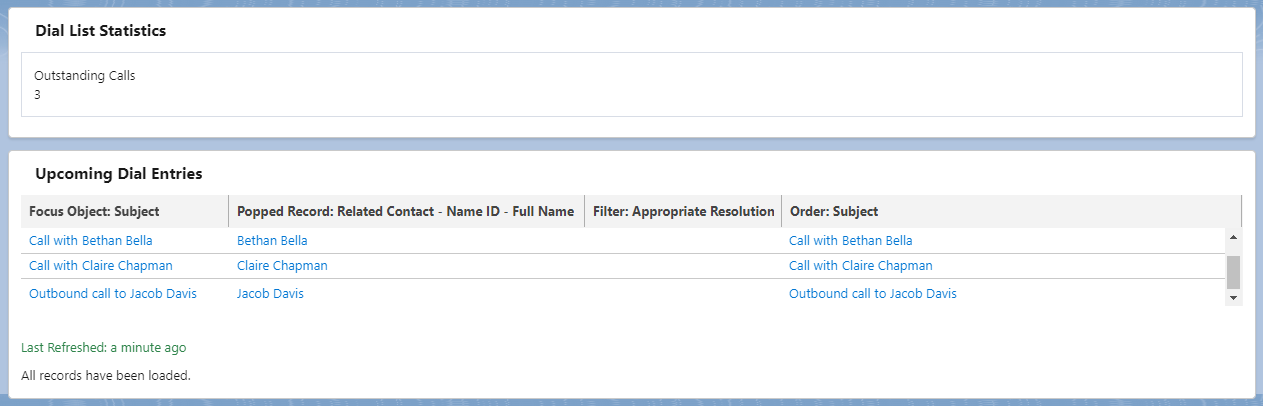
From the Q4 2023 release, users can see dial entry records in a dial list. This allows users to understand if the criteria and ordering of their filter lists are meeting their needs; if not, they can change the filter and ordering as required. The number of outstanding calls moved to this view. In the image, you can see the upcoming dial entries and which records will be popped.
ContactPad
Updated WebRTC Buttons in ContactPad
| VCC Priority | VCC Express | VCC bundled w/VBC Express | VCC Essentials | VCC bundled w/VBC Elevate | VCC Select | VCC Premium | Service Cloud Voice |
|---|---|---|---|---|---|---|---|
|
|
|
|
|
|
|
Previously, agents could use two different sets of buttons to end or reject a call in ContactPad: the Reject and Hangup buttons in the WebRTC control panel and the End or Release interaction button. The different buttons ended or rejected calls in different ways; this caused inconsistencies in statistics and reports, and a confusing user experience.
The Reject and Hangup buttons have now been removed from the WebRTC control panel in ContactPad Refresh and replaced with an End button. The End button is active only during the call.
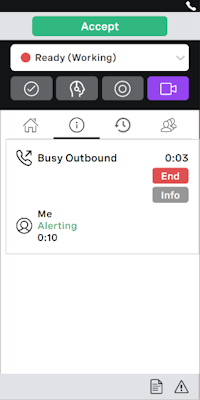
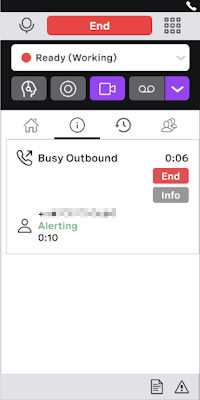
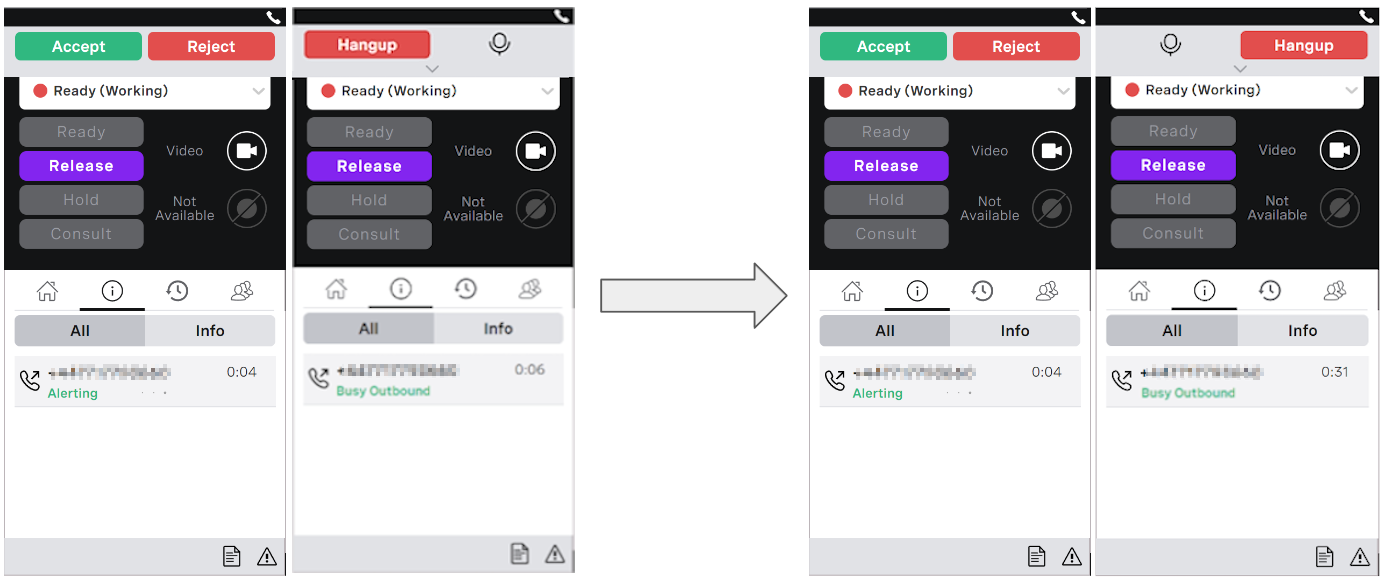
In the other versions of ContactPad, the Reject and Hangup buttons in the WebRTC control panel have been updated to terminate calls in the same way as clicking Release. In addition, the Hangup and mute buttons have been reversed to reduce accidental hangups.
Agent warning when local issues may affect WebRTC
| VCC Priority | VCC Express | VCC bundled w/VBC Express | VCC Essentials | VCC bundled w/VBC Elevate | VCC Select | VCC Premium | Service Cloud Voice |
|---|---|---|---|---|---|---|---|
|
|
|
|
|
|
|
Many WebRTC call quality issues relate to local configuration, equipment, and infrastructure. This is common for all IP telephony and conferencing solutions. Problems with these are difficult for Vonage to diagnose and correct as they relate to conditions that are outside of our control and that we do not provide support for or manage.
Vonage Contact Center now warns end users when they are experiencing call quality issues relating to local factors (such as internet connectivity issues). This helps agents to self-serve when call quality issues are caused by things that are under their control.
When Vonage Contact Center detects potential call quality problems caused by local issues for agents using WebRTC it displays a warning message within ContactPad. This warning message contains a link to a webpage containing more information and suggestions for the agent to follow to try and resolve the issues.
Reject calls automatically when WebRTC is temporarily unavailable
| VCC Priority | VCC Express | VCC bundled w/VBC Express | VCC Essentials | VCC bundled w/VBC Elevate | VCC Select | VCC Premium | Service Cloud Voice |
|---|---|---|---|---|---|---|---|
|
|
|
|
|
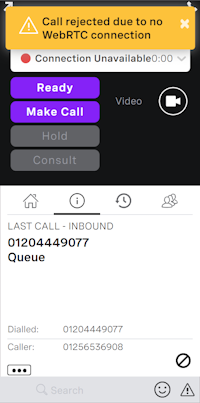
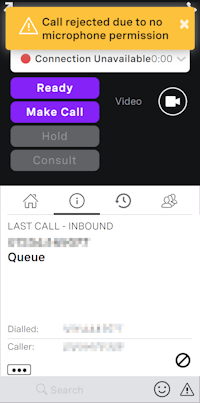
Network connectivity issues can sometimes leave WebRTC temporarily unavailable and agents unable to answer calls. These temporary issues are often local to the agent and transient in nature. However, ContactPad can still inform the agent that a call has been assigned to them, present an Answer button, and allow the agent to attempt to answer the call.
Vonage Contact Center has been updated so that ContactPad will check if it is properly connected to WebRTC before giving the agent the opportunity to answer a call. If WebRTC is not connected, the call is automatically rejected and returned to the queue. This improves the user experience, by avoiding agents trying to answer calls that cannot be answered, and the customer experience, by reducing the time they spend listening to ringing when the call cannot be answered.
Administration
Announcer applet
| VCC Priority | VCC Express | VCC bundled w/VBC Express | VCC Essentials | VCC bundled w/VBC Elevate | VCC Select | VCC Premium | Service Cloud Voice |
|---|---|---|---|---|---|---|---|
|
|
|
|
|
|
|
|
For the past 6 months, as part of the wider simplification and modernization of Interaction Plan Architect, we have been consolidating the functionality of the Announcement and Data Announcer applets into one applet. We have brought the ability to upload announcement wav files, use dynamic audio, or use text-to-speech together in one place. This functionality will be rolled out across other applets in the future, Data Announcer being the first. We enabled the new Data Announcer functionality, and at the same time renamed the applet to Announcer to reflect its new function.
VCC Marketplace added to VCC Admin Portal
| VCC Priority | VCC Express | VCC bundled w/VBC Express | VCC Essentials | VCC bundled w/VBC Elevate | VCC Select | VCC Premium | Service Cloud Voice |
|---|---|---|---|---|---|---|---|
|
|
|
|
|
|
| |
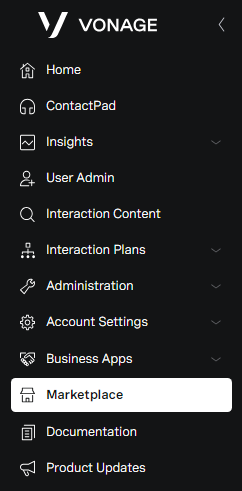
The VCC Marketplace is part of the Vonage Marketplace, a public website where customers can explore a variety of add-ons, integrations, and services offered by Vonage and trusted partners. VCC Marketplace is now integrated into the VCC Admin Portal. This integration enables administrators to view VCC-related add-ons and service providers directly within VCC. To request a specific add-on, administrators can fill out a form, and the Account Manager then reaches out to them. Currently, this is not a self-serve purchasing process.
Insights
Insights products renaming
| VCC Priority | VCC Express | VCC bundled w/VBC Express | VCC Essentials | VCC bundled w/VBC Elevate | VCC Select | VCC Premium | Service Cloud Voice |
|---|---|---|---|---|---|---|---|
|
|
|
|
|
|
| |
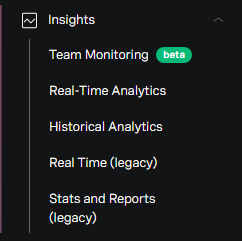
Vonage has streamlined the naming of several VCC Portal components for clarity:
- Dashboards is now Real-time Analytics
- Analytics is now Historical Analytics
The renamed components, along with the new Team Monitoring (beta) and the legacy Real Time components, are now contained within the Insights product area for enhanced navigation and user experience.
Historical Analytics (general access)
| VCC Priority | VCC Express | VCC bundled w/VBC Express | VCC Essentials | VCC bundled w/VBC Elevate | VCC Select | VCC Premium | Service Cloud Voice |
|---|---|---|---|---|---|---|---|
|
|
|
|
|
|
| |
Historical Analytics is now globally available with viewer and creator access. Users can now start creating their custom Historical Analytics dashboards and tailor reporting exactly to their needs. With Creator access to Historical Analytics, users can leverage the entirety of business intelligence (BI) capabilities — hundreds of data characteristics and measures, and access to more complex historical, current, and predictive analysis. This data will enable users to make the right decisions that will support the unique needs of your customers.
Historical Analytics also offers a rich set of pre-built dashboards that answer most of the common questions that arise when running a contact center. Pre-built dashboards save time and effort and maximize the efficiency of providing valuable insights.
To know more about the default license model for Historical Analytics, see our documentation with Historical Analytics licenses and access. If you were part of the Analytics Beta/Early Access Program, see Analytics Beta/Early Access Program or contact your Account Manager.
Download raw interaction detail records (IDRs) in Real-time Analytics and Historical Analytics
| VCC Priority | VCC Express | VCC bundled w/VBC Express | VCC Essentials | VCC bundled w/VBC Elevate | VCC Select | VCC Premium | Service Cloud Voice |
|---|---|---|---|---|---|---|---|
|
|
|
|
|
|
| |
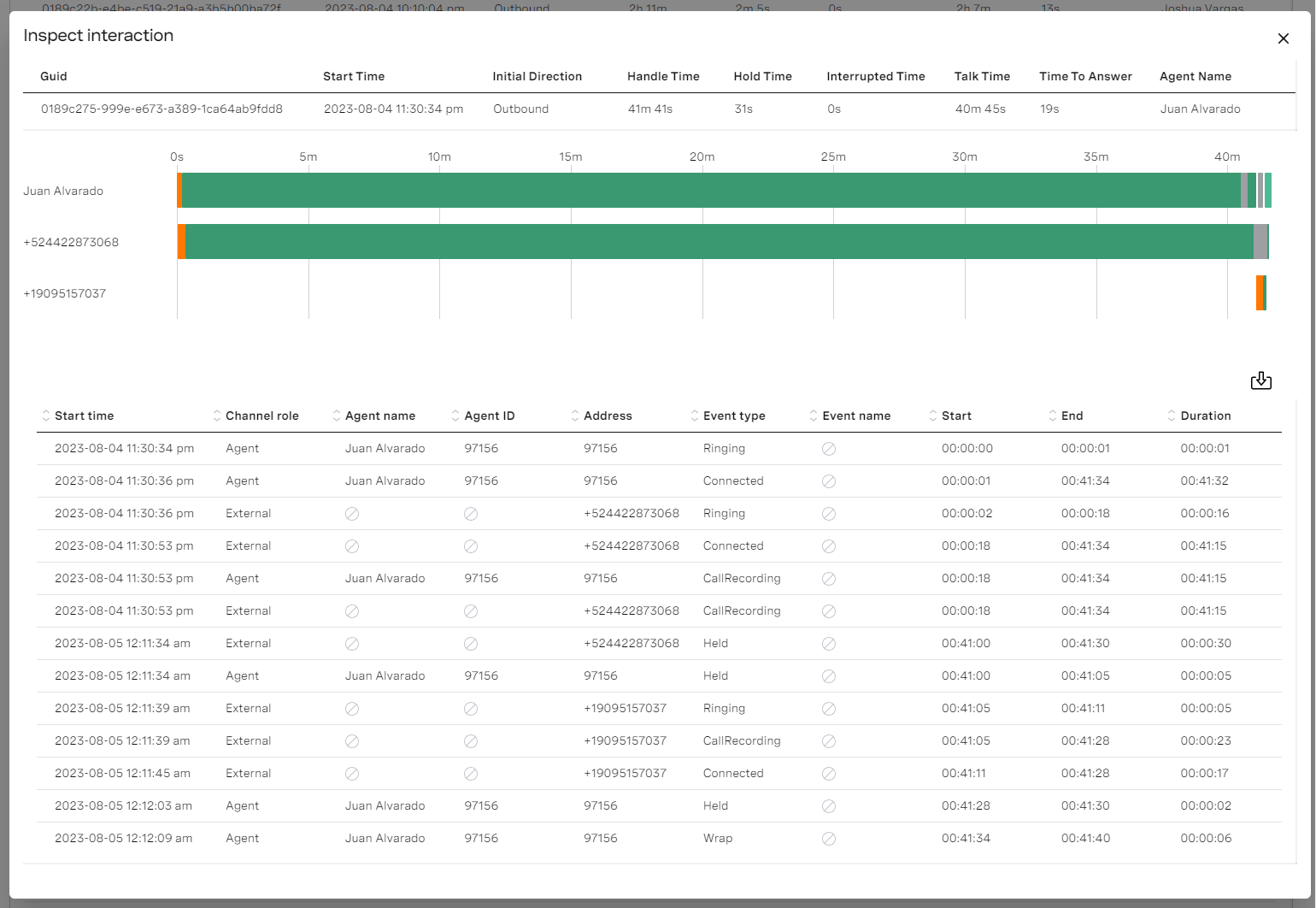
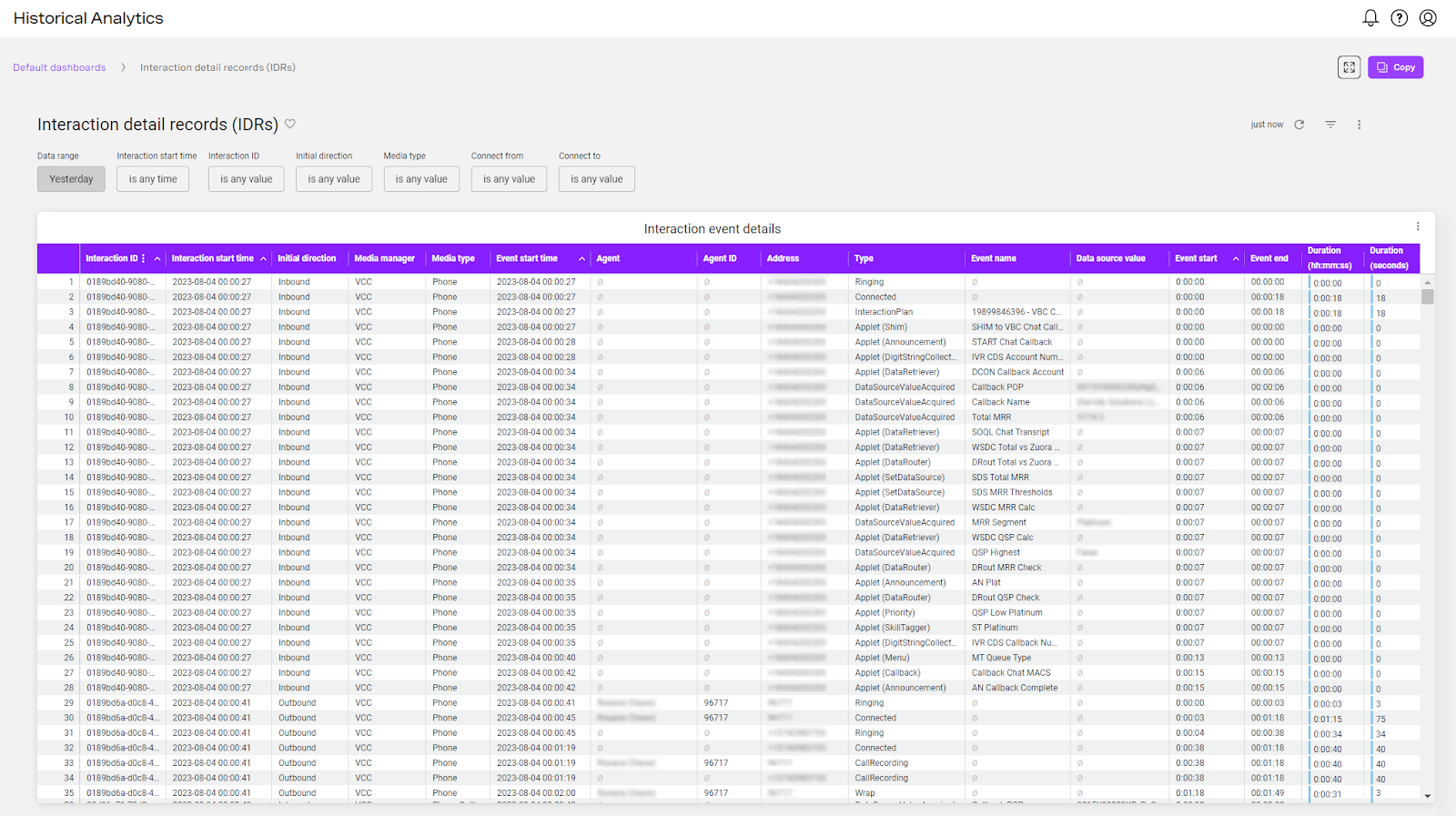
Included in the Q4 2023 release, are enhancements to the Real-time Analytics and Historical Analytics products that enable users to access raw interaction detail records. This functionality is the last parity feature with the Stats and Reports product. Users can access raw interaction data in real time using the Inspect interaction view in Real Time Analytics or access single or multiple interaction detail records for historical interactions in Historical Analytics.
Download table content from Real-time Analytics
| VCC Priority | VCC Express | VCC bundled w/VBC Express | VCC Essentials | VCC bundled w/VBC Elevate | VCC Select | VCC Premium | Service Cloud Voice |
|---|---|---|---|---|---|---|---|
|
|
|
|
|
|
| |
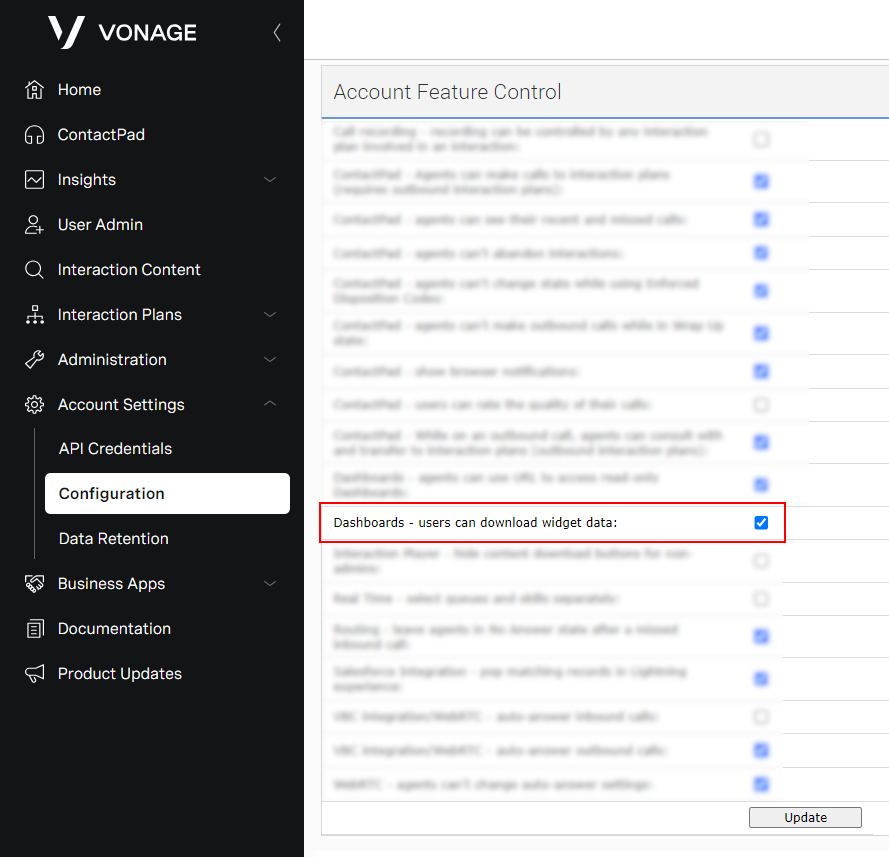
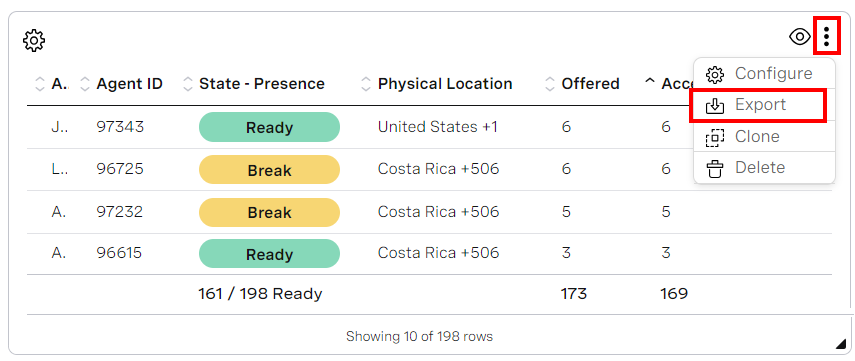
To improve usability and access to data within Real-time Analytics (previously called Dashboards), we introduced the ability to download the content in a table widget in CSV format. Administrators can control access to this functionality in your account in the Account Feature Control section on the Configuration page. By default, this functionality is enabled.
Conversation Analyzer
Control playback speed of call and screen recordings
| VCC Priority | VCC Express | VCC bundled w/VBC Express | VCC Essentials | VCC bundled w/VBC Elevate | VCC Select | VCC Premium | Service Cloud Voice |
|---|---|---|---|---|---|---|---|
|
|
|
|
|
|
| |
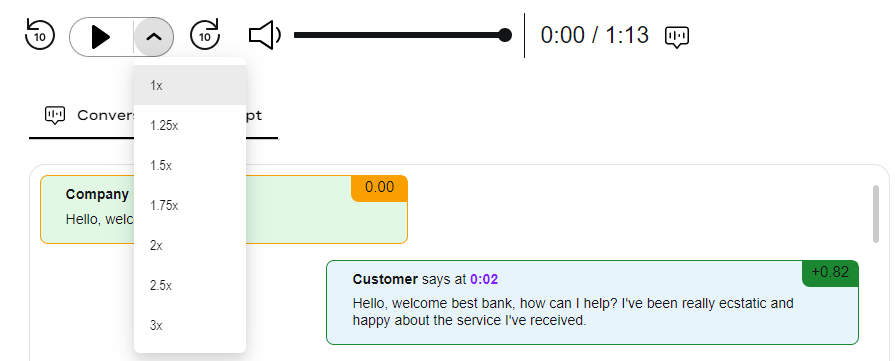
Previously call recordings played back at the same speed they were recorded. Users can now set the speed at which a recording is played back. Users can set the playback speed to listen to or watch recordings faster and consequently listen to or watch more calls. In the image, you can see the dropdown list that allows users to select their preferred playback speed. This applies to Screen Recording as well.
Transcript scrolls during recording playback
| VCC Priority | VCC Express | VCC bundled w/VBC Express | VCC Essentials | VCC bundled w/VBC Elevate | VCC Select | VCC Premium | Service Cloud Voice |
|---|---|---|---|---|---|---|---|
|
|
|
|
|
|
| |
Users can now see the transcript scroll automatically as they play the recording. Although Conversation Analyzer is not a transcription tool, but rather an insights tool, users want to follow the transcript as the recording is played. In the image below you can see how this is enabled or disabled.

Support for additional languages
| VCC Priority | VCC Express | VCC bundled w/VBC Express | VCC Essentials | VCC bundled w/VBC Elevate | VCC Select | VCC Premium | Service Cloud Voice |
|---|---|---|---|---|---|---|---|
|
|
|
|
| |
The Q4 2023 release release included additional languages that Conversation Analyzer supports. The full list of languages can be found in the Multi-language support section in Overview of Conversation Analyzer. Although some right-to-left languages are supported, the layout of the player is still left to right.
Screen Recording
Screen Recording begins when the call is presented to the agent
| VCC Priority | VCC Express | VCC bundled w/VBC Express | VCC Essentials | VCC bundled w/VBC Elevate | VCC Select | VCC Premium | Service Cloud Voice |
|---|---|---|---|---|---|---|---|
|
|
|
|
|
|
| |
Screen recording is now configurable to start when the call is presented to the agent, rather than when the call is answered. This enhancement is intended as an occasional feature to understand specific agent behavior rather than understand agent behavior for all calls. It can be enabled upon request.
APIs
User Admin API: permissions and licenses
| VCC Priority | VCC Express | VCC bundled w/VBC Express | VCC Essentials | VCC bundled w/VBC Elevate | VCC Select | VCC Premium | Service Cloud Voice |
|---|---|---|---|---|---|---|---|
|
|
|
|
|
|
| |
The User Admin API enables developers to manage all aspects of users, skills, groups, and schedules. Developers can now also manage user feature permissions and license assignments for Historical Analytics.
Beta/Early Access Program
Our Beta/Early Access Program gives some customers access to VCC enhancements that are still under development. Incorporating feedback from customers during the program allows us to continue improving these features, which ensures that every feature fulfills its purpose in a range of different environments. All customers using features in the Beta/Early Access Program must agree to participate in the feedback process.
If you are interested in gaining access to a feature in the Beta/Early Access Program, please contact your Customer Success Manager or Account Manager. Participation in this pilot program is at the discretion of Product Management and not guaranteed.
Team Monitoring
| VCC Priority | VCC Express | VCC bundled w/VBC Express | VCC Essentials | VCC bundled w/VBC Elevate | VCC Select | VCC Premium | Service Cloud Voice |
|---|---|---|---|---|---|---|---|
|
|
|
|
|
|
| |
As we continue our commitment to innovation and excellence, we're excited to announce the upcoming Team Monitoring rollout. Team Monitoring is a modern evolution of our traditional Real Time component.
Key updates:
- From PSTN to WebRTC: Extend monitoring capabilities. Team Dashboards are designed to support both PSTN and WebRTC phone calls.
- Omnichannel enabled: Embrace the future of communication. With Team Monitoring, supervisors can oversee multiple agents across various media channels, including voice, chat, and email.
- Modernized interface: Experience an intuitive, streamlined dashboard that integrates seamlessly with Real-time Analytics.
With Team Monitoring, supervisors gain a comprehensive tool to monitor real-time performance, promptly identify and act on emerging trends, and adjust agent states to the dynamic demands of the contact center.
Rollout timeline: Throughout the remainder of 2023 and the beginning of 2024, Vonage will progressively roll out Team Monitoring to all VCC customers. Upon completing this rollout, Team Monitoring will transition from its beta phase to full general availability (GA). We are thrilled to usher in this new era of superior supervisor experience, emphasizing clarity and efficiency.
Two-factor authentication (email)
| VCC Priority | VCC Express | VCC bundled w/VBC Express | VCC Essentials | VCC bundled w/VBC Elevate | VCC Select | VCC Premium | Service Cloud Voice |
|---|---|---|---|---|---|---|---|
|
|
|
|
|
|
| |
In line with our commitment to fortifying Vonage products' security landscape, we're thrilled to introduce two-factor authentication (2FA) using email to the VCC platform. Featuring:
- Configurable 2FA: Administrators can enforce mandatory two-factor authentication for selected users.
- Seamless integration: Upon activation, users will receive a one-time code sent directly to their email during login. This code is essential to finish the authentication process, ensuring an added layer of security.
- Early access limitations: During the early access phase, email is the only verification method. Furthermore, once verified, users will have a 30-day trust period before requiring another 2FA.
This enhanced security feature debuted in early access as part of our Q4 2023 release, reinforcing our dedication to providing a secure environment for all VCC users.
Sentiment Analysis in Conversation Analyzer
| VCC Priority | VCC Express | VCC bundled w/VBC Express | VCC Essentials | VCC bundled w/VBC Elevate | VCC Select | VCC Premium | Service Cloud Voice |
|---|---|---|---|---|---|---|---|
|
|
|
|
|
|
| |
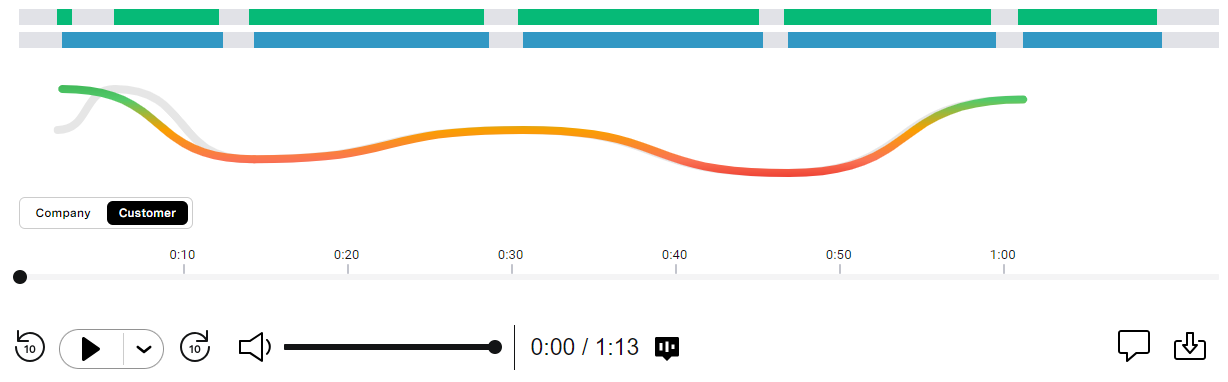
Users in the Beta/Early Access Program can see the sentiment throughout the call, for both agents and customers. This is automatically detected and displayed as a trend during the call from very negative to neutral to very positive represented by red, amber, and green respectively. The data is available in Salesforce and through our APIs — users can use this data to create conversational insights. As an example, users can discover which calls, and thus agents, have the most (or least) positive (or negative) sentiment and what the sentiment is throughout the call. This will enable users to identify calls that, for example, started well and ended poorly from a sentiment perspective. This is only available in English. In the following image, you can see that the call started well and deteriorated and recovered a little in the middle and deteriorated again and then got better at the end.
Call summarization in Conversation Analyzer
| VCC Priority | VCC Express | VCC bundled w/VBC Express | VCC Essentials | VCC bundled w/VBC Elevate | VCC Select | VCC Premium | Service Cloud Voice |
|---|---|---|---|---|---|---|---|
|
|
|
|
|
|
| |
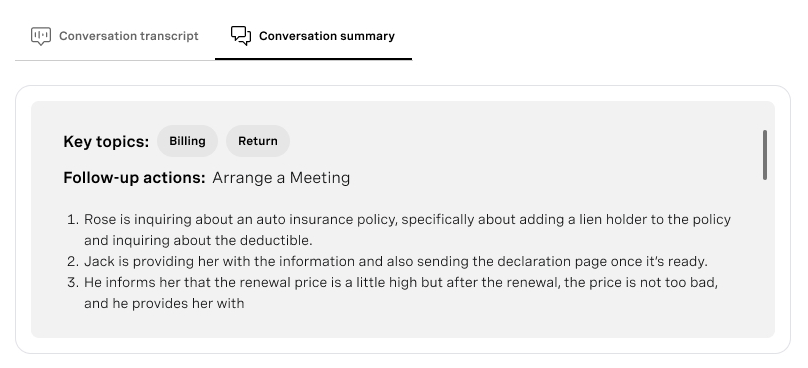
In the Q4 2023 release, we introduced a call summarization feature as a beta for selected customers, using post-call transcription. Supervisors can create summaries by clicking the new Conversation summary tab, located alongside the existing Conversation transcription tab. Summaries are generated upon request; they're not automatically created when the transcription is complete. These summaries are produced using the Google Vertex AI engine. In addition to the summary, we provide Key topics and Follow-up actions. Please note that due to legal agreements, rather than technical constraints, the current summary feature is not suitable for HIPAA customers. No additional price is applied when using this feature.
Conversation Analyzer reporting with Historical Analytics
| VCC Priority | VCC Express | VCC bundled w/VBC Express | VCC Essentials | VCC bundled w/VBC Elevate | VCC Select | VCC Premium | Service Cloud Voice |
|---|---|---|---|---|---|---|---|
|
|
|
|
|
|
| |
Users can now access insights generated by Conversation Analyzer within Historical Analytics. These insights give users a more complete view of the overall customer experience and satisfaction. With the pre-built default dashboard showing analysis of the categorization data, users can instantly identify insights and trends, and assess their team’s compliance and product knowledge.
VDI support for WebRTC
| VCC Priority | VCC Express | VCC bundled w/VBC Express | VCC Essentials | VCC bundled w/VBC Elevate | VCC Select | VCC Premium | Service Cloud Voice |
|---|---|---|---|---|---|---|---|
|
|
|
|
|
An increasing number of enterprise customers are using virtual desktop infrastructure (VDI) to manage the environment contact center agents use on a daily basis. VDI presents unique challenges when WebRTC is used for agent telephony as hair-pinning the WebRTC session to a remote desktop server adds an extra leg to the media path. This extra leg can add latency and increase packet loss, which reduces call audio quality.
Vonage now offers a beta version of VDI support. To use a VDI, the agent should open a specific webpage in a browser on their local computer which enables WebRTC media to be routed directly to the agent. This bypasses the remote desktop server and avoids the problems this extra leg can cause.
If you would like to be considered for one of the spaces on this beta please reach out to your Account Manager or Customer Success Manager.
USB-connected headset controls for WebRTC
| VCC Priority | VCC Express | VCC bundled w/VBC Express | VCC Essentials | VCC bundled w/VBC Elevate | VCC Select | VCC Premium | Service Cloud Voice |
|---|---|---|---|---|---|---|---|
|
|
|
|
|
WebRTC provides the best user experience for agents by bringing all of the VCC call controls into ContactPad. Without WebRTC agents have to answer the call outside the contact center and then use ContactPad for all other call controls. The agent has to find and switch to ContactPad to answer, reject, hangup, mute, and unmute calls — even if they are busy elsewhere.
Vonage now offers a beta version of headset control support for USB-connected headsets that are compatible with WebHID. Using a compatible headset, agents can now perform basic call controls even if they are in an application, window, or tab that does not contain ContactPad. Using WebHID means that no additional software is required. Note that different headset models and manufacturers support different combinations of call controls.
If you would like to be considered for one of the spaces on this beta please reach out to your Account Manager or Customer Success Manager.
Noise cancellation for WebRTC
| VCC Priority | VCC Express | VCC bundled w/VBC Express | VCC Essentials | VCC bundled w/VBC Elevate | VCC Select | VCC Premium | Service Cloud Voice |
|---|---|---|---|---|---|---|---|
|
|
|
|
|
Vonage is proud to partner with Krisp, the leading provider of AI-powered real-time noise cancellation software.
Background noise is a significant problem in contact centers which affects both agents and customers. Customers will call in from wherever is convenient for them, contact centers themselves can be noisy environments, and the rise of agents working from home brings other background noise-related issues. High-quality telephony devices and headsets will transmit everything they pick-up, even if that is not always desirable.
Vonage now offers a beta version of the fully-integrated Krisp Noise Cancellation solution. This is built into ContactPad and requires no additional software to be installed or managed. The noise-cancellation algorithms run locally within the agent’s web browser and no third-party servers are involved in the processing. All that agents need to do is turn the feature on or off as required.
If you would like to be considered for one of the spaces on this beta please reach out to your Account Manager or Customer Success Manager. Krisp Noise Cancellation will have an additional charge when generally available.
VCC Webhooks
| VCC Priority | VCC Express | VCC bundled w/VBC Express | VCC Essentials | VCC bundled w/VBC Elevate | VCC Select | VCC Premium | Service Cloud Voice |
|---|---|---|---|---|---|---|---|
|
|
|
|
|
|
| |
A beta version of Webhooks is now available, allowing developers to seamlessly integrate with the Webhooks API and subscribe to specific event types for real-time insights.
Supported event types:
- Channel retrieved: Triggered when a held channel is retrieved from hold.
- Agent presence change: Triggered when an agent's presence changes.
- Incoming interaction: Fires when a new incoming interaction starts but hasn't yet connected. The channel is being alerted.
- Channel disconnection: This occurs when an established channel is disconnected.
- Channel connection: Triggered when a new channel successfully connects.
- Connection failure: Fires when a channel fails to connect.
- Channel ended: Occurs when an active channel is terminated or closed.
- Post-interaction wrap: Triggered at the start of the after-interaction work phase.
- Channel on hold: This occurs when a channel is placed on hold.
Whenever events of any listed event types are activated, be it due to an agent's action or an interaction channel change, an HTTP POST notification is sent to subscribers, delivering comprehensive details of the event.
Enhancing the VCC experience to cater to specific business needs is now even more effortless. By using the Webhooks feature alongside our robust API suite, developers are equipped with all the necessary tools for customization.
Important Announcements
Auto conversion of Data Announcer applets to Announcer applets
As part of the new Data Announcer upgrade we have renamed the Data Announcer applet to the Announcer applet; this is to reflect its new role as the universal announcement mechanism within VCC.
Auto conversion of legacy applets
As part of an ongoing simplification project within VCC we will be automatically converting the following applets to data routers. These applets have been superseded by newer and more comprehensive applets.
- Check IVR Digit
- Check IVR String
- Router CLID
Synchronizing presences when a Salesforce user misses or declines an incoming call
Recent changes in Vonage for Service Cloud Voice require some changes in your Salesforce setup. These changes ensure that presences are synchronized when agents miss or decline incoming calls, preventing agents from being immediately redelivered a missed or declined call.
The changes override any previously recommended workaround for synchronizing missed or declined call presences.
We recommend that you make these changes as soon as possible, informing Vonage that you have done so. Eventually the changes will be mandatory.
Feature Retirement
Along with the exciting new functionality added to the product with every release, we are also working to retire older parts of the product. The removal of functionality within our product is completed in up to these stages: This is an optional stage that gives users early warning of our intent to deprecate functionality. It is most commonly used when an alternative is announced, and gives users the ability to migrate ahead of the functionality becoming deprecated. At this stage we encourage customers to stop using the mentioned product functionality, and migrate to an alternative. This indicates that a piece of functionality is no longer supported. The functionality will continue to work, but no new enhancements or bug fixes will be made (with the exception of security vulnerabilities) and new functionality may not be compatible. We commonly announce the target Retirement date when deprecating. At this stage customers must stop using the mentioned product functionality, and migrate to an alternative. After the retirement date the functionality will either cease working entirely, or become completely unsupported.Intent to deprecate
Deprecated
Retired
For a full list of deprecated features, see Vonage Contact Center feature retirement.
Intent to deprecate — Call Parking
Call Parking is a complex capability that does not fit into many common contact center use cases. Few customers use this feature and the feature's complexity impacts the development of other in-demand Vonage Contact Center features, so we intend to retire Call Parking during the first half of 2024. Contact center admins and supervisors should start to consider alternative approaches and processes. If further support is required please reach out to your Customer Success Manager or Account Manager.
Projected deprecation date: Q1, 2024.
Projected retirement date: Q2, 2024.
Intent to deprecate — DTMF Call Controls
DTMF call controls are a legacy, PBX-related, feature from the first versions of Vonage Contact Center. Few customers use this capability today with all call controls available within ContactPad or Service Cloud Voice. We intend to retire DTMF Call Controls during the first half of 2024. Contact center agents using DTMF Call Controls should switch to using the on-screen controls within ContactPad or Service Cloud Voice to control calls. If further support is required please reach out to your Customer Success Manager or Account Manager.
Projected deprecation date: Q1, 2024.
Projected retirement date: Q2, 2024.
Intent to deprecate — Unite Case Routing
For the past 2 years, we have been working on improving our External Routing product, by increasing the types of media it can route and bringing it to parity with Unite. External Routing has now surpassed Unite and therefore we do not see the need to have two case routing products and intend to retire Unite during 2024. Admins should begin to plan migration from Unite to External Routing. If further support is required please reach out to your Customer Success Manager or Account Manager.
Projected deprecation date: Q1, 2024.
Projected retirement date: Q3, 2024.
Intent to deprecate — Real Time
Vonage is excited to introduce the phased rollout of our new Team Monitoring capabilities. Alongside this, we are announcing our intention to deprecate the Real Time feature. Rest assured, all functionalities of Real Time have been seamlessly migrated to various components within the Insights suite.
Projected deprecation date: Q1, 2024.
Projected retirement date: Q2, 2024.
Deprecated — Announcement applet
With the introduction of the Announcer applet, we are announcing the deprecation of the Announcement applet. At the time of retirement, we will automatically convert all Announcement applets to Announcer applets, however, if customers wish to upgrade at their own pace, they will have two options for this:
- Manually upgrade the Announcement applets to Announcer applets
- Request a conversion of their accounts' Announcement applets to Announcer applets, allowing tests to be completed on the new applets before moving to production. This can be requested, through your Customer Success Manager, Account Manager, managed services, and support.
Projected retirement date: Q1, 2024.
Retired — Stats and Reports
In the Q2 2023 release, we announced the deprecation of Stats and Reports.
From October 31 2023, users will no longer be able to access Stats and Reports. To access historical reporting, users can go to Historical Analytics or Advanced Reporting in Salesforce. To download raw CDRs, see Download Raw IDRs in Real-time Analytics and Historical Analytics earlier in this page.
Retirement date: October 31, 2023.
Retired — Insights Stats API Version 2
In early 2022, Vonage announced the deprecation of Insights Stats API version 2. We are officially retiring this version and have transitioned to the more advanced Insights Stats API.
All customers using version 2 have been notified. Users must transition away from this version by January 1, 2024, to avoid potential disruptions to their integrations. A migration guide between version 2 and 3 is available.
Retirement date: January 1, 2024.
Package Supported Deprecated* Retired 24.100 or higher 23.117 or lower 23.117 or lower 24.124 or higher 23.118 or lower 22.101 or lower 2.83 or higher 2.80 or lower 2.76 or lower 24.100 or higher 23.149 or lower 23.149 or lower * These packages will be retired after the Q3 2024 releaseSalesforce package deprecation and retirement
Vonage Contact Center Core Components 23.108 or higher 23.106 or higher N/A
(version 2.85 is highly recommended using the new flags)
For general assistance, please contact Customer Support.
For help using this documentation, please send an email to docs_feedback@vonage.com. We're happy to hear from you. Your contribution helps everyone at Vonage! Please include the name of the page in your email.