Q3 '22 release
- Helen Griffith
| In this page |
|---|
 Platform-wide feature
 Optional feature
General Availability Features
ContactPad Enhancements
Choice of Warm or Cold Transfer
| VCC Priority | VCC Express | VCC bundled w/VBC Express | VCC Essentials | VCC bundled w/VBC Elevate | VCC Select | VCC Premium | Service Cloud Voice |
|---|---|---|---|---|---|---|---|
 |
|
|
|
|
|
|
Within ContactPad, your account can be configured to warm transfer (agent goes with the customer) and cold transfer (agent drops immediately) calls. They are mutually exclusive. If enabled for your account, this feature gives agents the choice of warm or cold behavior when making a transfer.
To enable this feature, contact your Customer Success Manager or Account Manager.
For more information, see Warm and cold transfers in ContactPad.
Guidance for Agents Abandoning Interactions
| VCC Priority | VCC Express | VCC bundled w/VBC Express | VCC Essentials | VCC bundled w/VBC Elevate | VCC Select | VCC Premium | Service Cloud Voice |
|---|---|---|---|---|---|---|---|
|
|
|
|
|
|
|
In Q3 ‘22, we added new guidance in ContactPad about abandoning interactions. This guidance tells agents that they should not abandon interactions unless they have been unable to release them in the correct way. It is available in both multiple and single interaction ContactPad.
Abandoning interactions in ContactPad ends them immediately. This may negatively impact statistics, recordings, and customer experience. Agents should only abandon interactions if attempts to release them have failed.
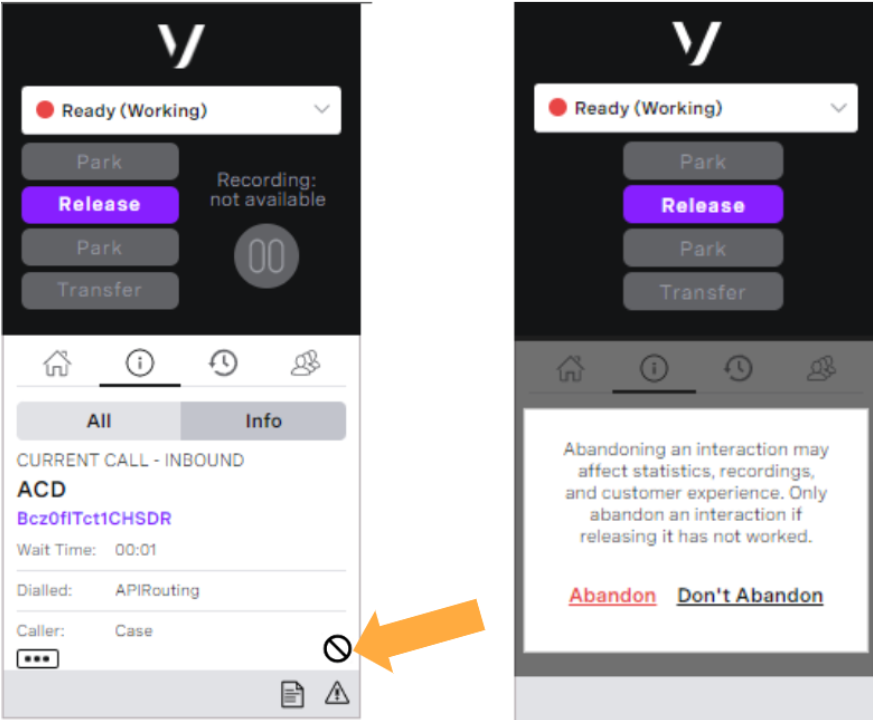
For more information, see Abandoning calls in Making and receiving calls in ContactPad and Using multi-interaction routing.
Service Cloud Voice
Call Transfer
| VCC Priority | VCC Express | VCC bundled w/VBC Express | VCC Essentials | VCC bundled w/VBC Elevate | VCC Select | VCC Premium | Service Cloud Voice |
|---|---|---|---|---|---|---|---|
|
Call transfer is a core part of the VCC platform. We have further enhanced the capability for the Service Cloud Voice integration. The updated transfer feature allows agents to do a warm transfer to an interaction plan or a transfer to an external number. The configuration for these transfer use cases is the same as for the core VCC platform. The Service Cloud Voice Omni-Channel widget allows agents to filter for interaction plans and type in an external number. In the first image you can see that an agent has used a filter of “ma” to search transfer destinations. The agent can see a combination of interaction plans and agents. In the second image, an agent has entered an external telephone number. The agent can now press “Call” and then consult, merge, or transfer as they would with an internal Service Cloud Voice call.
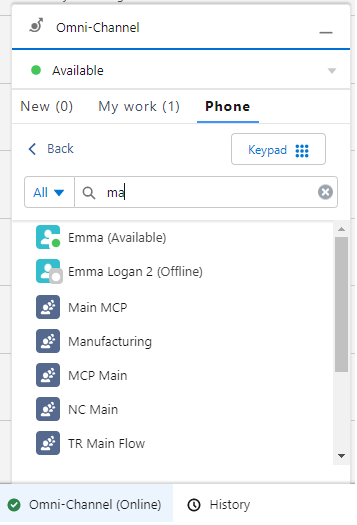
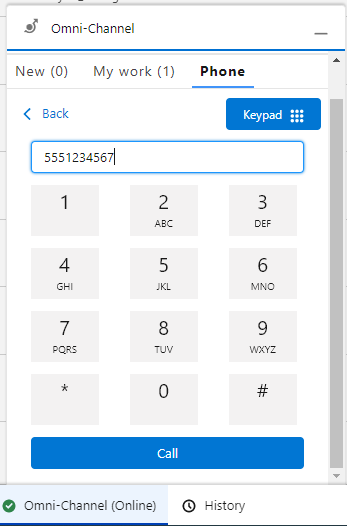
For more information, see Consulting, transferring, and conferencing (or merging) calls in Vonage Premier for Service Cloud Voice.
Conferencing/Merge
| VCC Priority | VCC Express | VCC bundled w/VBC Express | VCC Essentials | VCC bundled w/VBC Elevate | VCC Select | VCC Premium | Service Cloud Voice |
|---|---|---|---|---|---|---|---|
|
Conferencing is a core part of the VCC platform. We have further enhanced this capability for our Service Cloud Voice integration. Conferencing is known as merging using Service Cloud Voice terminology and is an extension of the transfer feature. The configuration for the conference use case is the same as for the core VCC platform. The Service Cloud Voice Omni-Channel widget allows agents to dial an external number to conference with. In the image you can see that two other parties are now connected to the current agent, one of which is the external telephone number.
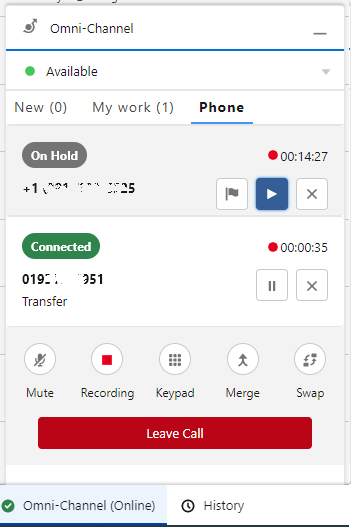
For more information, see Consulting, transferring, and conferencing (or merging) calls in Vonage Premier for Service Cloud Voice.
Integration with Salesforce High Velocity Sales (HVS)
| VCC Priority | VCC Express | VCC bundled w/VBC Express | VCC Essentials | VCC bundled w/VBC Elevate | VCC Select | VCC Premium | Service Cloud Voice |
|---|---|---|---|---|---|---|---|
|
Salesforce’s High Velocity Sales (HVS) (soon to be renamed Sales Engagement) product allows you to accelerate your inside sales process with a high-productivity workspace. Using HVS, managers can create sales cadences — custom sales processes that guide sales reps through handling different types of prospects. Those cadences appear for sales reps in the Work Queue, a task list that appears inside the Sales Console. The VCC platform passes the after-call work events to our Service Cloud Voice integration. This enables you to work with HVS and to advance HVS Sales Cadence after your agent wraps up a call.
For information, see High Velocity Sales in Vonage Premier for Service Cloud Voice.
Timed After-Conversation Work
| VCC Priority | VCC Express | VCC bundled w/VBC Express | VCC Essentials | VCC bundled w/VBC Elevate | VCC Select | VCC Premium | Service Cloud Voice |
|---|---|---|---|---|---|---|---|
|
Most calls require work after the call ends — for example, sending an email, writing some notes, or updating a case. Salesforce provides a pilot feature called “Give Agents Time for After-Conversation Work”. The feature allows supervisors to set and manage the amount of time agents spend on work after a conversation. This tells agents roughly how much time to spend on tasks. The VCC platform passes the after-call work events to our Service Cloud Voice integration to enable this Salesforce pilot. The following image shows how After Conversation Work is displayed within Salesforce.
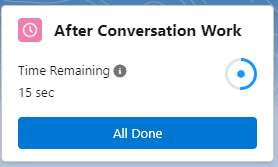
For information, see After conversation work in Vonage Premier for Service Cloud Voice.
Desk Phone Support
| VCC Priority | VCC Express | VCC bundled w/VBC Express | VCC Essentials | VCC bundled w/VBC Elevate | VCC Select | VCC Premium | Service Cloud Voice |
|---|---|---|---|---|---|---|---|
|
Service Cloud Voice has enabled voice to be blended with digital channels and become native to Salesforce. Desk phone support now allows you to benefit from blending digital channels whilst allowing you to keep your current investment and to use the desk phone of your choice, such as a desk phone or a mobile phone. With desk phone support, a Service Cloud Voice user can alternate between a desk phone and WebRTC, and set their phone number. The user doesn’t need to rely on an administrator to make these changes for them. The image here shows how the user can change their phone type and number.
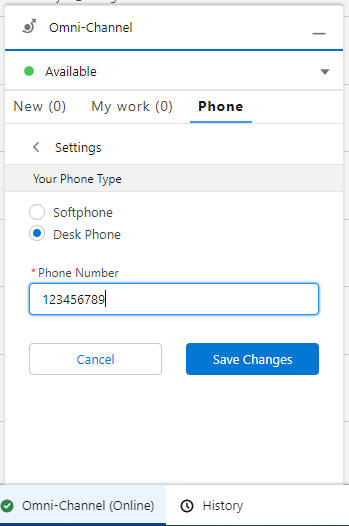
Known limitation: After the user changes their phone type, they must refresh the web page otherwise the call controls will be disabled.
For more information, see Desk phone support in Vonage Premier for Service Cloud Voice.
Salesforce Omni-Channel Flows Route VCC Calls to Interaction Plans
| VCC Priority | VCC Express | VCC bundled w/VBC Express | VCC Essentials | VCC bundled w/VBC Elevate | VCC Select | VCC Premium | Service Cloud Voice |
|---|---|---|---|---|---|---|---|
|
We can now notify Salesforce about an inbound call which enables Salesforce to use Omni-Channel flows. Omni-Channel flows can route the call to a VCC interaction plan, which can then route the call to an agent. This allows you to make routing decisions in Salesforce as well as in VCC.
It also provides the option of using Salesforce as a single routing engine for all interactions. Having a single routing engine can reduce setup and maintenance time. The single routing engine can also ensure agents are routed work effectively across all channels.
For more information, see Omni-Channel flow routing in Vonage Premier for Service Cloud Voice.
Presence Status Mapping from VCC to Service Cloud Voice
| VCC Priority | VCC Express | VCC bundled w/VBC Express | VCC Essentials | VCC bundled w/VBC Elevate | VCC Select | VCC Premium | Service Cloud Voice |
|---|---|---|---|---|---|---|---|
|
We now support presence mapping from VCC to Service Cloud Voice. This enhances the current mapping of presences from Service Cloud Voice to VCC and means we can synchronize presence in the two systems.
If an agent goes into a presence in VCC that prevents them from taking calls, Salesforce is notified. The agent’s presence in Salesforce is updated to make both the supervisor and agent aware they are not ready for any new interactions.
For more information, see Presence mapping between SCV and VCC in Vonage Premier for Service Cloud Voice.
Salesforce Integration
VCC Support for Salesforce Shield’s Deterministic Encryption
| VCC Priority | VCC Express | VCC bundled w/VBC Express | VCC Essentials | VCC bundled w/VBC Elevate | VCC Select | VCC Premium | Service Cloud Voice |
|---|---|---|---|---|---|---|---|
|
|
|
|
| |
Salesforce Shield allows you to encrypt specific fields within your Salesforce org. VCC now supports Shield encryption for fields that use the deterministic encryption type. We support installing ContactWorld for Salesforce and ContactWorld Connect in Salesforce orgs with Shield platform encryption enabled. You can use fields encrypted with deterministic encryption in line with Salesforce’s limitations. This allows you to have the security Salesforce Shield provides, alongside the rich feature set of VCC.
For details, see Considerations for Using Deterministic Encryption.
For more information, see Creating a single Dial List (first-come, first-served), Creating a single Dial List (record ownership), Creating multiple individual Dial Lists for agents, and Retrieving data from Salesforce.
External Routing Supports Agent Capacity in Salesforce
| VCC Priority | VCC Express | VCC bundled w/VBC Express | VCC Essentials | VCC bundled w/VBC Elevate | VCC Select | VCC Premium | Service Cloud Voice |
|---|---|---|---|---|---|---|---|
| |
With External Routing, when routing an interaction to an agent, VCC notifies Salesforce of the capacity taken up by the routed interaction. This means that, in Omni Supervisor, a supervisor can see how much capacity an agent has available. Also, if you are using Salesforce’s Live Agent, the chat button displayed on your website can be disabled automatically when your agents have no capacity to take any new chats. This ensures that chats only enter the queue when an agent has the capacity to work on them.

For information, see Capacity in Vonage Contact Center omni-channel solution.
Payment Card Industry (PCI)
Third-party Secure Payments Integrated with VCC
| VCC Priority | VCC Express | VCC bundled w/VBC Express | VCC Essentials | VCC bundled w/VBC Elevate | VCC Select | VCC Premium | Service Cloud Voice |
|---|---|---|---|---|---|---|---|
|
|
|
|
|
|
Some VCC customers are commercially or operationally tied to a Payment Service Provider (PSP). This PSP may not be compatible with the Agent Assist, Self Service, or Digital Secure Payment capabilities of VCC. Currently, VCC initiates, and remains in control of, the payment process when taking an Agent Assist, Self Service, or Digital Secure Payment, but some PSPs need to be the initiator (and controller) of the process. These models are very different from each other with commands and API calls flowing in opposite directions.
This new capability enables our partner (PCI Pal) to instruct VCC to secure an existing customer call leg for payment. This means that PCI Pal and PSPs who need to initiate payments can work together to use this capability to take secure payments in VCC calls. In turn, this means that new and existing VCC customers who cannot switch to a PSP compatible with Agent Assist, Self Service, or Digital Secure Payments may be able to use VCC for Secure Payments through their existing PSP.
For information, see Payments in Vonage Contact Center and IVR Secure Payments solution.
Dashboards
Agent Availability by Interaction Type Metric
| VCC Priority | VCC Express | VCC bundled w/VBC Express | VCC Essentials | VCC bundled w/VBC Elevate | VCC Select | VCC Premium | Service Cloud Voice |
|---|---|---|---|---|---|---|---|
|
|
|
|
|
|
| |
In Dashboards you can report on the availability of agents in queues within your contact center. Currently, such metrics tell you which agents have 100% of their capacity available, and do not specify which types of interactions agents are available for.
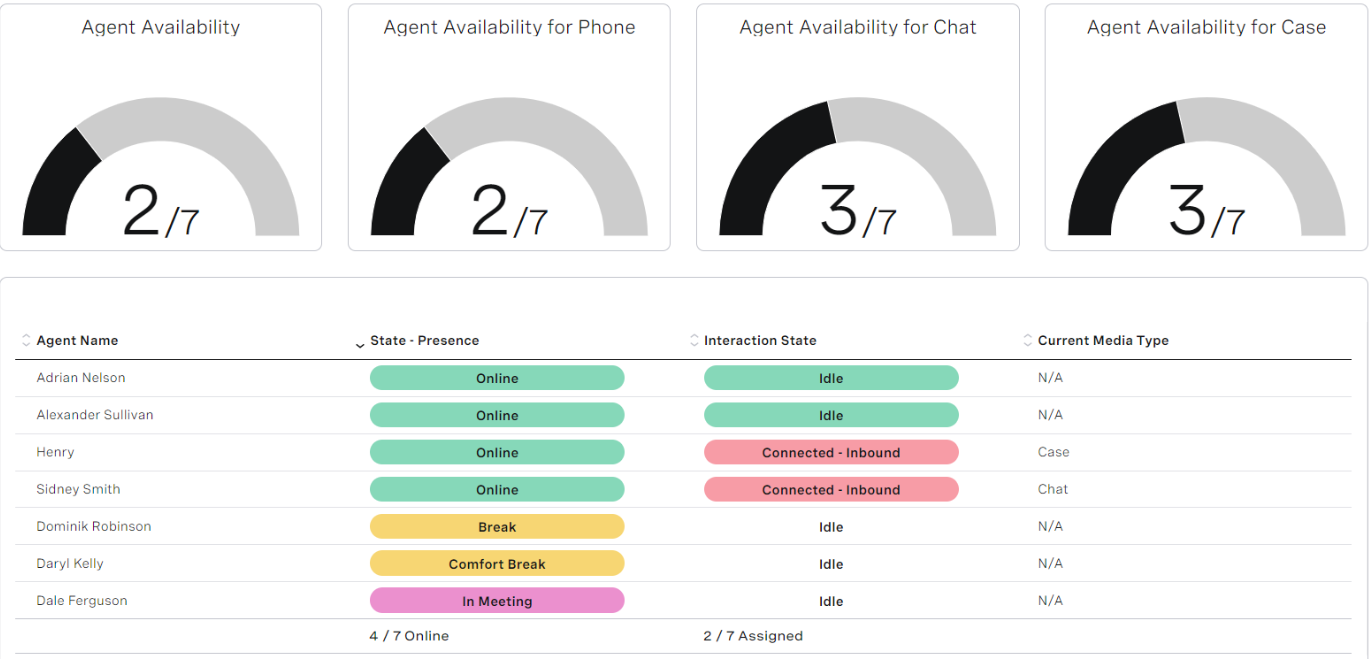
In Q3 ‘22, we added a new metric — Agent Availability (by type). Using this metric in reports allows you to see the number of agents who are available for each type of interaction — live, semi-live, and non-live. Visibility of an agent’s availability considers all aspects of the VCC routing engine. These include interrupting cases (non-live interactions) and an agent’s capacity for handling more than one interaction simultaneously.
For information, see Real-time Analytics metrics.
Extended Filter for Agent Presences
| VCC Priority | VCC Express | VCC bundled w/VBC Express | VCC Essentials | VCC bundled w/VBC Elevate | VCC Select | VCC Premium | Service Cloud Voice |
|---|---|---|---|---|---|---|---|
|
|
|
|
|
|
| |
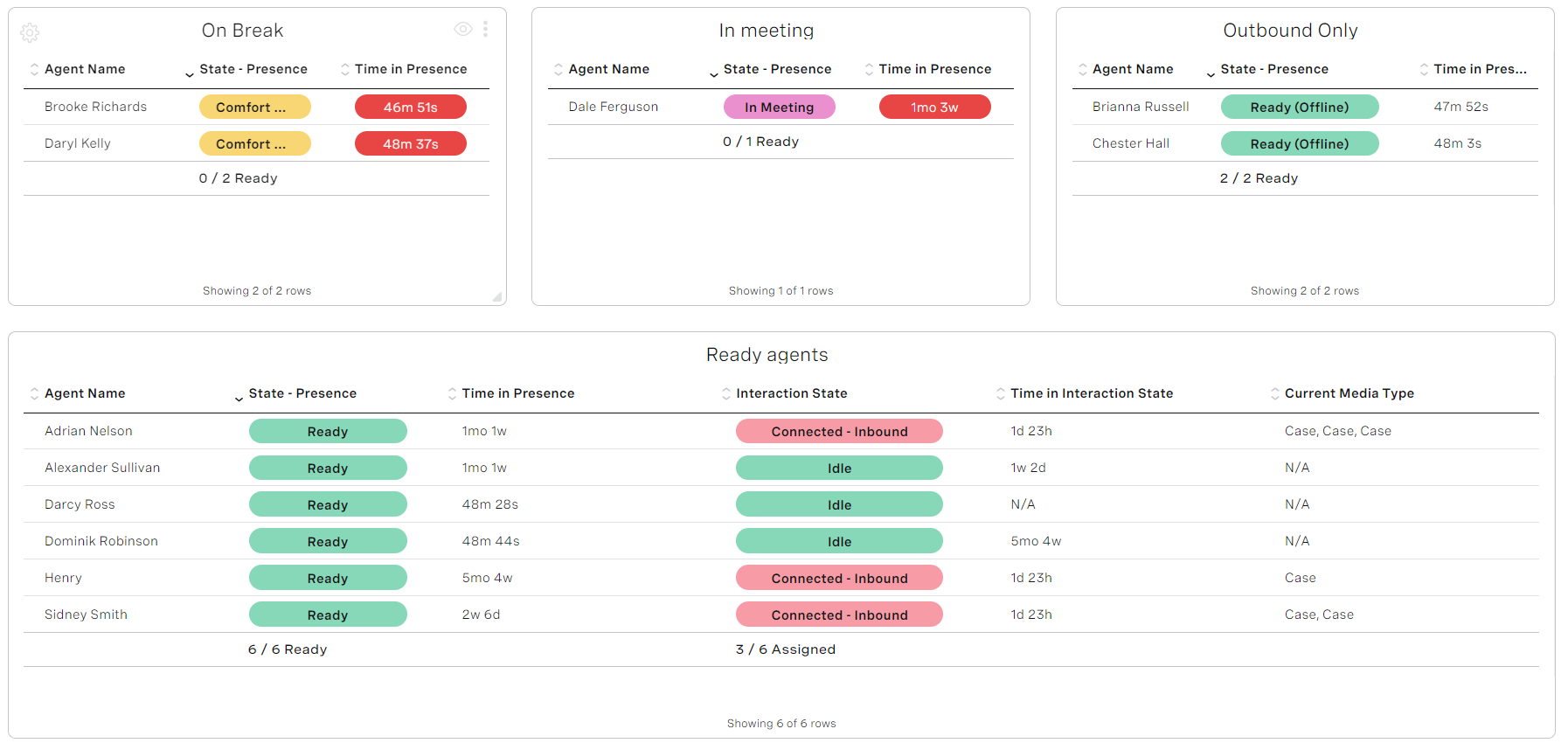
In Dashboards you can filter data in agent widgets by an agent’s presence. For example, you may want to display agent data for agents in the Online presence only. Currently, you can filter only by presence categories — Online, Away, Extended Away, and Logged Out.
Since Q3 ‘22, you can filter by all presences, not just by presence categories. You can filter by all default and custom presences within the categories.
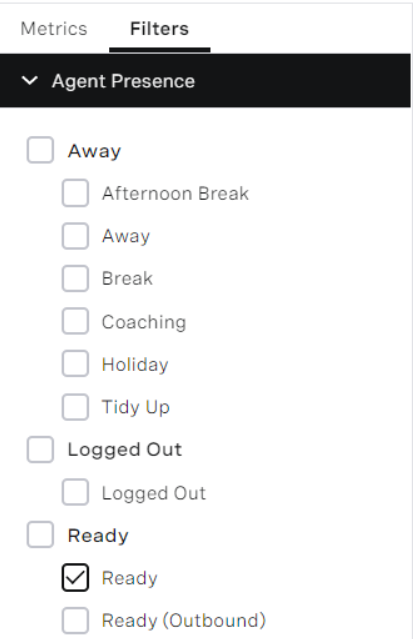
This allows you to view the agents in the exact presence of interest. Combining this information with browser notifications, a dashboard user can be alerted as agents spend a configurable amount of time in a given presence.
For information, see Filtering the data in your widget in Using Real-time Analytics.
‘Online’ presence is now ‘Ready’
| VCC Priority | VCC Express | VCC bundled w/VBC Express | VCC Essentials | VCC bundled w/VBC Elevate | VCC Select | VCC Premium | Service Cloud Voice |
|---|---|---|---|---|---|---|---|
|
|
|
|
|
|
| |
Dashboards display the Ready presence as ‘Online’. We have updated this to display ‘Ready’ instead, aligning the presence visible in Dashboards with the terminology used within ContactPad.
For information, see Filtering the data in your widget in Using Real-time Analytics.
Audit Logs for Dashboard Management
| VCC Priority | VCC Express | VCC bundled w/VBC Express | VCC Essentials | VCC bundled w/VBC Elevate | VCC Select | VCC Premium | Service Cloud Voice |
|---|---|---|---|---|---|---|---|
|
|
|
|
|
|
| |
In the Q3 ‘22 release, we started tracking the actions users perform in Dashboards. We display those actions in the Audit Log area (within Administration) in the VCC admin portal.
For information, see Tracked actions.
Administration
Minor Agent States Limit Increased
| VCC Priority | VCC Express | VCC bundled w/VBC Express | VCC Essentials | VCC bundled w/VBC Elevate | VCC Select | VCC Premium | Service Cloud Voice |
|---|---|---|---|---|---|---|---|
|
|
|
|
|
|
| |
Currently VCC has a limit of 16 custom minor states for each agent presence state. We have increased this to a limit of 200 minor states for each major state. To enable this feature, contact your Customer Success Manager or Account Manager.
For information, see Configuring agent states.
Auto-generated Agent and Group IDs in User Admin
| VCC Priority | VCC Express | VCC bundled w/VBC Express | VCC Essentials | VCC bundled w/VBC Elevate | VCC Select | VCC Premium | Service Cloud Voice |
|---|---|---|---|---|---|---|---|
|
|
|
|
|
|
| |
When creating a user or a group in User Admin, an agent ID or group ID must be provided.
In the Q3 ‘22 release, we made these fields optional. If left blank, an agent or group ID are automatically generated for you.
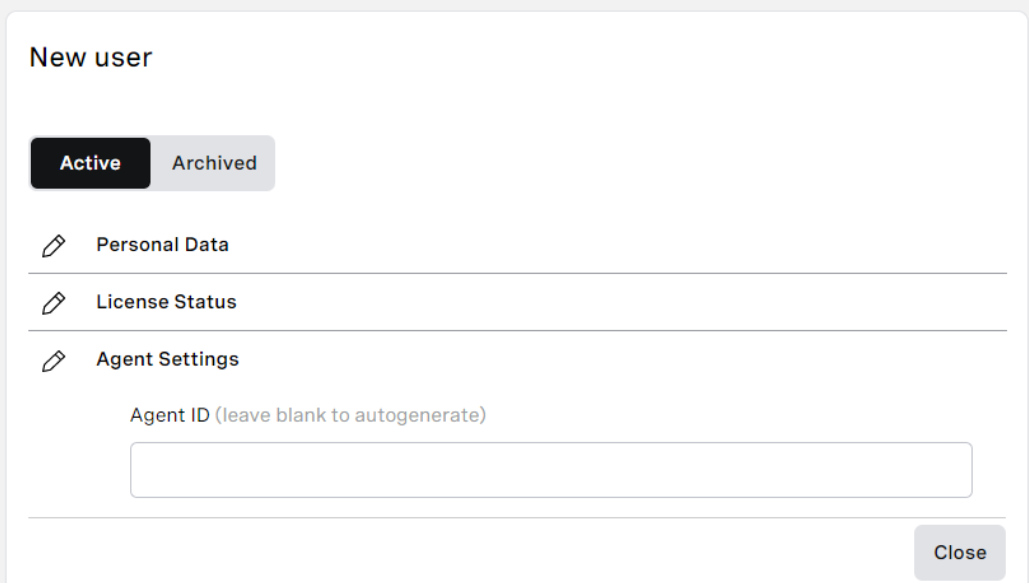
This change also applies when you import users in User Admin or you create users/groups through the User Admin API.
For information, see Configuring individual users, Configuring groups, and Creating or editing multiple users from a CSV file.
Analytics
Interaction Summary Dataset
| VCC Priority | VCC Express | VCC bundled w/VBC Express | VCC Essentials | VCC bundled w/VBC Elevate | VCC Select | VCC Premium | Service Cloud Voice |
|---|---|---|---|---|---|---|---|
|
|
|
|
|
|
| |
In the Q3 ‘22 release we introduced a new dataset containing interaction summary data. This dataset contains higher level abstraction for interactions. Since the release, you have been able to report on data including disposition codes, audio problems, payment details, conversation analysis, last applet, and agents who handled the interaction. In addition, dimensions such as talk time, handle time, time to answer, and customer hold time are available. You are now able to use the dimensions’ respective measures for average, maximum, minimum or total durations.
The interaction summary dataset is a great addition to the existing datasets, and enables a variety of new reporting capabilities.
New Default Analytics Dashboards
| VCC Priority | VCC Express | VCC bundled w/VBC Express | VCC Essentials | VCC bundled w/VBC Elevate | VCC Select | VCC Premium | Service Cloud Voice |
|---|---|---|---|---|---|---|---|
|
|
|
|
|
|
| |
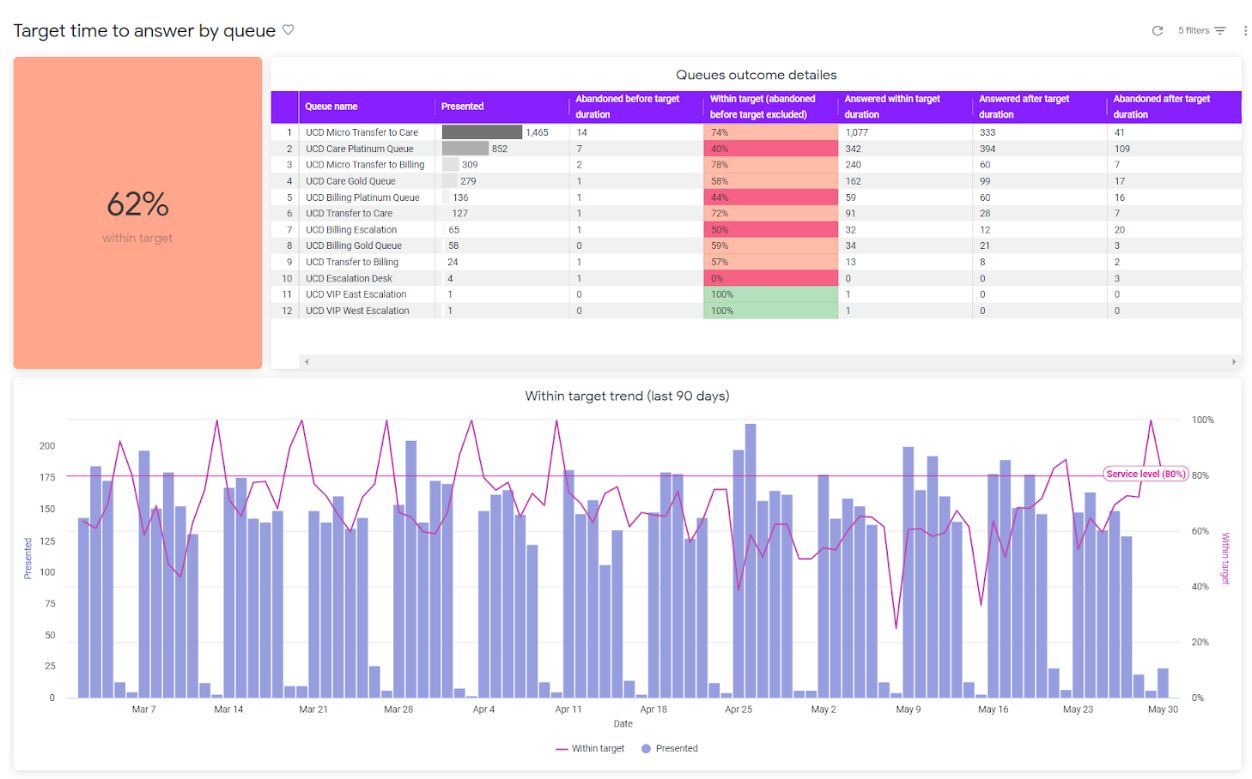
The default Analytics dashboards answer the most common questions that arise when running a contact center. In the Q3 ‘22 release, we added several more default dashboards giving approximately 20 in total. These additional dashboards help you monitor and analyze trends and performance in your contact center. New default dashboards contain dedicated reports such as agents login/logout details, delivery failure summary, disposition codes, and target time to answer by queue/presented skills/virtual queues. We extended the existing queue performance and queue abandon dashboards to report by presented skills and virtual queues as well. In addition, you see dedicated dashboards with users’ details and their last VCC logins, for better visibility and user management.
Beta/Early Access Program
Our Beta/Early Access Program gives some customers access to VCC enhancements that are still under development. Incorporating feedback from customers during the program allows us to continue improving these features, which ensures that every feature fulfills its purpose in a range of different environments. All customers using features in the Beta/Early Access Program must agree to participate in the feedback process.
If you are interested in gaining access to a feature in the Beta/Early Access Program, please contact your Customer Success Manager or Account Manager. Participation in this pilot program is at the discretion of Product Management and not guaranteed.
Multiple Voicemail Drop - Early Access
| VCC Priority | VCC Express | VCC bundled w/VBC Express | VCC Essentials | VCC bundled w/VBC Elevate | VCC Select | VCC Premium | Service Cloud Voice |
|---|---|---|---|---|---|---|---|
|
|
|
|
|
|
|
Multiple voicemail drop expands on the ability to play a voicemail recording on outbound calls. The new feature allows an agent to upload multiple voicemail recordings and select which one to play on an outbound call. Note that current voicemail recordings are not migrated over to the new voicemail drop — agents will need to upload recordings again.
To enable this feature, contact your Customer Success Manager or Account Manager.
Slack Notifications in IVR
| VCC Priority | VCC Express | VCC bundled w/VBC Express | VCC Essentials | VCC bundled w/VBC Elevate | VCC Select | VCC Premium | Service Cloud Voice |
|---|---|---|---|---|---|---|---|
|
|
|
| |
Since Q3 ‘22, you have been able to send real-time notifications from the IVR to a Slack app or an individual Slack user. You can configure the notifications to be triggered by important events in the IVR or in post-interaction processing. Events might include a VIP customer abandoning in a queue or an agent missing a personal queue call.
We have created a template within the Web Service Data Connector applet. The template helps you configure sending messages to Slack channels.
Important Announcements
New Interaction Data Source formatter
We have created a new data source formatter to simplify making API calls with E.164 telephone numbers. The formatter removes the ‘+’ from the number without needing to use Javascript. To use the formatter, add :RemoveLeadingPlus as a suffix to the data source name, for example $(CLID:RemoveLeadingPlus). You can use the formatter in any applet that supports data sources including the Set Data Source and Data Connector applets.
For information, see Using a Data Source value in a Web Service Interface request.
Audio Codec Update (Major Browser Support)
Historically, audio captured using the Take Message applet or IVR Collector Audio applet couldn’t be played in all our supported browsers. In the Q2 ‘22 release, we updated the audio format to play within all our supported browsers so users no longer need to download the audio to play it.
For information, see IVR Collect Audio applet, Take Message applet, and Viewing collected IVR data.
Feature Retirement
Along with the exciting new functionality added to the product with every release, we are also working to retire older parts of the product. The removal of functionality within our product is completed in these stages:
Intent to deprecate | This is an optional stage that gives users early warning of our intent to deprecate functionality. It is most commonly used when an alternative is announced, and gives users the ability to migrate ahead of the functionality becoming deprecated. At this stage we encourage customers to stop using the mentioned product functionality, and migrate to an alternative. |
|---|---|
Deprecated | This indicates that a piece of functionality is no longer supported. The functionality will continue to work, but no new enhancements or bug fixes will be made (with the exception of security vulnerabilities) and new functionality may not be compatible. We commonly announced the target Retirement date when deprecating. At this stage customers must stop using the mentioned product functionality, and migrate to an alternative. |
Retired | After the retirement date the functionality will either cease working entirely, or become completely unsupported. |
For a full list of deprecated features, see Vonage Contact Center feature retirement.
Applet Retirement
As part of an ongoing simplification project within VCC have retired the following applets. These applets have been superseded by newer and more comprehensive applets.
- CRM Based Router applet - Retired
- Router - Geographic CLID - Retired
- Check IVR String - Intent to deprecate
- Check IVR Digit - Intent to deprecate
Screen Recording Chrome Extension - Retired
Initially we provided a Chrome extension for screen recording. Since then we have replaced the extension with the screen recording desktop client. The client is now generally available and we have therefore retired the extension.
Classic User Admin - Retired
Since the Q3 ‘22 release, users can no longer access classic User Admin.

Subset of User Access functionality - Retired
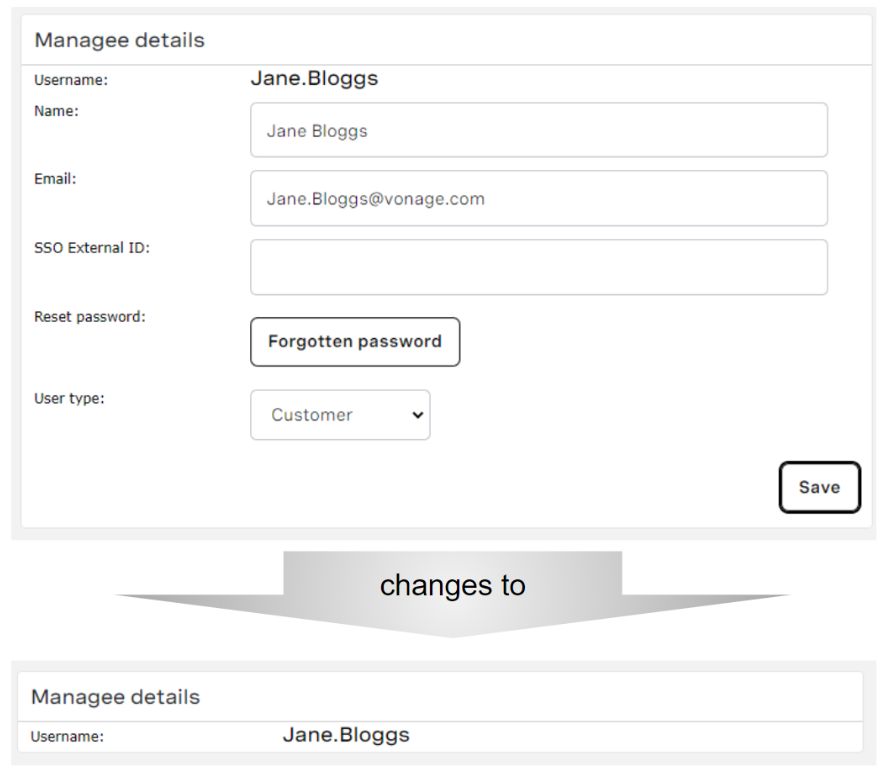
In the Q2 ‘22 release, we announced that we would be retiring a subset of User Access functionality between May 2022 and July 2022. This was delayed and then happened as part of the Q3 ‘22 release. User Admin provides many of the same capabilities as User Access. The following capabilities within User
Access have been retired:
- Create user
- Edit users:
- Name
- Reset Password
- User Type
- SSO External ID
- Forgotten Password
The managee details section in User Access changed as shown in the following images:
Salesforce Managed Packages
The following packages and earlier versions are deprecated.
Package | Supported Versions | Deprecated Versions* | Retired |
|---|---|---|---|
Vonage Contact Center for Salesforce | 21.105 or higher | 21.103 or lower* | 20.112 or lower |
Vonage Contact Center Connect | 21.106 or higher | 20.114 or lower* | 20.105 or lower |
Vonage Contact Center Advanced Reporting | 2.71 or higher | 2.65 or higher | 2.64 or lower |
Vonage for Service Cloud Voice | 1.9 or higher | 1.8 or lower |
* These packages will be retired after the Q4 2022 release
Related content
For general assistance, please contact Customer Support.
For help using this documentation, please send an email to docs_feedback@vonage.com. We're happy to hear from you. Your contribution helps everyone at Vonage! Please include the name of the page in your email.