Q2 '23 release
- Helen Griffith
| In this page |
|---|
 Platform-wide feature
 Optional feature
General Availability Features
Service Cloud Voice
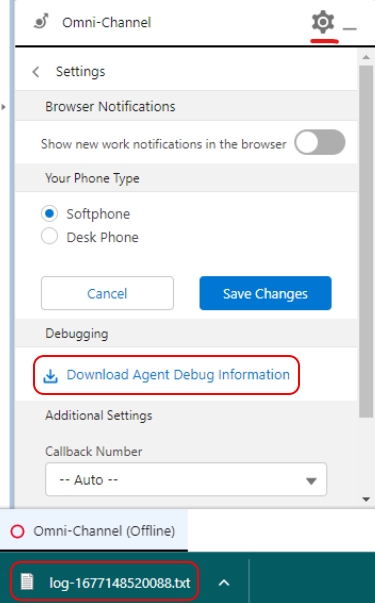
Download debug information
| VCC Priority | VCC Express | VCC bundled w/VBC Express | VCC Essentials | VCC bundled w/VBC Elevate | VCC Select | VCC Premium | Service Cloud Voice |
|---|---|---|---|---|---|---|---|
|
Service Cloud Voice relies on Salesforce and Vonage communicating successfully. Occasionally there may be an issue with communication due to, for example, network issues.
To help with such issues, Salesforce allows Vonage to log messages from our Service Cloud Voice connector. The agent can then download these logged messages as a text file and share them as required. In Q2 '23 we added this capability to our Service Cloud Voice integration.
Voicemail drop
| VCC Priority | VCC Express | VCC bundled w/VBC Express | VCC Essentials | VCC bundled w/VBC Elevate | VCC Select | VCC Premium | Service Cloud Voice |
|---|---|---|---|---|---|---|---|
|
Allowing an agent to leave voicemails for customers or prospects is a core part of the Vonage Contact Center platform. Agents can upload and manage voicemail messages they want to leave for customers and then drop the messages during a call. In Q2 '23 we added this capability to our Service Cloud Voice integration.
The configuration for managing and dropping voicemails in SCV is similar to that in the core VCC platform.
Change status while on a call (intended states)
| VCC Priority | VCC Express | VCC bundled w/VBC Express | VCC Essentials | VCC bundled w/VBC Elevate | VCC Select | VCC Premium | Service Cloud Voice |
|---|---|---|---|---|---|---|---|
|
Setting the intended state for an agent is a core part of the Vonage Contact Center platform. An agent can set the state they want to be in when their current interaction ends. In Q2 '23 we added this capability to our Service Cloud Voice integration.
Salesforce Open CTI
Custom object routing becomes generally available
| VCC Priority | VCC Express | VCC bundled w/VBC Express | VCC Essentials | VCC bundled w/VBC Elevate | VCC Select | VCC Premium | Service Cloud Voice |
|---|---|---|---|---|---|---|---|
|
|
Previously, the ability to route Salesforce custom objects was available only through the pilot scheme.
This feature is now generally available following a successful pilot. Custom object routing enables a custom object in Salesforce to be routed just like a case. The object is also treated as a non-live interaction. This gives customers greater flexibility on what can be achieved with routing through VCC. In turn, this provides consistency and simplification as more processes can be routed by a single engine which is VCC.
Re-routing of cases in external routing
| VCC Priority | VCC Express | VCC bundled w/VBC Express | VCC Essentials | VCC bundled w/VBC Elevate | VCC Select | VCC Premium | Service Cloud Voice |
|---|---|---|---|---|---|---|---|
|  |
Another enhancement to external routing in Q2 '23 is the ability for a Salesforce case to be routed more than once.
Previously, after a case had been routed to an agent, the agent had to use ContactPad to transfer the case. They could transfer only to another agent or to an interaction plan in VCC.
Now the agent can transfer in a different way and re-route cases using external routing. The agent can select the new owner — an agent or a Salesforce queue — in the Case Owner field within the case record. Changing the case owner to a Salesforce queue that is configured to use external routing triggers Salesforce to reroute the case using external routing.
The Case Owner field can be used to reroute cases in other ways too. For example, if a case is in the wrong queue, an agent or supervisor can change the owner of the case. Changing the case owner to a Salesforce queue (that uses external routing) will trigger Salesforce to transfer and route the case using external routing.
Filter management in Connect dial lists
| VCC Priority | VCC Express | VCC bundled w/VBC Express | VCC Essentials | VCC bundled w/VBC Elevate | VCC Select | VCC Premium | Service Cloud Voice |
|---|---|---|---|---|---|---|---|
|
| |
Using Connect, a supervisor can create dial lists. A dial list is a list of pending, active, completed, or skipped calls. Managing these existing lists can be cumbersome — for example, to update a filter, a supervisor must delete other filters.
From Q2 '23, administrators can edit dial list filters inline.
VCC-VBC Integrated Experience
VBC transfer to VCC interaction plans
| VCC Priority | VCC Express | VCC bundled w/VBC Express | VCC Essentials | VCC bundled w/VBC Elevate | VCC Select | VCC Premium | Service Cloud Voice |
|---|---|---|---|---|---|---|---|
|
|
|
|
|
|
|
|
Previously, if a VBC user wanted to transfer a call to a VCC queue they could not see VCC queues in the directory. The user couldn't click to dial and had to instead dial a PSTN number.
Since the Q2 '23 release, a VBC user can see and search for VCC queue names in the VBC directory when selecting Blind Transfer. The user can select a VCC queue name as a transfer destination.
Microsoft Teams
Call or Consult Non-user Microsoft Teams Entities From the VCC Address Book
| VCC Priority | VCC Express | VCC bundled w/VBC Express | VCC Essentials | VCC bundled w/VBC Elevate | VCC Select | VCC Premium | Service Cloud Voice |
|---|---|---|---|---|---|---|---|
|
|
|
|
|
|
Organizations using Microsoft Teams can benefit from the application-level integration between VCC and Teams. Agents can see and consult with available Teams users — who have a Teams Phone Standard license and a phone number — in the VCC address book.
Previously, to contact a non-user entity (such as auto attendants and call queues), an agent needed to manually dial the phone number assigned to that entity.
Since the Q2 '23 release, these entities — which must have a Teams Phone Resource Account license and a phone number — have been included in the VCC address book along with available Teams users. The agent can now consult with them without manually dialing their numbers.
ContactPad
Extended automatic wrap (remove manual wrap)
| VCC Priority | VCC Express | VCC bundled w/VBC Express | VCC Essentials | VCC bundled w/VBC Elevate | VCC Select | VCC Premium | Service Cloud Voice |
|---|---|---|---|---|---|---|---|
|
|
|
|
|
|
|
In Q4 '22, we changed how manual wrap is handled in single-interaction ContactPad and made it available in multi-interaction ContactPad. Instead of entering an unlimited manual wrap state, agents can manually extend their automatic wrap state an unlimited number of times. This extended wrap expires like automatic wrap if the agent stops extending it.
Previously the extended automatic wrap feature was available to only early access customers. Now administrators can turn on this feature for their account within Configuration in the VCC Admin Portal.
Visual Engagement recordings
| VCC Priority | VCC Express | VCC bundled w/VBC Express | VCC Essentials | VCC bundled w/VBC Elevate | VCC Select | VCC Premium | Service Cloud Voice |
|---|---|---|---|---|---|---|---|
|
|
|
|
|
In Q2 '23 we released a long-awaited and highly requested feature for Visual Engagement — the ability to record Visual Engagement interactions.
Video interactions are now recorded and added to Interaction Content where they can be accessed and viewed for up to 30 days alongside other interaction media. The ability to record the video interaction will enable businesses to understand what is being said by both the agent and customer during the interaction.
Customized Branding for Visual Engagement
| VCC Priority | VCC Express | VCC bundled w/VBC Express | VCC Essentials | VCC bundled w/VBC Elevate | VCC Select | VCC Premium | Service Cloud Voice |
|---|---|---|---|---|---|---|---|
|
|
|
|
|
Another highly anticipated feature for Visual Engagement was the ability to change the branding of the video interaction. Since the Q2 '23 release, this is now possible.
Supervisors and administrators can configure the branding of the video session. They can change the colors and logos which are shown during the video session. Branding the sessions helps customers ensure their brand is consistently and correctly shown when someone interacts with their business.
Administration
Tracking license assignment
| VCC Priority | VCC Express | VCC bundled w/VBC Express | VCC Essentials | VCC bundled w/VBC Elevate | VCC Select | VCC Premium | Service Cloud Voice |
|---|---|---|---|---|---|---|---|
|
|
|
|
|
|
| |
Within the Q2 '23 release, we introduced a new Licenses tab into User Admin. In the read-only Licenses tab, account admins can view current license usage against their contracted allowance. Together with filtering capabilities, admins can quickly and easily get a list of all users assigned with a specific license.
By default, all accounts will see two products — VCC and Analytics.
User password management
| VCC Priority | VCC Express | VCC bundled w/VBC Express | VCC Essentials | VCC bundled w/VBC Elevate | VCC Select | VCC Premium | Service Cloud Voice |
|---|---|---|---|---|---|---|---|
|
|
|
|
|
|
| |
Previously only supervisor and administrator users could manage their passwords in User Access. Agents could not change their passwords and they had to follow the Forgotten your password steps.
Since this release, all users, including agents, can manage their passwords. This functionality has been added to the Account menu for all users in the VCC Admin Portal.
Custom states as initial login state
| VCC Priority | VCC Express | VCC bundled w/VBC Express | VCC Essentials | VCC bundled w/VBC Elevate | VCC Select | VCC Premium | Service Cloud Voice |
|---|---|---|---|---|---|---|---|
|
|
|
|
|
|
| |
From Q2 '23, VCC administrators can select a custom state as the initial login state for agents.
This feature enables agents to enter custom states such as Initial Login before manually entering a Ready state and gives them time to prepare before any interactions are delivered.
In addition, manual wrap has been removed as an option within the initial login state.
Time zone support within IVR Data Collector
| VCC Priority | VCC Express | VCC bundled w/VBC Express | VCC Essentials | VCC bundled w/VBC Elevate | VCC Select | VCC Premium | Service Cloud Voice |
|---|---|---|---|---|---|---|---|
|
|
|
|
|
|
| |
By default, VCC previously displayed the data and time information for data collected in the IVR using the user’s local server time zone. However, this wasn’t always the same time zone as the user looking at the data.
Now, since Q2 '23, the local user can select the time zone they wish to view and download the data in.
Time zone support within audit logs
| VCC Priority | VCC Express | VCC bundled w/VBC Express | VCC Essentials | VCC bundled w/VBC Elevate | VCC Select | VCC Premium | Service Cloud Voice |
|---|---|---|---|---|---|---|---|
|
|
|
|
|
|
| |
By default, VCC previously displayed the data and time information for audit logs using the user’s local server time zone. However, this wasn’t always the same time zone as the user looking at the data.
Now, since Q2 '23, the local user can select the time zone they wish to view and download the data in.
Hide button for downloading interaction content
| VCC Priority | VCC Express | VCC bundled w/VBC Express | VCC Essentials | VCC bundled w/VBC Elevate | VCC Select | VCC Premium | Service Cloud Voice |
|---|---|---|---|---|---|---|---|
|
|
|
|
|
|
| |
Previously, within the VCC call recording player, all users could click a button to download copies of call recordings.
From Q2 '23, we have hidden this button for all non-admin users. We added this capability to help improve call recording security. (If necessary, administrators can make the download button visible to all users.)
Auto-answer management for WebRTC users
| VCC Priority | VCC Express | VCC bundled w/VBC Express | VCC Essentials | VCC bundled w/VBC Elevate | VCC Select | VCC Premium | Service Cloud Voice |
|---|---|---|---|---|---|---|---|
|
|
|
|
| |
When an agent receives an inbound call, or makes an outbound call, by default the agent must accept the call to be connected to it. If the auto-answer feature is enabled for your account and the agent's account, agents do not need to click to accept the call before being connected. The agent is automatically connected.
Administrators can now enable auto answer at account- or agent-level for either inbound or outbound calls, or both.
Configure IT contact for account
| VCC Priority | VCC Express | VCC bundled w/VBC Express | VCC Essentials | VCC bundled w/VBC Elevate | VCC Select | VCC Premium | Service Cloud Voice |
|---|---|---|---|---|---|---|---|
|
|
|
|
|
|
| |
VCC has many technical prerequisites. When these change, a customer’s local IT infrastructure may need to be updated, but for many customers the VCC administrators are not in the IT department. This disconnect has led to some customers experiencing problems when the prerequisites change because we have been unable to contact the right people to update local infrastructure.
The Q2 '23 release added a new mandatory setting within account administration where VCC administrators must provide a list of IT contacts for the account. Vonage can use this list to ensure they notify the correct people and teams when they may need to update local infrastructure. If this setting is not correctly configured, administrators will be reminded each time they log in. When the setting is configured, administrators will be periodically reminded to confirm or update the setting.
Reporting
Table view support (Analytics)
| VCC Priority | VCC Express | VCC bundled w/VBC Express | VCC Essentials | VCC bundled w/VBC Elevate | VCC Select | VCC Premium | Service Cloud Voice |
|---|---|---|---|---|---|---|---|
|
|
|
|
|
|
| |
In Q2 '23, we introduced a table view, alongside tiles, to display available Analytics dashboards. This aims to improve user experience particularly where there are many default or custom dashboards.
Since the release, users can select the display mode they want to use when viewing dashboards, with an option to have different modes for default and custom dashboards.
The selection is stored in the browser's local storage so when the user reopens Analytics in the same browser Analytics respects the previous display view selection.
Groups and skills support in default dashboards (Analytics)
| VCC Priority | VCC Express | VCC bundled w/VBC Express | VCC Essentials | VCC bundled w/VBC Elevate | VCC Select | VCC Premium | Service Cloud Voice |
|---|---|---|---|---|---|---|---|
|
|
|
|
|
|
| |
With this release, we have extended the Analytics product with the groups and skills datasets.
Users can now report on agents’ group configuration and skill assignment. If skill levels are enabled for your account, users can report on them as well.
On top of adding new datasets, we have extended the majority of default dashboards with the Group filter.
From Q2 '23, selecting specific agents to report on is easier and quicker. Using a Group filter, users don’t have to manually manage lists of agents in their reports. When an agent is added to or removed from a group, dashboards automatically update the list of included agents wherever the Group filter is applied.
Telecommunications
Access custom SIP headers within interaction plans
| VCC Priority | VCC Express | VCC bundled w/VBC Express | VCC Essentials | VCC bundled w/VBC Elevate | VCC Select | VCC Premium | Service Cloud Voice |
|---|---|---|---|---|---|---|---|
|
|
|
|
| |
Some integrations with external platforms require information to be passed into VCC. A new Q2 '23 feature enables the passing of information by making the contents of prespecified custom SIP headers available for use within interaction plans.
The SIP messages received over a carrier connection are sanitized to reduce message size and for security, and do not contain custom SIP headers.
To ensure that the custom SIP headers are available for interaction plans, the inbound call must be received over a direct SIP connection from the call origination point through our partner, GTT.
Beta/Early Access Program
Our Beta/Early Access Program gives some customers access to VCC enhancements that are still under development. Incorporating feedback from customers during the program allows us to continue improving these features, which ensures that every feature fulfills its purpose in a range of different environments. All customers using features in the Beta/Early Access Program must agree to participate in the feedback process.
If you are interested in gaining access to a feature in the Beta/Early Access Program, please contact your Customer Success Manager or Account Manager. Participation in this pilot program is at the discretion of Product Management and not guaranteed.
Dataset (Various) Updates (Analytics)
| VCC Priority | VCC Express | VCC bundled w/VBC Express | VCC Essentials | VCC bundled w/VBC Elevate | VCC Select | VCC Premium | Service Cloud Voice |
|---|---|---|---|---|---|---|---|
|
|
|
|
|
|
| |
In Q2 '23 we released a few enhancements in the Interaction summary, Interaction events, and Agent events datasets for our beta customers:
- We added the ability to quickly navigate from the Interaction ID dimension in the Interaction summary dataset to the Interaction details dashboard or to the call recording page.
- We joined the Interaction summary dataset with the Interaction events dataset. As a result, all dimensions from the Interaction summary are available to select and report on from the Interaction events dataset. This functionality significantly extends reporting capabilities based on this dataset.
- Within the Agent details dataset, we exposed the Interaction ID dimension. We also made it possible for users to get from the Interaction ID dimension to the Interaction details dashboard or to the call recording page.
These changes are available to our early access customers only.
Team Dashboards (Beta Access)
| VCC Priority | VCC Express | VCC bundled w/VBC Express | VCC Essentials | VCC bundled w/VBC Elevate | VCC Select | VCC Premium | Service Cloud Voice |
|---|---|---|---|---|---|---|---|
|
|
|
|
|
|
| |
We are excited to introduce a new feature called Team Dashboards. Team Dashboards allow administrators and supervisors to view an agent's current presence, change their presence, see all their active interactions, and monitor their calls. This feature went live for beta access in the Q2 '23 release.
One of the key highlights of this feature is an overhaul of the call monitoring functionality. Admins and supervisors will be able to use their configured phone number or WebRTC softphone to monitor calls through ContactPad. New call monitoring functionality includes more detailed monitoring reporting within Dashboards, Analytics, and ContactPad.
In addition, we would like to highlight that Team Dashboards is part of a long-term plan to replace the Real Time capability. Team Dashboards will provide a more comprehensive and modern solution for the real-time monitoring and management of teams.
Access to the beta version will be limited. Please contact your account manager or customer success manager to be considered for admission. Regular feedback sessions will be conducted throughout the beta testing period to ensure that the final version of the feature is of the highest quality.
Team Dashboards will be a valuable tool for administrators and supervisors to manage their teams more effectively. We look forward to your feedback on this exciting new addition to our platform.
Important Announcements
Conferencing enabled for all accounts
Conferencing allows an agent to add a consulted party (agent or external party) into a call with a customer. The three parties can continue the conversation as a group. The original agent can decide to either transfer or disconnect the consulted party.
In the Q2 23' release, this capability was enabled for all accounts and is available on inbound and outbound calls.
Multiple voicemail drop to be enabled for all existing single voicemail drop customers
As of this release, all voicemail files have migrated over to the multiple voicemail drop feature, which is now generally available after being in Early Access in previous releases. All single voicemail drop customers will now automatically have multiple voicemail drop enabled.
An agent is able to upload or record up to 50 voice messages in ContactPad. They can optionally set one of the messages as the default. When on an outbound call, if the agent is connected to a voicemail, answering machine, or a customer, the agent can choose which message to drop. The agent can then hang up their phone. The outbound call continues until the message has finished playing and then disconnects.
Async announcements
As part of the Q2 '23 release, we rolled out an enhancement to the playing of announcements during interaction plans for all customers. Previously, most of a plan must have been loaded (including complex applets such as Data Connectors) before announcements would play. This could result in periods of silence while the applets were processed. This particularly affected complex interaction plans with large numbers of Data Connectors or customers using GVA. With the Q2 '23 release, we now play announcements immediately and subsequent applets can be processed in the background while they play, filling any silence.
Feature Retirement
Along with the exciting new functionality added to the product with every release, we are also working to retire older parts of the product. The removal of functionality within our product is completed in up to these stages: This is an optional stage that gives users early warning of our intent to deprecate functionality. It is most commonly used when an alternative is announced, and gives users the ability to migrate ahead of the functionality becoming deprecated. At this stage we encourage customers to stop using the mentioned product functionality, and migrate to an alternative. This indicates that a piece of functionality is no longer supported. The functionality will continue to work, but no new enhancements or bug fixes will be made (with the exception of security vulnerabilities) and new functionality may not be compatible. We commonly announce the target Retirement date when deprecating. At this stage customers must stop using the mentioned product functionality, and migrate to an alternative. After the retirement date the functionality will either cease working entirely, or become completely unsupported.Intent to deprecate
Deprecated
Retired
For a full list of deprecated features, see Vonage Contact Center feature retirement.
Stats and Reports - Intent to deprecate
During 2022 we released and continued to enhance the VCC Analytics product. All administrators now have access to Analytics. In 2023, the Analytics product will become the primary historical reporting tool and replace the current Stats and Reports product. Throughout the year, we will continue to add functionality to Analytics, ensuring it has parity and surpasses all Stats and Reports capabilities.
Admins and supervisors using the Stats and Reports component should begin migrating to Analytics for scheduled and ad hoc reporting. Note that we continue to support and improve the Advanced Reporting and Statistics package in Salesforce.
Projected deprecation date: Q2, 2023.
Projected retirement date: Q3, 2023.
Salesforce managed packages
The following packages and earlier versions are deprecated. Package Supported Deprecated* Retired 24.100 or higher 23.117 or lower 23.117 or lower 24.124 or higher 23.118 or lower 22.101 or lower 2.83 or higher 2.80 or lower 2.76 or lower 24.100 or higher 23.149 or lower 23.149 or lower * These packages will be retired after the Q3 2024 releaseSalesforce package deprecation and retirement
Vonage Contact Center Core Components 23.108 or higher 23.106 or higher N/A
(version 2.85 is highly recommended using the new flags)
For general assistance, please contact Customer Support.
For help using this documentation, please send an email to docs_feedback@vonage.com. We're happy to hear from you. Your contribution helps everyone at Vonage! Please include the name of the page in your email.