Organizing the Real Time desktop
- Helen Griffith
Real Time (legacy) is deprecated Real Time (legacy) is now deprecated. For more information, see User Admin, Real-time Analytics, Historical Analytics, and Team Monitoring.
How can I organize the Real Time desktop?
In Real Time, you can drag agents, groups, queues and agreements around the desktop:
- To recreate the geographical layout of your agents.
- To maximize screen utilization.
- To visually group your agents by skill or assignment.
Agents, groups, queues and agreements snap to an invisible grid while you drag them around making it easier to align them. If you try to drag an item beyond the confines of the screen then it snaps back to the edge, remaining in view.
On the right side of the sidebar are four tabs. (Or three if you do not have the agreements feature enabled for your account.)
- To display a list of agents, click the top tab
- To display a list of groups, click the second tab
- To display a list of queues, click the third tab
- To display a list of agreements, click the bottom tab
- To hide the sidebar, click the active tab
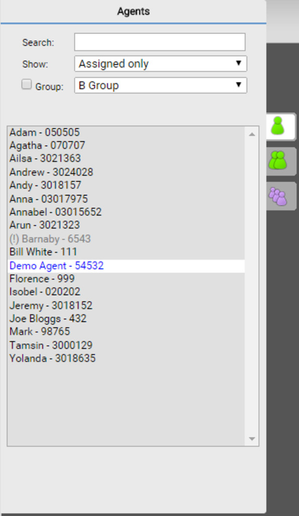
When you click a tab, a list of the agents, groups, or queues appears, along with a search box. Use the search box on the agents, groups and queue tabs, to filter the items that appear in the list. On the Agents tab, you can also restrict the agents that appear in the list to agents who are:
- Assigned to a group.
- Not assigned to a group.
- Assigned to multiple groups.
- Assigned to a specific group.
An exclamation mark appears alongside inactive agents:

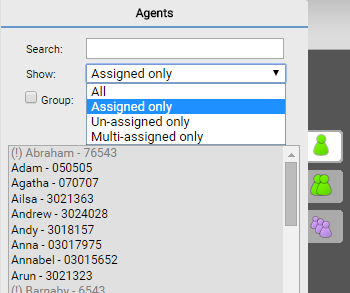
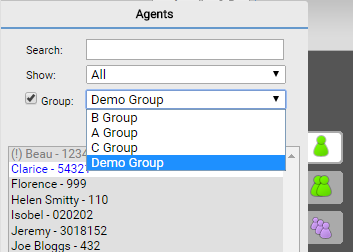
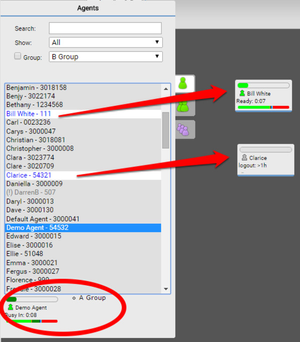
To add an agent, group, queue or agreement to the desktop, double-click the item name in the appropriate list. To remove an item from the desktop, drag the item back to the sidebar.
Items that are on the desktop appear in the list in blue text with a white background.
To see information about an agent, click the agent name in the list shows. The agent name, state, and assigned group appears at the bottom of the sidebar.
For general assistance, please contact Customer Support.
For help using this documentation, please send an email to docs_feedback@vonage.com. We're happy to hear from you. Your contribution helps everyone at Vonage! Please include the name of the page in your email.