Interaction between announcements, agent groups, and overflow settings in queues
- Helen Griffith
Longest Waiting
Example
In this example, ACD Group Settings contains four agent groups:
| Group | Overflow (s) |
|---|---|
| Group 1 | 0 |
| Group 2 | 0 |
| Group 3 | 19 |
| Group 4 | 19 |
The applet contains two queue announcements (Announcement 1 and 2). The announcements are 10 seconds long. Queue music plays after the announcements for 10 seconds.
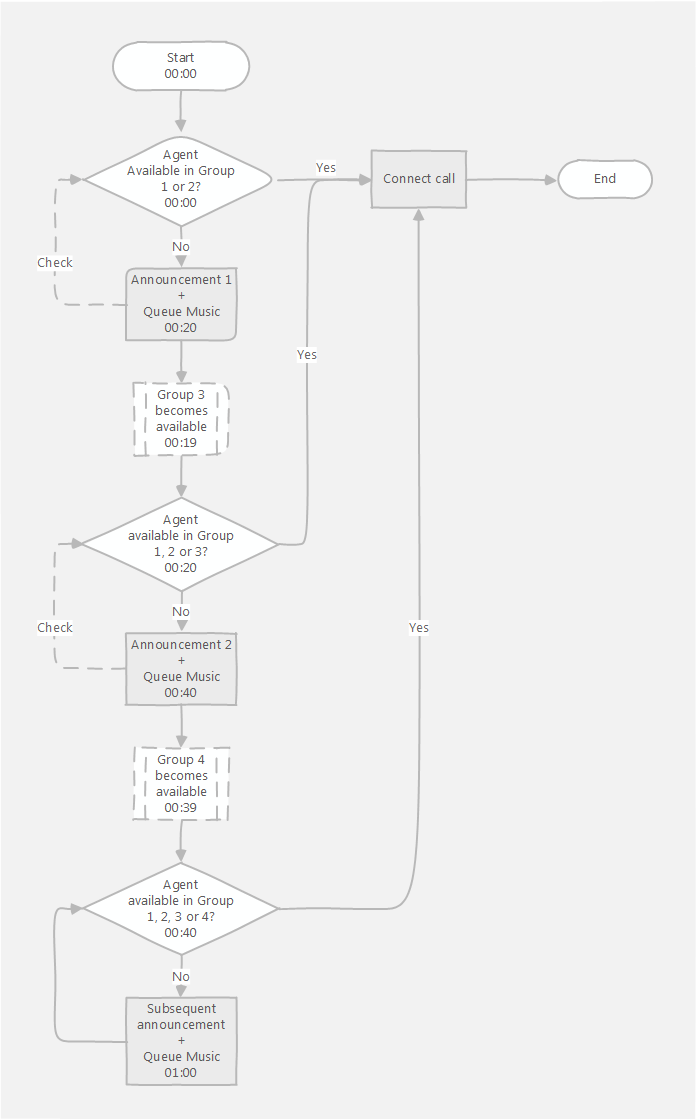
When a call enters a queue, the ACD applet looks for an available agent (in Ready state) in Group 1.
If a single available agent is found, the call is connected to that agent.
If more than one available agent is found, the call is connected to the agent that has been in the Ready state for the longest time.
If no available agent is found, the applet looks for an available agent in Group 2. Group 2 is available because it has an overflow of 0 seconds.
If one or more available agents are found, in either Group 1 or 2, the call is connected to the agent who has been in the Ready state for the longest time (with agents in Group 1 taking precedence over those in Group 2 regardless of how long they have been available).
If no available agent is found, Announcement 1 is played followed by the queue music for 10 seconds.
At the end of the queue music, the applet looks for an available agent in Group 1, then Group 2, then Group 3. Group 3 is now available because the overflow of 19 seconds is exceeded by the duration of announcement and music (20 seconds).
If one or more available agents are found, the call is connected to the agent who has been in the Ready state for the longest time (with agents in Group 1 taking precedence over those in Group 2, and agents in Group 2 over those in Group 3, regardless of how long they have been available).
If no available agent is found, Announcement 2 is played followed by the queue music for 10 seconds.
At the end of the queue music, the applet looks for an available agent in Group 1, then Group 2, then Group 3, then Group 4. Group 4 is now available because the overflow of 19 seconds is exceeded by the duration of announcement and music (20 seconds).
If one or more available agents are found, the call is connected to the agent who has been in the Ready state for the longest time (with agents in Group 1 taking precedence over those in Group 2, and agents in Group 2 over those in Group 3, and agents in Group 3 over those in Group 4, regardless of how long they have been available).
If no available agent is found, the Subsequent Announcement is played followed by the queue music for 10 seconds. The applet looks for an available agent in Group 1, then Group 2, then Group 3, then Group 4. If an available agent is found, the call is connected to the first agent found. This continues until one of the following occurs:
- an agent becomes available. The caller is connected to the agent.
- the caller hangs up. The call ends.
- the caller presses a breakout key, if breakouts are available. The call is routed to the applet that corresponds to the breakout key.
- all agents log out. The call is routed to the No Agents Logged In Applet.
- the maximum queue duration is exceeded. The call is routed to the Queue Time Out Applet.
In an ACD applet with additional announcements and groups defined, this process continues. The applet looks for available agents in the additional groups according to their overflow settings, and plays additional announcements accordingly. After using the First, Second, and Third Announcements, the applet then plays the Subsequent Announcement multiple times, as required.
Rules
The applet checks the groups in order and routes calls to the longest waiting agent.
Overflow values are incremented. If one group has an overflow of 10 seconds, that group becomes available for checking after 10 seconds. If the next group also has an overflow of 10 seconds, that group becomes available 10 seconds after the first group becomes available.
When calculating overflows, take into account the following:
- the length of time that the applet takes to check for agents in each available group
- the length of the announcement
- the duration of the queue music (Duration of music between announcement(s))
- the length of the queue position announcement, if enabled
- the time that the applet tries to connect a call to an available agent before trying the next agent (No answer timeout (seconds))
- the time that the applet takes to fetch and load sound files—this time is difficult to predict but you should keep it in mind
No answer
When a call is routed to an agent, if the agent does not answer the call, the call will return to the queue.
When the call re-enters the queue, announcements will play to the caller from the beginning again. For example, even if the caller had already heard announcements 1 and 2, they will hear them again.
To avoid this scenario, agents should be in Ready state only when they are available to handle calls.
- When the call re-enters the queue, all the groups that were available before the call was routed to an agent are still available.
For general assistance, please contact Customer Support.
For help using this documentation, please send an email to docs_feedback@vonage.com. We're happy to hear from you. Your contribution helps everyone at Vonage! Please include the name of the page in your email.